Using license file
This document describes how to set up license file for your Chemaxon software. License files has cxl extension (xml-based file format), e.g. with name license.cxl. It contains all information of licenses, including the expiration date of the license, the entitled product(s), and the number of users.
License files are sent directly via emails from Chemaxon Sales to customer contact person. The distribution of the file within customer company is the responsibility of the customer. If license key is sent instead of license file, please see this manual.
There are multiple ways of configuring license files for Chemaxon software.
License file copy to Chemaxon home
The easiest way is to copy Chemaxon license file(s) into chemaxon home folder. By default, Chemaxon home is a sub-directory in user home:
~/.chemaxon- Unix%USERPROFILE%\chemaxon- Windows
You can copy your file(s) the following locations:
(.)chemaxon/license.cxl- you have only one file, and the file name is exactlylicense.cxl(.)chemaxon/licenses/*.cxl- you have multiple Chemaxon license files, ending.cxl
Chemaxon home itself is configurable via CHEMAXON_HOME environment variable (help on setting environment variables). After setting this up, CHEMAXON_HOME/license.cxl and CHEMAXON_HOME/licenses are picked up by Chemaxon runtime.
Passing license file location(s)
It is possible to pass multiple arbitrary license file locations via environment variable or VM option. The separator character is ";".
In case license files are set this way, the license files will be read from all locations defined by the environment variable, the Java system property (and also from the user's home directory if there is any).
Using environment variable
Chemaxon license file location can be passed to Chemaxon software via CHEMAXON_LICENSE_URL environment variable (help on setting environment variables):
CHEMAXON_LICENSE_URL="/your/path/to/license.cxl;/your/other/path/other-license.cxl"
Using JVM parameters
Chemaxon license file location can be passed to Chemaxon software via chemaxon.license.url Java system property:
-Dchemaxon.license.url="C:\Chemaxon\license2009.cxl;C:\Chemaxon\license2010.cxl"
Using License Manager GUI
You can use Chemaxon License Manager GUI. It is a simple application installed along with many desktop Chemaxon applications like Marvin Sketch or JChem Base. With that, you can manage the licenses of all Chemaxon products. Ways of launching:
- Choose "Licenses..." from the Help menu of any Chemaxon application.
- Find the License Manager among your installed applications (e.g. Start menu on Windows : Start->Programs->Chemaxon contains several packages.)
- (You can find the same Chemaxon License Manager in any package.)
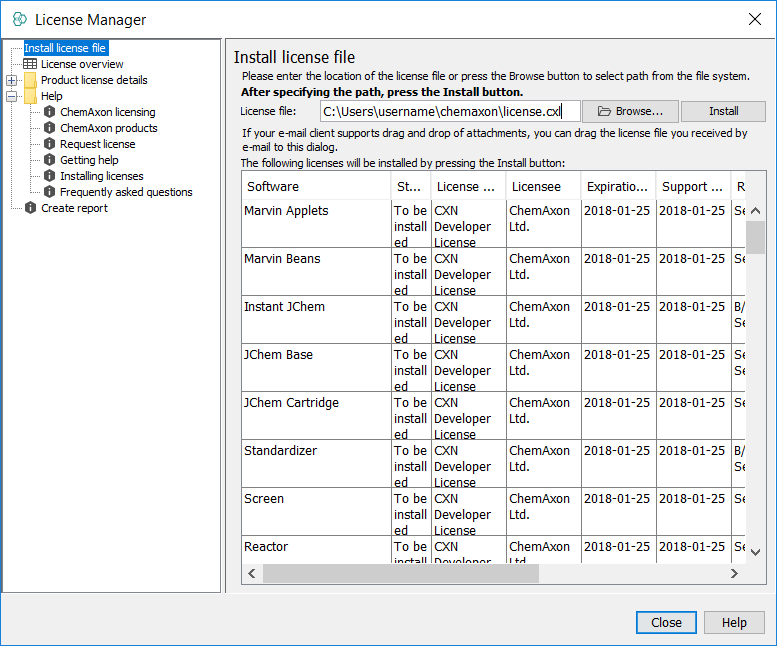
The licenses are usually stored in the license.cxl file which you receive from Chemaxon. You don't need to open or edit the content of this file, just simply save it to an arbitrary location of your file system.
- Click on the Browse... button
- Select the location where you have saved your license.cxl file.
- Press the Install button
- Installing licenses is complete, you will see a license overview where you can see the installed licenses.
You can overview your licenses any time by selecting the "License overview" panel.