Setting Up Proxy for Machines Running Chemaxon Software
In some secured networks, internet access is limited or restricted.
In these networks, additional setup is needed for the software to be properly usable.
On such a network, a proxy server must be configured, allowing the communication with https://license.chemaxon.com
Proxy Configuration Overview
Chemaxon license related software is written in Java programming language.
The proxy settings for Java can be controlled via system properties or operating system configurations.
For details, you can refer to the official Java networking documentation.
Steps to Configure Proxy Settings
1. Configure JVM System Properties
- Use the following JVM options to specify the proxy settings when starting the Java application:
java -Dhttps.proxyHost=<proxy-host> -Dhttps.proxyPort=<proxy-port> -jar your-application.jar
 ```

- Replace `<proxy-host>` and `<proxy-port>` with your proxy server's hostname or IP address and port.

#### 2. Operating System Proxy Configuration

Alternatively, you can set up the proxy at the operating system level to ensure all Java applications on the machine can automatically use the proxy:

- **Windows:**
  1. Open **Settings** → **Network & Internet** → **Proxy**.
  2. Enable **Use a proxy server** and provide the proxy details (proxy address and port).
  3. Save your changes.

- **Linux/MacOS:**
  1. Configure the proxy by setting the appropriate proxy settings in the system network settings.
 ```bash
export http_proxy=http://<proxy-host>:<proxy-port>
export https_proxy=http://<proxy-host>:<proxy-port>
3. Testing the Proxy Setup
Using curl
You can verify the proxy settings by checking if your system can access the Chemaxon license server via the configured proxy.
bash
curl -x http://<proxy-host>:<proxy-port> https://license.chemaxon.com
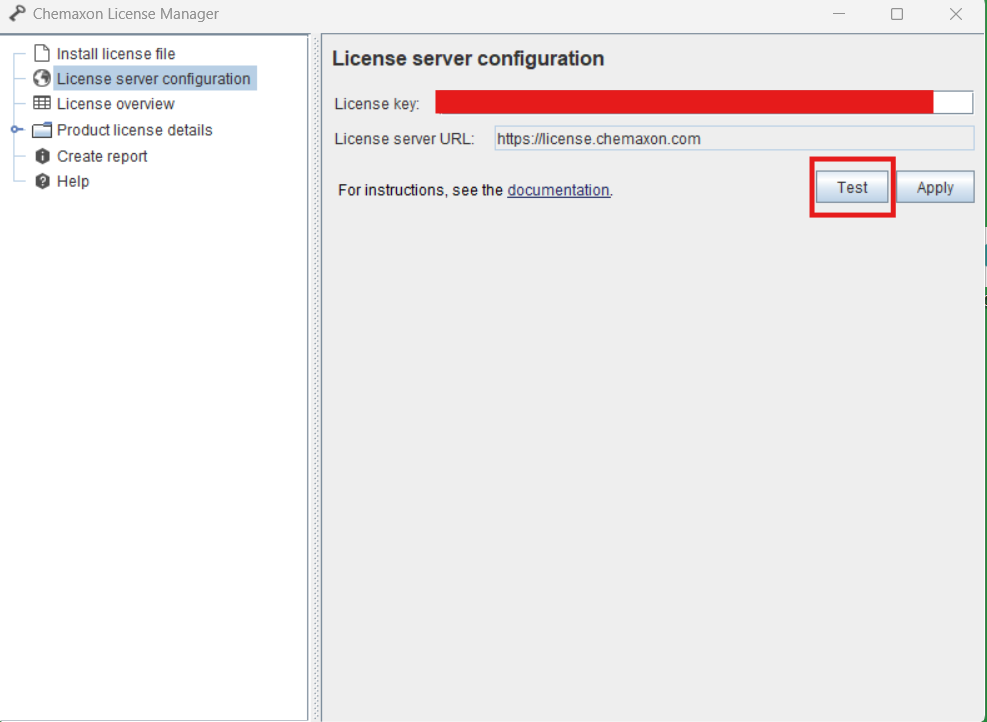
Using License Manager
If you use a desktop Chemaxon application and Chemaxon License Manager is installed, you can also verify the setup there: