Public Repository
Introduction
Chemaxon provides a public repository at https://chemaxon.jfrog.io/ for our products and modules. It is designed for integrators and resellers but is available for any registered Chemaxon user as well. Chemaxon provides both web user interface and CLI access. How to acquire the required credentials in order to use this repository is described below.
Acquire credentials
Create your Chemaxon Account
If you do not already have a Chemaxon account, you may create it via filling the form at https://accounts.chemaxon.com/register. Your email address will serve as the username when setting up a repository.
Generate your Identity Token
API keys will be deprecated, therefore we will be using Identity tokens henceforth.
To generate your Identity Token visit https://chemaxon.jfrog.io/. Please log in with your Chemaxon account credentials.
Navigate to the top right corner of your screen, select your user profile. Your Username will be displayed above your registered e-mail.
Select "Edit Profile".
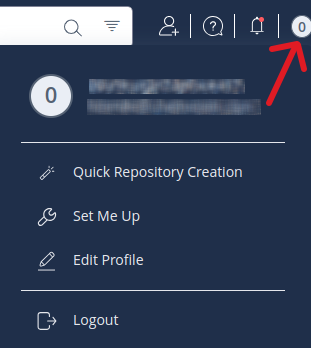
You'll find the option to generate your Identity Token here.
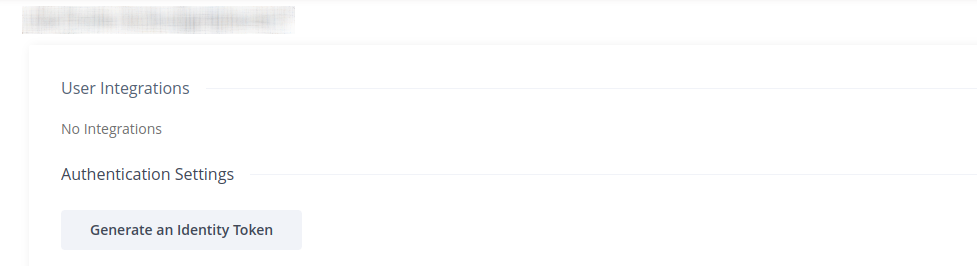
Follow further instructions while generating your token from Artifactory.
Get your GPG Key for Debian
TOKEN = Identity_Token
USER = user_email
export TOKEN=
export USER=
wget -qO - https://$USER:$TOKEN@chemaxon.jfrog.io/artifactory/api/security/keypair/default-gpg-key/public | sudo gpg --dearmor -o /etc/apt/trusted.gpg.d/chemaxon.jfrog.io.gpg
Configure your project
Help is available on your user inteface with commands already parametered for the following repository types: Docker, Generic, Maven, Debian, npm, pypi, Rpm.
- Please log in to your Jfrog account through OKTA.
- In the top right corner of your screen, select your user.
- Select "Set Me Up".
- Select repository type.
Gradle
If you would like to use Gradle as your build tool, you can follow these instructions to access Chemaxon's Maven repository. Or you can use the quickstart project as an example.
In your Gradle project, create (or edit if already exists) a gradle.properties file and add these contents. You can also move this file outside your project, into user home/.gradle directory.
chemaxonRepositoryUser=<USER EMAIL>
chemaxonRepositoryPassword=<IDENTITY TOKEN>
chemaxonRepositoryUrl=https://chemaxon.jfrog.io/artifactory
In the build.gradle file, add our Maven repository in the repositories block as follows:
repositories {
    maven {
        url = "${chemaxonRepositoryUrl}/libs-release"
        credentials {
            username = chemaxonRepositoryUser
            password = chemaxonRepositoryPassword
        }
    }
}
After applying these settings, you can add Chemaxon modules as dependencies. For example:
Quickstart Projects
Gradle
A simple, self-contained quickstart project example using Gradle:
chemaxon_java_gradle_quickstart.zip
Maven
A simple, self-contained quickstart project example using Apache Maven:
chemaxon_java_maven_quickstart.zip
Top-Level Modules
We recommend one of the following three top-level modules to be added as a dependency to your project. All required modules will be downloaded transitively.
| Module | Feature set |
|---|---|
chemaxon-chemistry |
The comprehensive chemistry toolkit of Chemaxon without GUI components and tools for database handling and document processing. |
chemaxon-marvin-classic |
Marvin Desktop Suite, which includes the chemistry toolkit, Swing GUI components related to MarvinSketch and MarvinView, and tools for document processing. See API reference documentation here. |
chemaxon-jchem |
JChem Suite, the full Java toolkit of Chemaxon, which includes Marvin Desktop Suite and database handling tools. See API reference documentation here. |