License Installation
You need a valid Chemaxon license to use any piece of Chemaxon software.* This can be granted by either a file or a key.
License key is a unique identifier checked online to grant you rights for using the Chemaxon software. License file is a signed xml file, with the details of Chemaxon license attributes. Both solutions can be used independently or together.
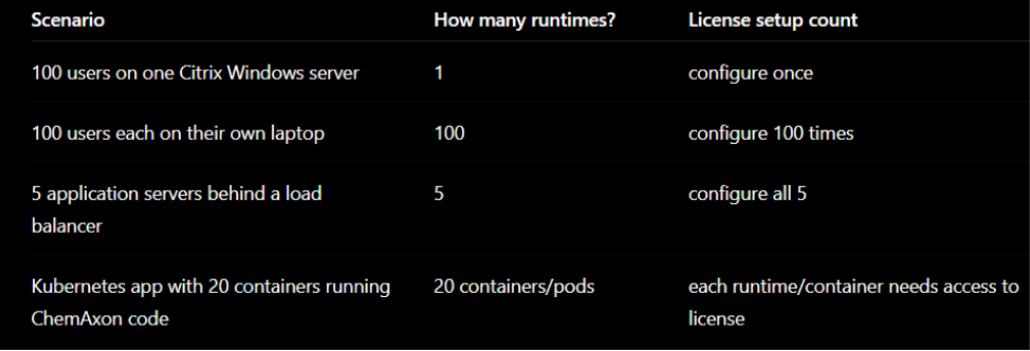
Chemaxon provides the license file or license key to the customer's contact person via email or a link. It is the customer's responsibility to distribute and set up the license within their organization. The license should be set up on each machine/runtime that runs Chemaxon software, according to these manuals.
*
A license file or license key should be set up only on runtimes that run Chemaxon software. This means every desktop, server, container, etc. For web applications, end users should not set up anything on their own machines; only the server needs a valid license. The same applies to clients connecting to such servers.
Example scenarios:
In this section, you will find detailed manuals for setting up a Chemaxon license, depending on whether you have a license key or a license file.