Stereoisomer Generator Plugin
This manual guides you through Chemaxon's Stereoisomer Generator Plugin.
Introduction
The Stereoisomer Generator Plugin can generate stereoisomers of a molecule. It can recognise both tetrahedral- and double-bond-type stereo centers in the generation process.
Stereoisomers Options
The Stereoisomer Generator Plugin has the following options.
Generate
This option is for selecting the stereoisomer type to be generated.
- Tetrahedral stereo isomers: if this option is used, only the R/S isomers are generated.
- Double bond stereo isomers: if this option is used, only E/Z isomers are generated.
- Both: if this option is used, both R/S and E/Z isomers are generated.
Other options
There are other options of the Stereoisomer Generator Plugin as well.
- Generate all stereoisomers: if this option is used, all isomers are generated.
- Generate maximum: sets a maximum number of generated isomers. This option gets enabled if not all isomers are generated.
- Protect tetrahedral stereo centers: if this option is used, pre-set tetrahedral stereocenters are kept intact in the generation process.
- Protect double bond stereo: if this option is used, all double bonds with pre-set stereo information are kept intact in the generation process.
- Filter invalid 3D structures: if this option is used, sterically restricted isomers are discarded in the generation process.
- Display in 3D: if this option is used, results are displayed in a 3D viewer. By default the results are shown in a 2D viewer. This option can be used only if 3D filtering is enabled.
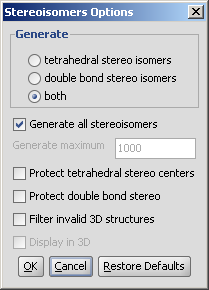
Fig. 1 The Stereoisomers Options window
The result window
An example of stereoisomer generation in 2D (see Fig. 2) and in 3D (see Fig. 3) can be found below.
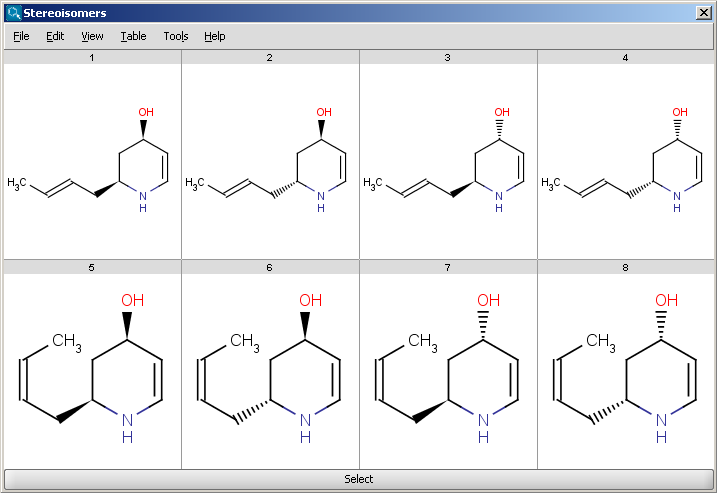
Fig. 2 Generated stereoisomers shown in 2D
Importing generated isomers
To replace your original input molecule in the sketcher with any of the isomers generated first click on the isomer. Then press Select at the bottom of the result window (The result window disappears after selection).
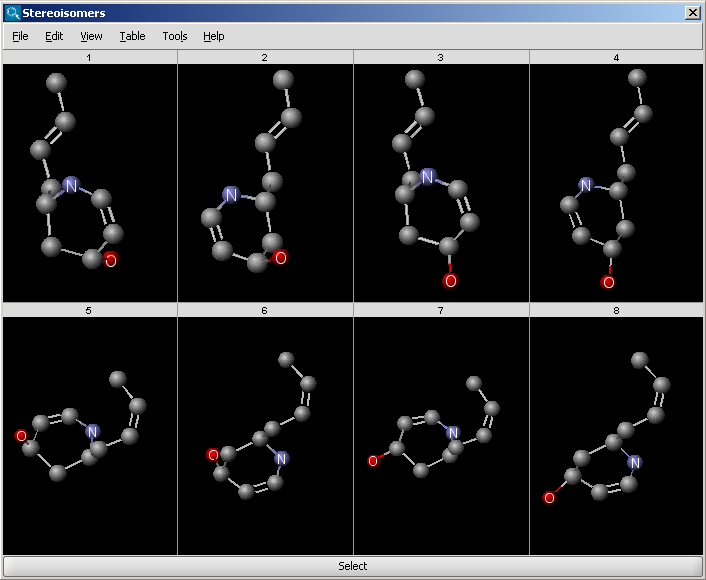
Fig. 3 Generated stereoisomers shown in 3D
References
- Smith, M. B.; March, J. Advanced Organic Chemistry, 5th ed., Wiley Interscience, New York, 2001; pp 1218-1223. ISBN 0471585890