Homology Groups
Built-in Homology groups can be found on the Advanced Tab of the Periodic Table , under the Special Nodes section.
For more information about other Query features and Homology groups, see the Query Guide.
Add a Homology Group
The simplest way to insert homology groups is by creating a pseudo atom with the homology group name by utilizing the Atom Label Editor tool.
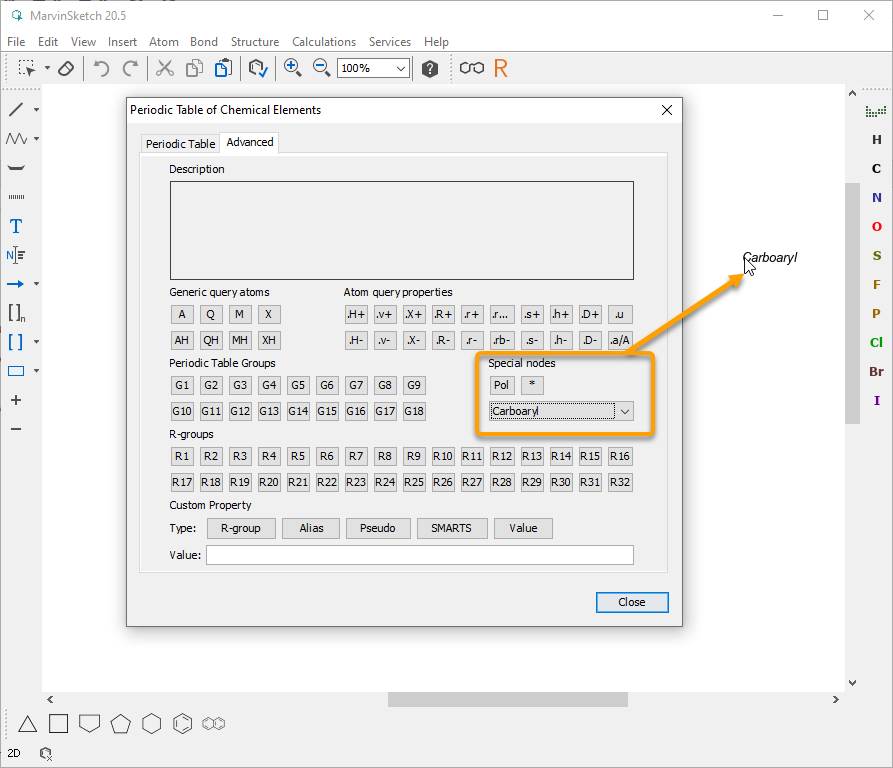
Alternatively, homology groups can be inserted from the Advanced Tab of the Periodic Table. To do this, follow the steps below.
- Open the Periodic Table and switch to the Advanced tab.
- In the Special nodes section, choose the homology group from the dropdown list. The homology group is placed at the tip of the cursor and you can click the atoms on the canvas with it.
Edit Homology Group Properties
To edit the homology group properties, follow the steps below.
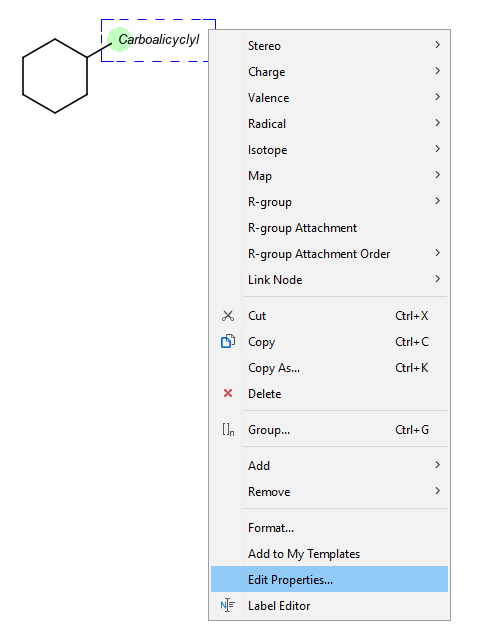
- Select the homology group and right-click to invoke the context menu.
- Click Edit Properties.
- Set the group properties in the dialog box.
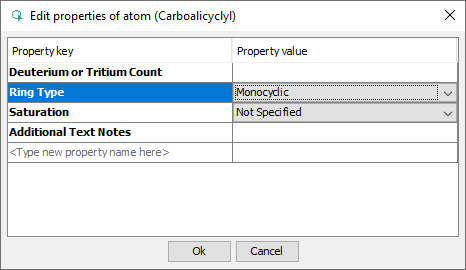
By default, the atom and homology group properties are not shown. To switch it on, navigate to View > Advanced > Atom Properties.