File Import in JChem for Office
The figure below shows the file import options.
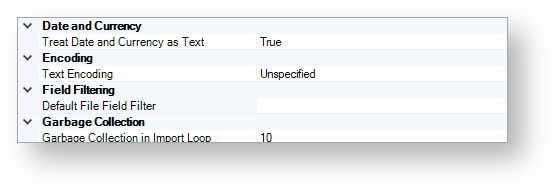
Date and Currency
Treat Date and Currency as Text
Use this option to specify if the date and currency data are treated as text fields during the file import process or not. The possible values are as follows:
TRUE
FALSE
The default value of this option is TRUE.
Encoding
Text Encoding
Set the value of this option to UTF-8 if you would like to import a file that has UTF character coding. This ensures that the characters are imported correctly.
The default value of this option is Unspecified.
Field Filtering
Default File Field Filter
By using this option, you can specify the default field filter file that is used during the import file process.
For more information about using the filter file during the file import process, see Import File in Jchem for Office-Columns Tab.
Garbage Collection
Garbage Collection in Import Loop
Use this option to specify the frequency of memory cleans in terms of the number of imported molecules.
For example, if the value is set to 50, garbage collection is cleared after every 50 molecules. If the value is set to 0, the function is disabled.
The default value is 10.