Database Import Options
The figure below shows the database connection options.
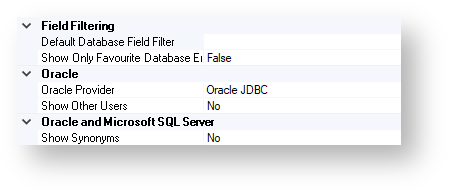
Field Filtering
Default Database Field Filter
By using this option, you can specify the default field filter file that is used during the database import process.
For more information about using the filter file during the database import process, see Import from Database in JChem for Office-Columns Tab.
Show Only Favorite Database Tables
This option affects the default state of the Show only favorites check-box which is used on the Import from Database in JChem for Office dialog.
Possible values are as follows:
TRUE
FALSE
The default value of this option is FALSE.
Oracle
Oracle Provider
To connect to an Oracle database the following providers can be selected:
Oracle JDBC
Oracle ODP.NET
The default value of this option is Oracle JDBC.
Show Other Users
Use this option to specify if the tables of other users are accessible and searchable (with rights configured properly) or not.
Possible values are as follows:
TRUE
FALSE
The default value of this option is FALSE.
This option is valid only for Oracle tables.
Oracle and Microsoft SQL Server
Show Synonyms
Use this option to specify if you would like to display database synonyms in your database connection list or not.
Possible values are as follows:
TRUE
FALSE
The default value of this option is FALSE.
This option is valid only for Oracle database connections.