Image Formatting
The figure below shows the image formatting options of JChem for Office.
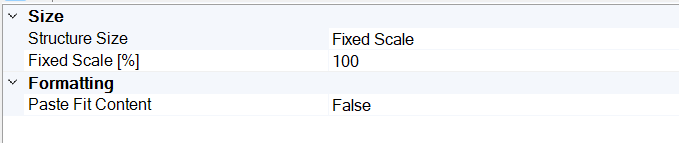
Size
Structure Size
You can specify the structure sizing behavior. The possible values are as follows:
Fixed Scale
Image Size
The default value is Fixed Scale.
Fixed Scale [%]
This option is only available when the value of Structure Size is set to Fixed Scale.
Use this option to define the scale of the structure in percentage. The default value is 100. In this case, all structures are displayed with a fixed size and bond length, proportional to each other. The percentage will be the same as the zoom factor in MarvinSketch dialog when opening the structure for editing.
Image Size [pt]
This option is only available when the value of Structure Size is set to Image Size.
Use this option to specify the default structure size ( Width , Height ) in pts. The default value for both options is 100.
Formatting
Paste Fit Content
You can specify whether the imported tables must fit the current page or not.
The available values are as follows:
TRUE
FALSE
The default value of this option is FALSE.