Draw Link Nodes
To draw link nodes, follow the steps below.
- Right-click an atom to open the context menu,
- Select the required repetition number from the Link Node submenu. In this case, MarvinSketch out the outer (non-repeating) bonds automatically.
Alternatively, link nodes can be drawn in the following way:
- Select the atom you would like to be the link node and two neighboring bonds for outer (non-repeating) bonds.
- Right-click anywhere on the canvas to open the context menu.
- Select the required repetition number from the Link Node submenu.
The Link Node submenu is available through the Atom menu as well.
If it is not possible to create a link node for the specified configuration (for example, at ring fusions) MarvinSketch displays an error message.
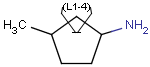
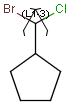
Outer (non-repeating) bonds are denoted by brackets crossing them and the repetition numbers are put on the atom.
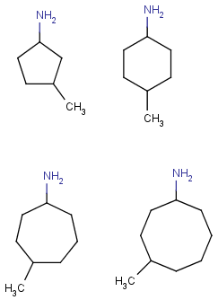
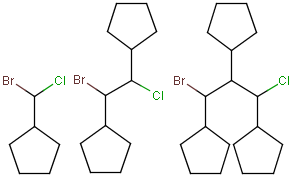
All portions of the molecule connected to the link atom through non-outer bonds are supposed to repeat together with the atom.
See the table below for examples.
| The molecule with link node | Meaning |
|---|---|
 |
 |
 |
 |
 |
 |
To edit a link node repetition number or change outer bonds, repeat the drawing steps above.
To change a link atom into an ordinary atom again, select Off from the Link Node submenu or just simply overwrite it.