Copolymers
If the structure consists of more than one repeating unit (mon, mer) or structural repeating unit, Copolymer (co) brackets/groups can be used to represent the structure.
Copolymers might contain crossing bonds and star atoms.
The following copolymers can be drawn:
- Random (ran)
- Alternating(alt)
- Block (blk) - with or without junction unit
- Copolymer to represent modified polymers (mod)
- Copolymer to represent grafted polymers (grf)
- Copolymer to represent cross-linked polymers (xl)
See the figure below for an example.
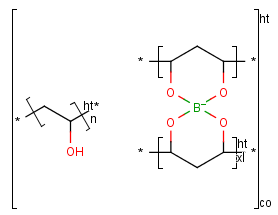
To draw a copolymer, follow the steps below.
- Create the components to form the copolymer.
- Click the Create Group tool on the toolbar then select the components to be included.
- In the Create Group dialog window, choose one of the following types:
- Copolymer (co)
- Copolymer, alternating (alt)
- Copolymer, block (blk)
- Copolymer, statistical (stat)
- Click OK.
To add a new sub-polymer to a copolymer, draw the sub-polymer to add outside of the bracket and drag one part of the bracket to include the new sub-polymer. The new molecule is marked with blue circles when you hover the mouse cursor over it.
To delete a sub-group from a copolymer, select the sub-polymer to be deleted and press the Delete button on your keyboard or delete it with the Erase tool.