Elemental Analysis Plugin
This manual guides you through Chemaxon's Elemental Analysis Plugin.
Introduction
The Elemental Analysis Plugin calculates basic properties related to the elemental composition of a molecule.
The example below illustrates the analysis results for an input structure.
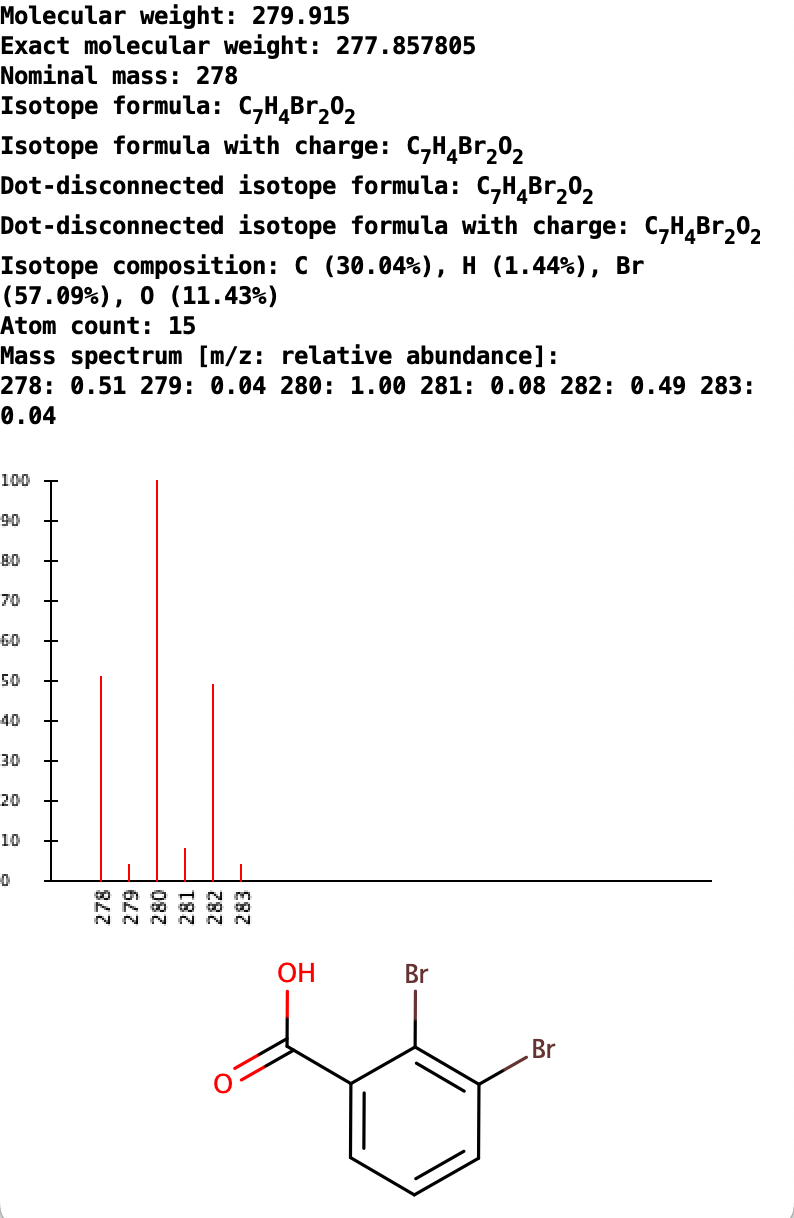
Fig. 1 Elemental Analysis result window example
Plugin options
In the Elemental Analysis Options window you can set the following types of elemental properties to be calculated/generated and the general options:
- Type
- Molecular weight: calculates the average molecular weight using the standard atomic weights, the averages of the atomic weights of all natural isotopes.
- Exact molecular weight: calculates the mono-isotopic molecular weight using the atomic weights of the most abundant natural isotopes.
- Nominal mass: calculates the mono-isotopic mass using the rounded atomic weights of the most abundant natural isotopes.
- Formula: generates the chemical formula of the molecule according to the Hill notation. The notation defines that the number of C atoms is indicated first, the number of H atoms next and then the number of all other chemical elements subsequently, in alphabetical order. Isotopes (like D and T) are not listed separately but counted together (e.g. D and T atoms are counted as H). When the formula contains no C atom, all elements (including H) are listed alphabetically. If the molecule contains an SRU or a Repeating Unit S-group, it is taken into account and a Polymer Formula is generated.
- Formula with charge: generates the chemical formula of the molecule including its formal charge and separately listed isotopes according to the Hill notation.
- Dot-disconnected formula: generates the chemical formula built from the formulae of its fragments (e.g. salts, counter ions, solvent molecules), separated by dots.
- Dot-disconnected formula with charge: generates the chemical formula of the molecule with its formal charge built from the formulae of its fragments (e.g. salts, counter ions, solvent molecules), separated by dots.
- Mass spectrum: calculates the mass distribution of the molecule considering the relative abundance of the isotopes. The distribution is displayed as a spectrum, which is usually called the m/z:relative abundance spectrum in mass spectroscopy.
- Composition: calculates the elemental composition from the atomic masses in weight percentage (w/w%).
- Atom count: calculates the total number of atoms in the molecule.
For polymers mass, composition and atom count calculations are not available. NaN, N/A and -1 values are returned in these cases, respectively.
- General options
- Recognize formula in pseudo-labels: valid formulae in pseudo atoms are taken into consideration in the calculations if this option is checked (default).
- Use D/T symbols for Deuterium/Tritium: D and T symbols are used for Deuterium and Tritium if checked (default). Hydrogen isotopes are displayed as 2H and 3H if this option is unchecked.
- Single fragment mode: if this option is unchecked (default), the calculations handle the fragments of multi-fragmented molecules (e.g. salts) together, e.g. summing up the masses of the fragments when molecular weight is calculated. If this option is checked, calculations are run on each fragment separately and the results are displayed in a scroll window.
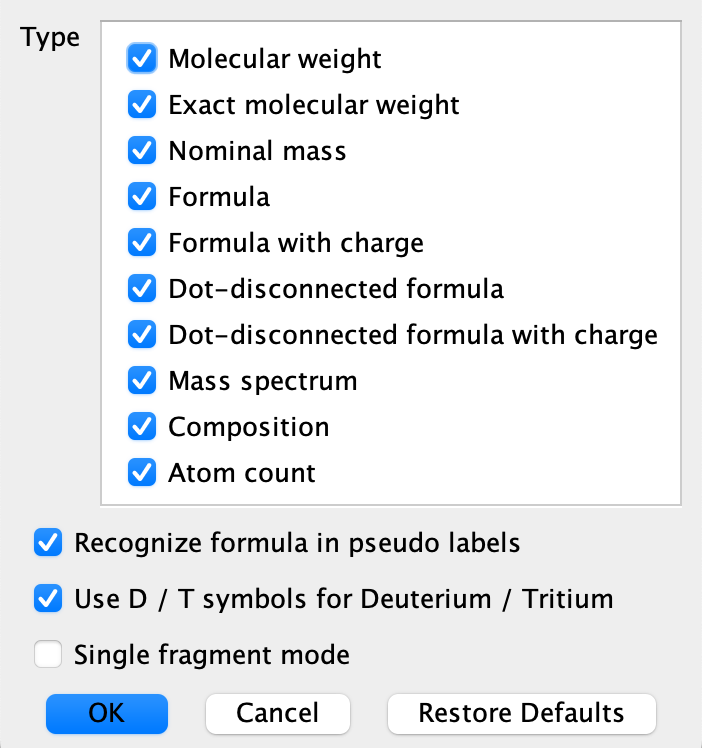
Fig. 2 Elemental property types and calculation options
Atomic weights used
The atomic weights used in the elemental calculations are regularly updated to the actual atomic weights suggested by IUPAC. The timeline of the past updates were the following:
- From Marvin v. 14.7.28 we use the 2013 IUPAC atomic weights of the elements published here.
- From Marvin v. 19.2 we use the 2015 IUPAC atomic weights of elements.
- From Marvin v. 20.15 we use the 2019 IUPAC atomic weights of elements.
- From Marvin v. 22.20 we use the 2021 IUPAC atomic weights of elements.
- From Marvin v. 25.3.0 we use the 2023 IUPAC atomic weights of elements.
On using custom atomic weights for molecular mass calculations
The atomic weights used for molecular mass calculations can be customised by placing the custom weights in an elements.txt file. This file should be placed under the Chemaxon configuration folder of the user's system. In the absence of such a custom file, default weights are used by calculations.
References
-
G. Audi, A.H.Wapstra, The 1995 update to the atomic mass evaluation, Nuclear Physics A, Vol. 595, Issue 4, pp. 409-480, 1995;
-
E. A. Hill, On A System Of Indexing Chemical Literature; Adopted By The Classification Division Of The U. S. Patent Office., J. Am. Chem. Soc., 22(8), pp. 478-494, 1900;