Graphical Objects Context Menu
Context: Right-clicking on a graphical box.
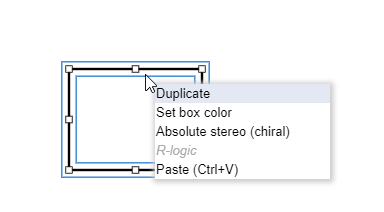
| Context menu item | Description |
|---|---|
| Duplicate | Makes a copy from the box in context. |
| Set box color | Opens the Set box color dialog, where the color of the lines and the background of the graphical boxes (rectangle, ellipse) can be selected from a predefined list. |
| Absolute stereo (chiral) | Sets the Absolute chiral flag on the entire structure, indicating that the molecule represents a single, well-defined stereoisomer. |
 {info}
 The Absolute stereo flag is displayed only when the chiral flag visibility is turned on in [View settings](marvin-js_view-settings-dialog.md) dialog.