Bond Properties Dialog
In the Bond properties dialog, you can set the type, the topology, and reacting center property of the selected bonds.
To change a bond's properties, right-click a bond and choose Bond properties from the context menu. In the opening Bond properties dialog, set the appropriate values from the lists, then click OK.
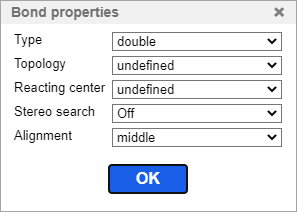
Bond Properties and Values in Marvin JS
Type:
- single
- double
- triple
- aromatic
- up
- down
- single up or down
- double cis or trans
- double cis or trans or unspecified
- single or double
- single or aromatic
- double or aromatic
- any
- coordinate
Topology:
- undefined (default value)
- in ring
- in chain
Reacting center:
- undefined (default value)
- center - #
- make or break - ||
- change - |
- make and change - |||
- not center - X
Stereo search:
- On
- Off
Alignment:
- Auto
- Middle
- Left
- Right