Design Hub developer guide - REST API
- Authorize requests
- Methods
- GET /api/user
- GET /api/projects
- GET /api/hypotheses
- PUT /api/hypotheses
- POST /api/hypotheses/:id
- DELETE /api/hypotheses/:id
- GET /api/designsets
- PUT /api/designsets
- POST /api/designsets/:id
- DELETE /api/designsets/:id
- GET /api/attachments/project/:projectId
- POST /api/attachments/project/:projectId
- GET /api/attachments/project/:projectId/:attachmentId
- DELETE /api/attachments/project/:projectId/:attachmentId
- GET /api/compounds/public
- POST /api/compounds/activity
- POST /api/compounds/:id/data
- POST /api/compounds/:id/additionalfield
- GET /api/compounds/:id/detach-match-plan
- POST /api/compounds/:id/detach-match
- POST /api/compounds/:compoundId/attachments
- POST /api/compounds/internal/:compoundId/attach
- POST /api/compounds/:compoundId/attach
- GET /api/compounds/:compoundId/attachments
- GET /api/compounds/:compoundId/attachments/:attachmentId
- DELETE /api/compounds/:compoundId/attachments/:attachmentId
- POST /api/hypotheses/:hypothesisId/attachments
- GET /api/hypotheses/:hypothesisId/attachments
- GET /api/hypotheses/:hypothesisId/attachments/:attachmentId
- DELETE /api/hypotheses/:hypothesisId/attachments/:attachmentId
- POST /api/designsets/:designsetId/attachments
- GET /api/designsets/:designsetId/attachments
- GET /api/designsets/:designsetId/attachments/:attachmentId
- DELETE /api/designsets/:designsetId/attachments/:attachmentId
- GET /api/compounds/export
- POST /api/tags/:id
- POST /upload/api - multipart
- POST /upload/api - JSON
- POST /api/import/rawdata
- GET /api/import/rawdata/status/:id
- GET /api/import/rawdata/errors/:id
- POST /api/calculations/:compoundCollectionType/:compoundCollectionId/run
- DELETE /api/calculations/:compoundCollectionType/:compoundCollectionId/:calculationId
- GET /api/calculations/:compoundCollectionType/:compoundCollectionId/active
- GET /api/calculations/:compoundCollectionType/:compoundCollectionId/poll
- POST /api/calculations/:compoundCollectionType/:compoundCollectionId/replace
- PUT /api/comments/:id
- POST /api/search
- Postman
Design Hub includes a token based API access layer. Authenticated users of the system can generate API keys to be used to authorize HTTP requests made by other applications, outside of active login sessions. Additionally, when using OpenIDConnect authentication, Bearer tokens issued by the identity provider can be used as well.
Authorize requests with API key
Use of most API endpoints requires successful, per-request authentication and authorization. Authentication is done through API tokens in request headers, which identify an existing user of the application. The user account also needs ACCESS_REST_API permission to be able to use this API, and to create and view their API tokens. The token can be obtained by opening the corner menu on the user interface and creating a new token. Here, previous tokens can be invalidated as well.
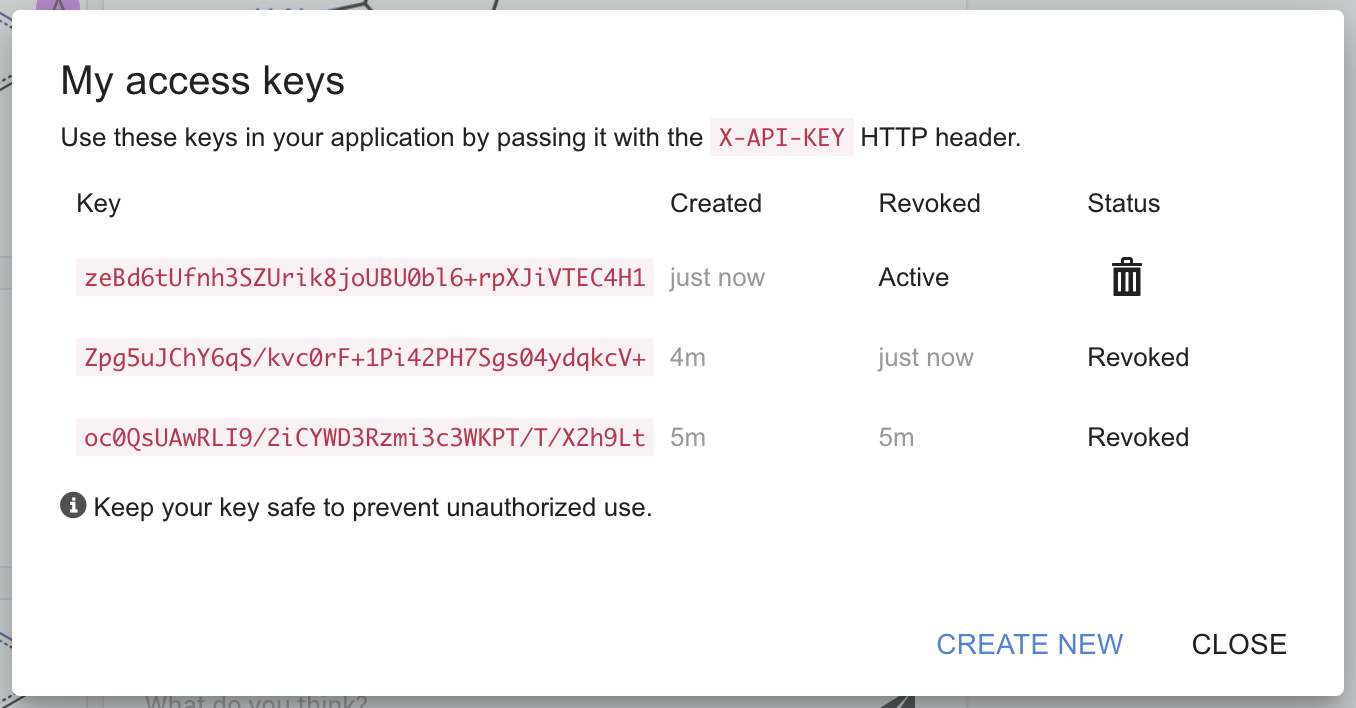
Once a token has been obtained, specifying them on HTTP requests can be done in the X-API-KEY header:
user:~/app$ curl -H "X-API-KEY: XFBg+9IVHhTRviLF1WOHgD0U2QS5Ww8oHqqG+405" "http://server:port/api/user"
{
  "user_id": 1,
  "displayName": "Tester"
}
Authorize requests with Bearer tokens
Use of most API endpoints requires a successful authentication. Using OpenIDConnect based authentication, users with valid access tokens can authorize requests using Bearer authentication. The token can be obtained from the identity provider.
Once a token is available, specifying them on HTTP requests can be done on the Authorization header:
user:~/app$ export TOKEN=eyJhbG...FaEyTA
user:~/app$ curl -H "Authorization: Bearer $TOKEN" "http://server:port/api/domainname/user"
{
  "user_id": 1,
  "displayName": "Tester"
}
Error codes
Different HTTP errors are returned for incorrect authentication. The following spreadsheets describes which status code corresponds to which check.
| Status code | Description |
|---|---|
400 Bad request |
X-API-KEY or Authorization header not specified on the request |
401 Unauthorized |
X-API-KEY value or Bearer token is invalid |
404 Not found |
HTTP path or method specified in the request doesn't exist |
415 Unsupported media type |
The request's content type is incorrect (e.g. Content-type: application/json is missing) |
Methods
Attachment-related paths use a parent resource path segment for the object the files belong to (compoundId, hypothesisId, designsetId, or projectId) and attachmentId for the file record (the same value as storage_location in JSON responses). For compounds, hypotheses, and design sets, list and upload use GET|POST /api/<type>/:<type>Id/attachments; download and delete use GET|DELETE /api/<type>/:<type>Id/attachments/:attachmentId. Project attachments keep the /api/attachments/project/... layout.
Get user details
HTTP Request: GET /api/user
Purpose: Provides basic information about the user authorized by the access token.
Request headers: X-API-KEY required
Response body:
| Property name | Type | Description |
|---|---|---|
user_id |
number | internal identifier of the user |
displayName |
string | user-specified display name |
Response content-type: application/json
Get projects
HTTP Request: GET /api/projects
Purpose: Provides list of projects accessible to the authorized user.
Request headers: X-API-KEY required
Response content-type: application/json
Response body:
| Property name | Type | Description |
|---|---|---|
project list |
list | An unordered list of projects |
project list[*].project_id |
number | Unique, internal identifier of the project. |
project list[*].label |
string | Human friendly name of the project. |
project list[*].key |
string | Unique identifier of the project. |
project list[*].last_used |
string | Serialized date object representing when this project was last used, in ISO date format, UTC timezone. May be used for sorting. |
Get hypotheses
HTTP Request: GET /api/hypotheses
Purpose: List of hypotheses in the specified projects.
Request headers: X-API-KEY required
Query parameters:
| Parameter name | Required | Type | Description |
|---|---|---|---|
myprojects |
No | boolean | Filter by projects to which the user is assigned |
project_id |
Yes | List of numbers | Filter by a comma separated list of project identifiers to which the hypotheses belong |
content_id |
No | List of strings | Comma-separated list of hypothesis content IDs to filter by. Non-existent content IDs are silently ignored. |
Response content-type: application/json
Response body:
[
  {
    "content_id": string,
    "title": string,
    "tags": string,
    "create_date": string,
    "modify_date": string,
    "project_id": number,
    "priority_label": string,
    "status_id": number,
    "status_label": string,
    "assignee": string,
    "assignee_username": string
  }, ...
}
| Property name | Type | Description |
|---|---|---|
hypothesis list |
list | An unordered list of hypotheses. |
hypothesis list[*].content_id |
string | Unique, internal identifier of the hypothesis. |
hypothesis list[*].title |
string | Human friendly name of the hypothesis. |
hypothesis list[*].tags |
List of string | A list of tags assigned to the hypothesis. |
hypothesis list[*].create_date |
string | The date when the hypothesis was created, in ISO date format, UTC timezone. |
hypothesis list[*].modify_date |
string | The date when the hypothesis was last changed, in ISO date format, UTC timezone. |
hypothesis list[*].project_id |
number | The unique identifier of the project. |
hypothesis list[*].priority_label |
string | The label of the priority attached to this hypothesis. |
hypothesis list[*].status_id |
number | The id of the status of this hypothesis. Optional - this value is undefined for private hypotheses. |
hypothesis list[*].status_label |
string | The label of the status of this hypothesis. Optional - this value is undefined for private hypotheses. |
hypothesis list[*].assignee |
string | The display name of the user this hypothesis is assigned to. Optional - this value is undefined for unassigned hypotheses. |
hypothesis list[*].assignee_username |
string | Unique user identifier of the user this hypothesis is assigned to. Optional - this value is undefined for unassigned hypotheses. |
Examples:
# List all hypotheses in project 1
curl -H "X-API-KEY: your-api-key" \
  "https://designhub.example.com/api/hypotheses?project_id=1"

# List hypotheses filtered to specific content IDs
curl -H "X-API-KEY: your-api-key" \
  "https://designhub.example.com/api/hypotheses?project_id=1,2&content_id=abc123,def456"
Create Hypothesis
HTTP Request: PUT /api/hypotheses
Purpose: Creates a new hypothesis in a project.
Request headers: X-API-KEY required
Required Permissions: CREATE_CONTENT, ACCESS_HYPOTHESES, write permission on the target project
Request content-type: application/json
Request body:
| Parameter name | Required | Type | Description |
|---|---|---|---|
title |
Yes | string | Title of the hypothesis |
project_id |
Yes | integer | ID of the project to create the hypothesis in |
visibility |
No | integer | 0 for private (default), any value > 0 for public |
Response: HTTP status 200 with the created hypothesis object: {"id": string, "title": string}
Change Hypothesis
HTTP Request: POST /api/hypotheses/:id
Purpose: Updates a single attribute of an existing hypothesis.
Request headers: X-API-KEY required
URL parameters:
| Parameter name | Required | Type | Description |
|---|---|---|---|
id |
Yes | string | The hypothesis content ID |
Request content-type: application/json
Request body:
| Parameter name | Required | Type | Description |
|---|---|---|---|
key |
Yes | string | The attribute to change |
value |
Yes | string or number | The new value for the attribute |
Accepted key values:
| Key | Value Type | Description |
|---|---|---|
title |
string | Hypothesis title |
text_content |
string | Text/description content |
drawing_content |
string | Chemical drawing content |
generated_image |
string | Generated image data |
visibility |
number | 0 = private, 1 = public |
status_id |
number | Status ID (only for public hypotheses) |
priority_id |
number | Priority ID |
assignee |
number | User ID of the assignee |
tags |
string | Comma-separated tag list |
project_id |
number | Move to a different project |
additional_search_text |
string | Extra searchable text |
Response: HTTP status 200 in case of success, error code otherwise
Delete Hypothesis
HTTP Request: DELETE /api/hypotheses/:id
Purpose: Deletes a hypothesis and its child content.
Request headers: X-API-KEY required
Required Permissions: Write access on the hypothesis, ACCESS_HYPOTHESES
URL parameters:
| Parameter name | Required | Type | Description |
|---|---|---|---|
id |
Yes | string | The hypothesis content ID |
Response: HTTP status 200 in case of success, error code otherwise
Get design sets
HTTP Request: GET /api/designsets
Purpose: Provides list of design sets accessible to the authorized user.
Request headers: X-API-KEY required
Query parameters:
| Parameter name | Required | Type | Description |
|---|---|---|---|
project_id |
No | List of numbers | Comma separated list of project identifiers to which the design sets belong. If omitted, all accessible design sets are returned. |
content_id |
No | List of strings | Comma-separated list of design set content IDs to filter by. Non-existent content IDs are silently ignored. |
Response content-type: application/json
Response body:
[
  {
    "content_id": string,
    "title": string,
    "tags": string,
    "create_date": string,
    "modify_date": string,
    "parent_title": string,
    "parent_content_id": string,
    "priority_label": string,
    "status_id": number,
    "status_label": string,
    "assignee": string,
    "assignee_username": string
  }, ...
}
| Property name | Type | Description |
|---|---|---|
design set list |
list | An unordered list of design sets. |
design set list[*].content_id |
string | Unique, internal identifier of the design set. |
design set list[*].title |
string | Human friendly name of the design set. |
design set list[*].tags |
List of string | A list of tags assigned to the design set. |
design set list[*].create_date |
string | The date when the design set was created, in ISO date format, UTC timezone. |
design set list[*].modify_date |
string | The date when the design set was last changed, in ISO date format, UTC timezone. |
design set list[*].parent_title |
string | The design set's parent title. |
design set list[*].parent_content_id |
string | The design set's parent unique, internal identifier. |
design set list[*].priority_label |
string | The label of the priority attached to this design set. |
design set list[*].status_id |
number | The id of the status of this design set. |
design set list[*].status_label |
string | The label of the status of this design set. |
design set list[*].assignee |
string | The display name of the user this design set is assigned to. Optional - this value is undefined for unassigned design sets. |
design set list[*].assignee_username |
string | The unique user ID of the user this design set is assigned to. Optional - this value is undefined for unassigned design sets. |
Examples:
# List all design sets in project 1
curl -H "X-API-KEY: your-api-key" \
  "https://designhub.example.com/api/designsets?project_id=1"

# List design sets filtered to specific content IDs
curl -H "X-API-KEY: your-api-key" \
  "https://designhub.example.com/api/designsets?project_id=1&content_id=ds001,ds002"
Create Design Set
HTTP Request: PUT /api/designsets
Purpose: Creates a new design set under a hypothesis.
Request headers: X-API-KEY required
Required Permissions: CREATE_CONTENT, ACCESS_HYPOTHESES (when parent_id is provided), write access on the parent hypothesis
Request content-type: application/json
Request body:
| Parameter name | Required | Type | Description |
|---|---|---|---|
title |
Yes | string | Title of the design set |
parent_id |
Yes | string | Content ID of the parent hypothesis |
visibility |
No | integer | 0 for private (default), any value > 0 for public |
Response: HTTP status 200 with the created design set object: {"content_id": string}
Change Design Set
HTTP Request: POST /api/designsets/:id
Purpose: Updates a single attribute of an existing design set.
Request headers: X-API-KEY required
URL parameters:
| Parameter name | Required | Type | Description |
|---|---|---|---|
id |
Yes | string | The design set content ID |
Request content-type: application/json
Request body:
| Parameter name | Required | Type | Description |
|---|---|---|---|
key |
Yes | string | The attribute to change |
value |
Yes | string or number | The new value for the attribute |
Accepted key values:
| Key | Value Type | Description |
|---|---|---|
title |
string | Design set title |
text_content |
string | Text/description content |
drawing_content |
string | Chemical drawing content |
generated_image |
string | Generated image data |
visibility |
number | 0 = private, 1 = public |
parent_id |
string | Move to a different hypothesis (public design set can only be moved to a public hypothesis) |
status_id |
number | Status ID (only for public design sets) |
priority_id |
number | Priority ID |
assignee |
number | User ID of the assignee |
tags |
string | Comma-separated tag list |
additional_search_text |
string | Extra searchable text |
Response: HTTP status 200 in case of success, error code otherwise
Delete Design Set
HTTP Request: DELETE /api/designsets/:id
Purpose: Deletes a design set and all its compounds.
Request headers: X-API-KEY required
Required Permissions: Write access on the design set, ACCESS_DESIGNSETS. The user must be the author of all child compounds.
URL parameters:
| Parameter name | Required | Type | Description |
|---|---|---|---|
id |
Yes | string | The design set content ID |
Response: HTTP status 200 in case of success, error code otherwise
List Project Attachments
HTTP Request GET /api/attachments/project/:projectId
Purpose Returns all file attachments associated with a project.
Path Parameters:
| Parameter | Type | Description |
|---|---|---|
projectId |
integer | The ID of the project to query |
Required Permissions:
READ_ASSIGNED_PROJECTS(for projects the user is a member of), orREAD_NONASSIGNED_PROJECTS(for projects the user is not a member of)
Response:
200 OK — Returns a JSON array of attachment objects:
[
  {
    "project_id": 1,
    "name": "report.pdf",
    "type": "project-attachment",
    "mime_type": "application/pdf",
    "storage_location": "a1b2c3d4-e5f6-7890-abcd-ef1234567890"
  }
]
An empty array is returned if the project has no attachments.
Error Responses:
| Status | Condition |
|---|---|
| 400 | Missing projectId parameter |
| 403 | User lacks read permission for the project |
Example:
Add Project Attachment
HTTP Request POST /api/attachments/project/:projectId
Purpose Uploads a file attachment to a project.
Path Parameters:
| Parameter | Type | Description |
|---|---|---|
projectId |
integer | The ID of the project to attach the file to |
Request:
The request body must be multipart/form-data containing a single file part.
| Part | Type | Description |
|---|---|---|
file |
file | The file to upload |
Query Parameters (optional):
| Parameter | Type | Default | Description |
|---|---|---|---|
internal |
string | true |
Set to "false" to mark the attachment as public |
Required Permissions:
WRITE_ASSIGNED_PROJECTS(for projects the user is a member of), orWRITE_NONASSIGNED_PROJECTS(for projects the user is not a member of)
Response:
200 OK — Returns the created attachment record:
{
  "upload_type": "project-attachment",
  "upload_id": {
    "project_id": 42
  },
  "name": "report.pdf",
  "type": "project-attachment",
  "mime_type": "application/pdf",
  "storage_location": "a1b2c3d4-e5f6-7890-abcd-ef1234567890",
  "internal": true
}
Error Responses:
| Status | Condition |
|---|---|
| 400 | Missing projectId parameter |
| 403 | User lacks write permission for the project |
Example:
curl -X POST \
  -H "X-API-KEY: your-api-key" \
  -F "file=@/path/to/report.pdf" \
  https://designhub.example.com/api/attachments/project/42
To upload with public visibility:
curl -X POST \
  -H "X-API-KEY: your-api-key" \
  -F "file=@/path/to/report.pdf" \
  "https://designhub.example.com/api/attachments/project/42?internal=false"
Get Project Attachment
HTTP Request: GET /api/attachments/project/:projectId/:attachmentId
Purpose Downloads a specific file attachment from a project.
Path Parameters:
| Parameter | Type | Description |
|---|---|---|
projectId |
integer | The ID of the project the attachment belongs to |
attachmentId |
string | The storage_location identifier of the attachment |
Required Permissions:
READ_ASSIGNED_PROJECTS(for projects the user is a member of), orREAD_NONASSIGNED_PROJECTS(for projects the user is not a member of)
Validation:
The server verifies that the attachment belongs to the specified project. If the attachment exists but is associated with a different project, a 404 error is returned.
Response:
200 OK — Returns the file as a binary download with appropriate headers:
Error Responses:
| Status | Condition |
|---|---|
| 400 | Missing projectId or attachmentId parameter |
| 403 | User lacks read permission for the project |
| 404 | Attachment not found or does not belong to the specified project |
Example:
curl -O -J \
  -H "X-API-KEY: your-api-key" \
  https://designhub.example.com/api/attachments/project/42/a1b2c3d4-e5f6-7890-abcd-ef1234567890
Delete Project Attachment
HTTP Request DELETE /api/attachments/project/:projectId/:attachmentId
Purpose Deletes a specific file attachment from a project.
Path Parameters:
| Parameter | Type | Description |
|---|---|---|
projectId |
integer | The ID of the project the attachment belongs to |
attachmentId |
string | The storage_location identifier of the attachment |
Required Permissions:
WRITE_ASSIGNED_PROJECTS(for projects the user is a member of), orWRITE_NONASSIGNED_PROJECTS(for projects the user is not a member of)
Additionally, the user must be a member of the specified project.
Validation:
The server verifies that the attachment belongs to the specified project before deleting. If the attachment exists but is associated with a different project, the request is rejected.
Response:
200 OK — The attachment was successfully deleted (empty body).
Error Responses:
| Status | Condition |
|---|---|
| 400 | Missing projectId or attachmentId parameter |
| 400 | Attachment does not belong to the specified project |
| 403 | User lacks write permission or is not a project member |
Example:
curl -X DELETE \
  -H "X-API-KEY: your-api-key" \
  https://designhub.example.com/api/attachments/project/42/a1b2c3d4-e5f6-7890-abcd-ef1234567890
List compounds and IDs
HTTP Request: GET /api/compounds/public
Purpose: Provides all IDs and compounds publicly available in the system. May be used to make Design Hub generated IDs usable in other systems.
Request headers: X-API-KEY required
Query parameters:
| Parameter name | Required | Type | Description |
|---|---|---|---|
offset |
No | number | number of compounds to skip in the beginning of the list, default 0 |
limit |
No | number | maximum size of list, default based on Design Hub config parameter limitPublicCompoundsListSize |
format |
No | string | output compound format supported by JChem Microservices IO. See file formats here |
Response content-type: application/json
Response body:
{
  "compounds": [
    {
      "content_id": string,
      "currentId": string,
      "previousIds": [ string, ... ],
      "source": string,
      "url": string
    },
    ...
  ],
  "total": number,
  "limit": number,
  "offset": number
}
| Property name | Type | Description |
|---|---|---|
compounds |
list | A list of compound records ordered by record creation date |
compounds[*].content_id |
string | content ID of the compound, e.g. "9d9c663085df0d12e5e826107eefcd5dcd99d06a" |
compounds[*].currentId |
string | Latest known ID of the compound, e.g. "CXN-123456" |
compounds[*].previousIds |
list of strings | List of previously known IDs of the compound, e.g.: ["VXN-1234567"] |
compounds[*].source |
string | formatted source of the compound (formatted by provided format, MRV if format not provided) |
compounds[*].url |
string | A root relative URL to the compound's dedicated webpage, e.g.: "/compounds/find/CXN-123456" |
compounds[*].formattedSourceError |
string | Error detail if compound cannot be converted to specified format. |
total |
number | Number of all public compounds that can be obtained using this endpoint |
offset |
number | Index of the first compound in this result set |
limit |
number | Number of compounds requested |
Get project progress report
HTTP Request: POST /api/compounds/activity
Purpose: Provides on-demand progress reports showing compound activity, status, and timelines across one or multiple projects within specified time periods. These reports provide visibility into which compounds are active, their current status in the workflow, and how long they've been in each stage - helping identify bottlenecks and track project health.
Request headers: X-API-KEY required
Request content-type: application/json
Request body: A JSON object with the following properties:
| Property name | Type | Required | Description |
|---|---|---|---|
project_ids |
array of numbers | Yes | List of project IDs to include in the report |
structure_format |
string | No | Format for structural representation. Supported values: "smiles" for SMILES format, or undefined to omit structure data. When set to "smiles", behavior matches the existing GUI functionality. |
timeframe |
object | Yes | Time period for the report |
timeframe.start_date |
string | Yes | Start date in ISO 8601 format (e.g., "2025-11-12") |
timeframe.end_date |
string | No | End date in ISO 8601 format (e.g., "2025-12-31") |
Response content-type: application/json
Response body: A JSON array of objects, each with the following properties:
| Property name | Type | Description |
|---|---|---|
content_id |
string | Design Hub's internal identifier of the compound |
project_id |
number | Design Hub's internal project identifier |
project_key |
string | Unique external identifier of the project (optional) |
hypothesis_title |
string | Title of the hypothesis containing the compound (optional) |
hypothesis_url |
string | URL to the hypothesis page (optional) |
designset_title |
string | Title of the design set containing the compound (optional) |
designset_url |
string | URL to the design set page (optional) |
compound_url |
string | URL to the compound's dedicated page |
structure |
string | Structural representation (e.g., SMILES) if structure_format was specified (optional) |
virtual_id |
string | Virtual identifier of the compound (optional) |
substance_id |
string | Physical substance identifier of the compound (optional) |
create_date |
string | Date when the compound was created, in ISO 8601 format, UTC timezone |
in_status |
number | Status ID of the compound (use with /api/status endpoint) |
start_time |
string | Timestamp when the compound entered the current status, in ISO 8601 format, UTC timezone |
end_time |
string | Timestamp when the compound left the current status, in ISO 8601 format, UTC timezone |
duration_in_days |
number | Number of days the compound has been in the current status |
Example request:
{
  "project_ids": [1, 2],
  "structure_format": "smiles",
  "timeframe": {
    "start_date": "2025-11-12",
    "end_date": "2025-12-31"
  }
}
Example response:
[{
  "content_id": "9d9c663085df0d12e5e826107eefcd5dcd99d06a",
  "project_id": 1,
  "project_key": "PROJ-001",
  "hypothesis_title": "HYP00025",
  "hypothesis_url": "/hypotheses/abc123",
  "designset_title": "Series A",
  "designset_url": "/designsets/def456",
  "compound_url": "/compounds/find/CPD-123456",
  "structure": "CCO",
  "virtual_id": "CPD-123456",
  "substance_id": "SUB-789",
  "create_date": "2025-11-15T10:30:00Z",
  "in_status": 3,
  "start_time": "2025-11-20T14:00:00Z",
  "end_time": "2025-12-01T09:15:00Z",
  "duration_in_days": 11
}]
Upload data to compound
HTTP Request: POST /api/compounds/:id/data
Purpose: adds data to a compound
Request headers: X-API-KEY required
URL parameters:
| Parameter name | Required | Type | Description |
|---|---|---|---|
id |
Yes | string | the content ID, virtual ID or substance ID of the selected compound |
Request content-type: application/json
Request body: a JSON object with the following values
| Parameter name | Required | Type | Description |
|---|---|---|---|
column |
Yes | string | Column name for the uploaded value |
value |
Yes | string, number, number array, or { value: string, type: "date" } |
Uploaded value. For date-type columns, provide an ISO 8601 date-time string (e.g. "2024-06-15T00:00:00Z"); the string is auto-detected as a date. The explicit { value: "...", type: "date" } form can also be used to enforce date validation. |
Response: HTTP status 200 in case of success, error code otherwise
Sets "Additional Field" value of a compound
HTTP Request: POST /api/compounds/:id/additionalfield
Purpose: uploads value of given additional field to a compound
Request headers: X-API-KEY required
URL parameters:
| Parameter name | Required | Type | Description |
|---|---|---|---|
id |
Yes | string | the content ID, virtual ID or substance ID of the selected compound |
Request content-type: application/json
Request body: a JSON object with the following values
| Parameter name | Required | Type | Description |
|---|---|---|---|
name |
Yes | string | Name of the additional field (not label). For list of available values see the server configuration. |
value |
Yes | string or number | New value of the field. For date-type custom compound fields, provide an ISO 8601 date-time string (e.g. "2024-06-15T00:00:00Z"). |
Response: HTTP status 200 in case of success, error code otherwise
Preview detaching a compound's substance match
HTTP Request: GET /api/compounds/:id/detach-match-plan
Purpose: Describes what detaching the approved substance match from the compound would do, without performing it.
Request headers: X-API-KEY required
Required Permissions: ACCESS_SUBSTANCE_ID
URL parameters:
| Parameter name | Required | Type | Description |
|---|---|---|---|
id |
Yes | string | Content ID of the virtual compound the match was approved on, not of a clone created by the approval |
Response content-type: application/json
Response body:
{
  "content_id": "string",
  "virtual_id": "string",
  "substance_id": "string",
  "clone_substance_ids": ["string"],
  "molecule_will_be_reverted": true,
  "fields_to_clear": ["string"]
}
| Property name | Type | Description |
|---|---|---|
content_id |
string | Content ID of the virtual compound the match is attached to |
virtual_id |
string | Virtual (design) ID that stays with the compound after detaching |
substance_id |
string | Substance ID that would be removed from the compound |
clone_substance_ids |
list of strings | Substance IDs of the clones the approval created; detaching deletes these compounds |
molecule_will_be_reverted |
boolean | true when the approval had overwritten the drawn molecule, so detaching reverts it |
fields_to_clear |
list of strings | Labels of the additional fields whose values detaching clears |
Error Responses:
| Status | Condition |
|---|---|
| 400 | Compound is not eligible for detaching |
| 403 | User lacks ACCESS_SUBSTANCE_ID |
Example:
curl -H "X-API-KEY: your-api-key" \
  https://designhub.example.com/api/compounds/9d9c663085df0d12e5e826107eefcd5dcd99d06a/detach-match-plan
Detach a compound's substance match
HTTP Request: POST /api/compounds/:id/detach-match
Purpose: Detaches the approved substance match from the compound: clears its substance ID, moves it back to the first shared workflow status, deletes the clones the approval created, clears the configured additional fields, and reverts the molecule if the approval had changed it. Takes no request body.
Request headers: X-API-KEY required
Required Permissions: Write access to the compound and its clones, plus ACCESS_SUBSTANCE_ID
URL parameters:
| Parameter name | Required | Type | Description |
|---|---|---|---|
id |
Yes | string | Content ID of the virtual compound the match was approved on, not of a clone created by the approval |
Response content-type: application/json
Response body:
{
  "content_id": "string",
  "detached_substance_ids": ["string"],
  "deleted_clone_content_ids": ["string"],
  "molecule_reverted": true,
  "cleared_fields": ["string"]
}
| Property name | Type | Description |
|---|---|---|
content_id |
string | Content ID of the compound the match was detached from |
detached_substance_ids |
list of strings | Substance IDs that were detached, including those of the deleted clones |
deleted_clone_content_ids |
list of strings | Content IDs of the clones that were deleted |
molecule_reverted |
boolean | true when the molecule was reverted to its pre-approval drawing |
cleared_fields |
list of strings | Labels of the additional fields whose values were cleared |
Error Responses:
| Status | Condition |
|---|---|
| 400 | Compound is not eligible for detaching |
| 403 | User lacks write access or ACCESS_SUBSTANCE_ID |
Example:
curl -X POST \
  -H "X-API-KEY: your-api-key" \
  https://designhub.example.com/api/compounds/9d9c663085df0d12e5e826107eefcd5dcd99d06a/detach-match
Add comments and files to compounds
HTTP Request: POST /api/compounds/:compoundId/attachments
Purpose: allows attaching generated files, and comments to a compound
The path `/api/compounds/:compoundId/attach` is also accepted for backward compatibility.
Request headers: X-API-KEY required
URL parameters:
| Parameter name | Required | Type | Description |
|---|---|---|---|
compoundId |
Yes | string | Content ID of the compound the attachments belong to |
Request content-type: application/json
Request body: a JSON object with the following values
| Parameter name | Required | Type | Description |
|---|---|---|---|
link |
No | string | A single URL (https://) to be attached to the compound as a comment |
comment |
No | string | A free text comment to be added to the compound |
files |
No | array of objects | A list of generated files to attach to the compound |
files[*].fileName |
Yes | string | name of the file |
files[*].content |
One of content or contentBase64 is required |
string | plain text contents of the file for text or xml files |
files[*].contentBase64 |
One of content or contentBase64 is required |
string | base64 encoded contents of the file for binary files |
files[*].mimeType |
Yes | string | mime type hint for the file - for certain mime types thumbnail images may be generated |
visibility |
No | string | the visibility type of the attachment. One of internal or public. Default: public. |
Response content-type: application/json
Response body:
Add comments and files to a compound — internal (deprecated)
HTTP Request: POST /api/compounds/internal/:compoundId/attach
Same as Add comments and files to compounds with the visibility parameter set to internal.
Deprecated in favor of Add comments and files to compounds.
Add comments and files to a compound — legacy path (deprecated)
HTTP Request: POST /api/compounds/:compoundId/attach
Same as Add comments and files to compounds.
Deprecated in favor of Add comments and files to compounds.
List Compound Attachments
HTTP Request GET /api/compounds/:compoundId/attachments
Purpose Returns all file attachments associated with a compound.
Path Parameters:
| Parameter | Type | Description |
|---|---|---|
compoundId |
string | Content ID of the compound |
Required Permissions:
ACCESS_FILE_ATTACHMENT- Content-level read access on the compound (based on visibility, project membership, and content assignment)
Response:
200 OK — Returns a JSON array of attachment objects:
[
  {
    "name": "report.pdf",
    "mime_type": "application/pdf",
    "storage_location": "a1b2c3d4-e5f6-7890-abcd-ef1234567890",
    "internal": false
  }
]
An empty array is returned if the compound has no attachments.
Error Responses:
| Status | Condition |
|---|---|
| 403 | User lacks read permission for the compound |
| 404 | Compound not found |
Example:
curl -H "X-API-KEY: your-api-key" \
  https://designhub.example.com/api/compounds/9d9c663085df0d12e5e826107eefcd5dcd99d06a/attachments
Get Compound Attachment
HTTP Request GET /api/compounds/:compoundId/attachments/:attachmentId
Purpose Downloads a specific file attachment from a compound.
Path Parameters:
| Parameter | Type | Description |
|---|---|---|
compoundId |
string | Content ID of the compound (same as for list/attach) |
attachmentId |
string | The storage_location identifier of the attachment |
Required Permissions:
ACCESS_FILE_ATTACHMENT- Content-level read access on the compound the attachment belongs to
Validation:
The server verifies that the attachment is a content attachment (not a project or plugin attachment) and that it belongs to the compound identified by compoundId. Otherwise a 404 error is returned.
Response:
200 OK — Returns the file as a binary download with appropriate headers:
Error Responses:
| Status | Condition |
|---|---|
| 403 | User lacks read permission for the compound |
| 404 | Compound not found, attachment not found, wrong type, or attachment does not belong to the compound |
Example:
curl -O -J \
  -H "X-API-KEY: your-api-key" \
  https://designhub.example.com/api/compounds/9d9c663085df0d12e5e826107eefcd5dcd99d06a/attachments/a1b2c3d4-e5f6-7890-abcd-ef1234567890
Delete Compound Attachment
HTTP Request DELETE /api/compounds/:compoundId/attachments/:attachmentId
Purpose Deletes a specific file attachment from a compound.
Path Parameters:
| Parameter | Type | Description |
|---|---|---|
compoundId |
string | Content ID of the compound |
attachmentId |
string | The storage_location identifier of the attachment |
Required Permissions:
ACCESS_FILE_ATTACHMENT- Content-level write access on the compound the attachment belongs to
Validation:
The server verifies that the attachment is a content attachment and that it belongs to the compound identified by compoundId before deleting.
Response:
200 OK — The attachment was successfully deleted (empty body).
Error Responses:
| Status | Condition |
|---|---|
| 403 | User lacks write permission for the compound |
| 404 | Compound not found, attachment not found, or attachment does not belong to the compound |
Example:
curl -X DELETE \
  -H "X-API-KEY: your-api-key" \
  https://designhub.example.com/api/compounds/9d9c663085df0d12e5e826107eefcd5dcd99d06a/attachments/a1b2c3d4-e5f6-7890-abcd-ef1234567890
Add comments and files to a hypothesis
HTTP Request POST /api/hypotheses/:hypothesisId/attachments
Purpose Allows attaching generated files and comments to a hypothesis.
Request headers: X-API-KEY required
Path Parameters:
| Parameter | Type | Description |
|---|---|---|
hypothesisId |
string | Content ID of the hypothesis |
Request content-type: application/json
Request body: Same format as Add comments and files to compounds. A JSON object with the following values:
| Parameter name | Required | Type | Description |
|---|---|---|---|
link |
No | string | A single URL (https://) to be attached to the hypothesis as a comment |
comment |
No | string | A free text comment to be added to the hypothesis |
files |
No | array of objects | A list of generated files to attach to the hypothesis |
files[*].fileName |
Yes | string | name of the file |
files[*].content |
One of content or contentBase64 is required |
string | plain text contents of the file for text or xml files |
files[*].contentBase64 |
One of content or contentBase64 is required |
string | base64 encoded contents of the file for binary files |
files[*].mimeType |
Yes | string | mime type hint for the file |
visibility |
No | string | the visibility type of the attachment. One of internal or public. Default: public. |
Response content-type: application/json
Response body:
Error Responses:
| Status | Condition |
|---|---|
| 403 | User lacks write permission for the hypothesis |
| 404 | Hypothesis not found |
| 415 | Request content type is not application/json |
Example:
curl -X POST \
  -H "X-API-KEY: your-api-key" \
  -H "Content-Type: application/json" \
  -d '{"files": [{"fileName": "notes.txt", "content": "experiment notes", "mimeType": "text/plain"}]}' \
  https://designhub.example.com/api/hypotheses/3df7412d5fd9e0afce28400c10339a2a026c035d/attachments
List Hypothesis Attachments
HTTP Request GET /api/hypotheses/:hypothesisId/attachments
Purpose Returns all file attachments associated with a hypothesis.
Path Parameters:
| Parameter | Type | Description |
|---|---|---|
hypothesisId |
string | Content ID of the hypothesis |
Required Permissions:
ACCESS_FILE_ATTACHMENT- Content-level read access on the hypothesis
Response:
200 OK — Returns a JSON array of attachment objects (same format as List Compound Attachments).
An empty array is returned if the hypothesis has no attachments.
Error Responses:
| Status | Condition |
|---|---|
| 403 | User lacks read permission for the hypothesis |
| 404 | Hypothesis not found |
Example:
curl -H "X-API-KEY: your-api-key" \
  https://designhub.example.com/api/hypotheses/3df7412d5fd9e0afce28400c10339a2a026c035d/attachments
Get Hypothesis Attachment
HTTP Request GET /api/hypotheses/:hypothesisId/attachments/:attachmentId
Purpose Downloads a specific file attachment from a hypothesis. Behaves identically to Get Compound Attachment.
Path Parameters:
| Parameter | Type | Description |
|---|---|---|
hypothesisId |
string | Content ID of the hypothesis |
attachmentId |
string | The storage_location identifier of the attachment |
Error Responses:
| Status | Condition |
|---|---|
| 403 | User lacks read permission for the hypothesis |
| 404 | Hypothesis not found, attachment not found, or attachment does not belong to the hypothesis |
Example:
curl -O -J \
  -H "X-API-KEY: your-api-key" \
  https://designhub.example.com/api/hypotheses/3df7412d5fd9e0afce28400c10339a2a026c035d/attachments/a1b2c3d4-e5f6-7890-abcd-ef1234567890
Delete Hypothesis Attachment
HTTP Request DELETE /api/hypotheses/:hypothesisId/attachments/:attachmentId
Purpose Deletes a specific file attachment from a hypothesis. Behaves identically to Delete Compound Attachment.
Path Parameters:
| Parameter | Type | Description |
|---|---|---|
hypothesisId |
string | Content ID of the hypothesis |
attachmentId |
string | The storage_location identifier of the attachment |
Error Responses:
| Status | Condition |
|---|---|
| 403 | User lacks write permission for the hypothesis |
| 404 | Hypothesis not found, attachment not found, or attachment does not belong to the hypothesis |
Example:
curl -X DELETE \
  -H "X-API-KEY: your-api-key" \
  https://designhub.example.com/api/hypotheses/3df7412d5fd9e0afce28400c10339a2a026c035d/attachments/a1b2c3d4-e5f6-7890-abcd-ef1234567890
Add comments and files to a design set
HTTP Request POST /api/designsets/:designsetId/attachments
Purpose Allows attaching generated files and comments to a design set.
Request headers: X-API-KEY required
Path Parameters:
| Parameter | Type | Description |
|---|---|---|
designsetId |
string | Content ID of the design set |
Request content-type: application/json
Request body: Same format as Add comments and files to compounds, with visibility defaulting to public.
Response content-type: application/json
Response body:
Error Responses:
| Status | Condition |
|---|---|
| 403 | User lacks write permission for the design set |
| 404 | Design set not found |
| 415 | Request content type is not application/json |
Example:
curl -X POST \
  -H "X-API-KEY: your-api-key" \
  -H "Content-Type: application/json" \
  -d '{"files": [{"fileName": "analysis.csv", "content": "col1,col2\n1,2", "mimeType": "text/csv"}]}' \
  https://designhub.example.com/api/designsets/88886ab9f0675120b8e6ab75ef6d9d0a1caad3b4/attachments
List Design Set Attachments
HTTP Request GET /api/designsets/:designsetId/attachments
Purpose Returns all file attachments associated with a design set.
Path Parameters:
| Parameter | Type | Description |
|---|---|---|
designsetId |
string | Content ID of the design set |
Required Permissions:
ACCESS_FILE_ATTACHMENT- Content-level read access on the design set
Response:
200 OK — Returns a JSON array of attachment objects (same format as List Compound Attachments).
An empty array is returned if the design set has no attachments.
Error Responses:
| Status | Condition |
|---|---|
| 403 | User lacks read permission for the design set |
| 404 | Design set not found |
Example:
curl -H "X-API-KEY: your-api-key" \
  https://designhub.example.com/api/designsets/88886ab9f0675120b8e6ab75ef6d9d0a1caad3b4/attachments
Get Design Set Attachment
HTTP Request GET /api/designsets/:designsetId/attachments/:attachmentId
Purpose Downloads a specific file attachment from a design set. Behaves identically to Get Compound Attachment.
Path Parameters:
| Parameter | Type | Description |
|---|---|---|
designsetId |
string | Content ID of the design set |
attachmentId |
string | The storage_location identifier of the attachment |
Error Responses:
| Status | Condition |
|---|---|
| 403 | User lacks read permission for the design set |
| 404 | Design set not found, attachment not found, or attachment does not belong to the design set |
Example:
curl -O -J \
  -H "X-API-KEY: your-api-key" \
  https://designhub.example.com/api/designsets/88886ab9f0675120b8e6ab75ef6d9d0a1caad3b4/attachments/a1b2c3d4-e5f6-7890-abcd-ef1234567890
Delete Design Set Attachment
HTTP Request DELETE /api/designsets/:designsetId/attachments/:attachmentId
Purpose Deletes a specific file attachment from a design set. Behaves identically to Delete Compound Attachment.
Path Parameters:
| Parameter | Type | Description |
|---|---|---|
designsetId |
string | Content ID of the design set |
attachmentId |
string | The storage_location identifier of the attachment |
Error Responses:
| Status | Condition |
|---|---|
| 403 | User lacks write permission for the design set |
| 404 | Design set not found, attachment not found, or attachment does not belong to the design set |
Example:
curl -X DELETE \
  -H "X-API-KEY: your-api-key" \
  https://designhub.example.com/api/designsets/88886ab9f0675120b8e6ab75ef6d9d0a1caad3b4/attachments/a1b2c3d4-e5f6-7890-abcd-ef1234567890
Add Comment
HTTP Request: PUT /api/comments/:id
Purpose: Adds a comment to a hypothesis, design set, or compound.
Request headers: X-API-KEY required
Required Permissions: Write access on the target content; WRITE_INTERNAL_COMMENTS for internal/top-level comments or WRITE_PUBLIC_COMMENTS for public comments and replies
URL parameters:
| Parameter name | Required | Type | Description |
|---|---|---|---|
id |
Yes | string | The content ID to add the comment to |
Request content-type: application/json
Request body:
| Parameter name | Required | Type | Description |
|---|---|---|---|
comment |
Yes | string | The comment text (plain text) |
parentId |
No | number | ID of the parent comment (for replies). Mutually exclusive with isInternal. |
isInternal |
No | boolean | Whether the comment is internal; defaults to true for top-level comments. Mutually exclusive with parentId. |
usageSource |
No | string | Source identifier for usage tracking |
Response: HTTP status 200 with the created comment record
Search
HTTP Request: POST /api/search
Purpose: Performs a compound search across accessible content, with filtering, sorting, and pagination.
Request headers: X-API-KEY required
Request content-type: application/json
Request body:
| Parameter name | Required | Type | Description |
|---|---|---|---|
query |
Yes | object | Search query object (see fields below) |
Query object fields:
| Field | Type | Required | Description |
|---|---|---|---|
content_types |
array of strings | No | Content types to search: "compound", "designset", "hypothesis" |
project_ids |
array of numbers | No | Restrict results to these project IDs |
all_projects |
boolean | No | If true, search across all accessible projects |
visibility |
string | No | Filter by visibility: "public" or "private" |
drawing_content |
string | No | Chemical structure query (molecule string for structure search) |
searchtype |
string | No | Structure search type: "sss" (substructure), "sim" (similarity), "dup" (duplicate), "mmp" (matched molecular pair) |
text |
string | No | Free-text search (matches titles, IDs, and indexed text fields) |
sort |
string | No | Sort field name |
status_ids |
array of numbers | No | Filter by status IDs |
priority_ids |
array of numbers | No | Filter by priority IDs |
authors |
array of numbers | No | Filter by author user IDs |
assignees |
array of numbers | No | Filter by assignee user IDs |
hypothesis_ids |
array of strings | No | Filter by parent hypothesis content IDs |
designset_ids |
array of strings | No | Filter by parent design set content IDs |
modify_date |
string | No | Relative date filter for modification date (e.g. "1d", "1w", "1m", "3m", "1y") |
tags |
string | No | Tag filter string |
starred |
boolean | No | If true, only return starred/watched items |
limit |
number | No | Maximum number of results to return |
pageSize |
number | No | Page size for pagination |
page |
number | No | Page number (0-based) |
ignoreStereo |
boolean | No | If true, ignore stereochemistry in structure searches |
excludeArchived |
boolean | No | If true, exclude archived content |
exclude_status_ids |
array of numbers | No | Exclude results with these status IDs |
exclude_priority_ids |
array of numbers | No | Exclude results with these priority IDs |
exclude_project_members |
array of numbers | No | Exclude results authored by these user IDs |
registrationIds |
string | No | Filter by registration IDs |
content_ids |
array of strings | No | Filter to specific content IDs |
Response content-type: application/json
Response body:
{
  "searchMetadata": {
    "incompleteJChemIndexData": false,
    "incompleteMMPIndexData": false
  },
  "hits": [
    {
      "content_id": "abc123...",
      "type": "compound",
      "title": "Compound-42"
    }
  ],
  "total": 150,
  "incompleteResults": false
}
| Property name | Type | Description |
|---|---|---|
searchMetadata |
object | Metadata about index completeness |
hits |
array | Array of content rows matching the query |
total |
number | Total number of matching results (before pagination) |
incompleteResults |
boolean | true if the result set was truncated due to internal limits |
Examples:
# Simple text search within a project
curl -X POST \
  -H "X-API-KEY: your-api-key" \
  -H "Content-Type: application/json" \
  -d '{"query": {"project_ids": [1], "text": "kinase inhibitor", "limit": 20}}' \
  https://designhub.example.com/api/search

# Substructure search with filters
curl -X POST \
  -H "X-API-KEY: your-api-key" \
  -H "Content-Type: application/json" \
  -d '{"query": {"project_ids": [1, 2], "drawing_content": "c1ccccc1", "searchtype": "sss", "excludeArchived": true, "pageSize": 50, "page": 0}}' \
  https://designhub.example.com/api/search
Export compounds data
HTTP Request: GET /api/compounds/export
Purpose: allows the export of compounds data using filters
Request headers: X-API-KEY required
Query parameters:
| Parameter name | Required | Type | Description |
|---|---|---|---|
offset |
No | number | number of compounds to skip in the beginning of the list, default 0 |
limit |
No | number | maximum size of list, default based on Design Hub config parameter limitPublicCompoundsListSize |
format |
No | string | output compound format supported by JChem Microservices IO. See file formats here. |
registration_ids |
No | string | a comma separated list of latest known ID of the compounds |
content_id |
No | string | a comma separated list of Design Hub's internal content IDs of the compounds to search for |
project_label |
No | string | a comma separated list of project labels |
project_key |
No | string | a comma separated list of project keys |
project_id |
No | string | a comma separated list of Design Hub's internal project IDs |
hypothesis_content_ids |
No | string | comma separated list of hypotheses identifiers |
hypothesis |
No | string | comma separated hypothesis titles |
designset_content_ids |
No | string | a comma separated list of design set identifiers |
designset |
No | string | comma separate list of design set titles |
status |
No | string | comma separated list of compound statuses; e.g. Draft, Ready for review, ... |
author |
No | string | comma separated list of display names of compound authors |
author_username |
No | string | comma separated list of unique IDs (usernames) of compound authors |
assignee |
No | string | comma separated list of display names for compound assignees |
assignee_username |
No | string | comma separated list of unique IDs (usernames) for compound assignees |
title |
No | string | a comma separated list of compound titles to search for |
structure |
No | string | chemical query structure in SMARTS or CXSMARTS format |
searchType |
No | string | chemical search type. One of sss, sim, or dup. Default: sss. |
create_date |
No | string | Relative date filter for creation date; accepted values: 1d, 1w, 1m, 3m, 1y, 10y. Cannot be combined with create_date_before or create_date_after — doing so returns 400 Bad Request. |
create_date_before |
No | ISO 8601 date string (UTC) | Include compounds created on or before this date. Accepts YYYY-MM-DD or full timestamp; normalized to the start of that day (UTC). Cannot be combined with create_date. When supplied together with create_date_after, forms an inclusive between filter. |
create_date_after |
No | ISO 8601 date string (UTC) | Include compounds created on or after this date. Accepts YYYY-MM-DD or full timestamp; normalized to the start of that day (UTC). Cannot be combined with create_date. |
modify_date |
No | string | Relative date filter for modification date; accepted values: 1d, 1w, 1m, 3m, 1y, 10y. Cannot be combined with modify_date_before or modify_date_after — doing so returns 400 Bad Request. |
modify_date_before |
No | ISO 8601 date string (UTC) | Include compounds modified on or before this date. Accepts YYYY-MM-DD or full timestamp; normalized to the start of that day (UTC). Cannot be combined with modify_date. When supplied together with modify_date_after, forms an inclusive between filter. |
modify_date_after |
No | ISO 8601 date string (UTC) | Include compounds modified on or after this date. Accepts YYYY-MM-DD or full timestamp; normalized to the start of that day (UTC). Cannot be combined with modify_date. |
visibility |
No | string | sharing related state of a compound. One of: private, public or mixed. Default: mixed. |
priority |
No | string | Compound export will include the priority_label if configured |
Response content-type: application/json
Response body:
{
  "compounds": [
    {
      "id": string,
      "content_id": string,
      "private": boolean,
      "project_label": string,
      "project_key": string,
      "project_id": number,
      "designset_content_id": string;
      "designset_title": string;
      "hypothesis_content_id": string;
      "hypothesis_title": string;
      "author": string,
      "author_username": string,
      "assignee": string,
      "assignee_username": string,
      "create_date": string,
      "modify_date": string,
      "status": string,
      "source": string,
      "priority": string,
      <additional fields>
      <calculated data schema>
      <calculated data fields>
    },
    ...
  ],
  "total": number,
  "limit": number,
  "offset": number,
  "hasMore": boolean
}
| Property name | Type | Description |
|---|---|---|
compounds |
list | A list of compound records ordered by record creation date. |
compounds[*].id |
string | Latest known ID of the compound, e.g. "CXN-123456". |
compounds[*].content_id |
string | Design Hub's internal ID of the compound, e.g. "9d9c663085df0d12e5e826107eefcd5dcd99d06a". |
compounds[*].private |
boolean | Visibility of the compound. |
compounds[*].project_label |
string | The project to which this compound belongs. |
compounds[*].project_key |
string | The unique ID of the project to which the compound belongs. |
compounds[*].project_id |
number | Design Hub's internal ID of the project to which this compound belongs. |
compounds[*].designset_title |
string | The design set title to which the compound belongs. |
compounds[*].designset_content_id |
string | The design set identifier to which the compound belongs. |
compounds[*].hypothesis_title |
string | The hypothesis title to which the compound belongs. |
compounds[*].hypothesis_content_id |
string | The hypothesis identifier to which the compound belongs. |
compounds[*].author |
string | The display name of the compound's author as known to other users. |
compounds[*].author_username |
string | The unique ID (username) of the compound's author. |
compounds[*].assignee |
string | The display name of the user to which the compound is assigned as known to other users. |
compounds[*].assignee_username |
string | The unique ID (username) of the user to which the compound is assigned. |
compounds[*].create_date |
string | The date when the compound was created, in ISO date format, UTC timezone. |
compounds[*].modify_date |
string | The date when the compound was last changed, in ISO date format, UTC timezone. |
compounds[*].status |
string | Status of the compound |
compounds[*].source |
string | formatted source of the compound (formatted by provided format, MRV if format not provided). |
compounds[*].<additional fields> |
string|number | Additional Fields. |
compounds[*].formattedSourceError |
string | Error detail if compound cannot be converted to specified format. |
compounds[*].<calculated data fields> |
<calculated data field id>: { value: string\|number\|boolean, modifier?: "<<"\|"<"\|"<="\|"="\|"*"\|"~"\|">="\|">"\|">>", error?: string } |
Fields containing calculated data for the compound. Date-type fields return an ISO 8601 timestamp string (e.g. "2024-06-15T00:00:00.000Z"). |
calculated_data_schema |
<calculated data field id>: { uiGroup: string, pluginName: string, pluginLabel: string, pluginSettings: object, columnLabel: string, key: string, valueType: "numeric"\|"text"\|"numericArray"\|"cxsmarts"\|"date" } |
Description of the calculated data fields |
total |
number | Number of all public compounds that can be obtained using this endpoint. |
offset |
number | Index of the first compound in this result set. |
limit |
number | Number of compounds requested. |
hasMore |
boolean | Indicates that there are more compounds matching the specified filters. |
Examples:
/api/compounds/export?modify_date_before=2022-11-15T09:11:28.085Z&modify_date_after=2022-11-13T09:11:23.144Z
Upload tags to compound, design set or hypothesis
HTTP Request: POST /api/tags/:id
Purpose: uploads tags to a compound, design set or hypothesis
Request headers: X-API-KEY required
URL parameters:
| Parameter name | Required | Type | Description |
|---|---|---|---|
id |
Yes | string | the content ID, virtual ID or substance ID of a compound or content ID of a design set or content ID of a hypothesis |
Request content-type: application/json
Request body: a JSON object with the following values
| Parameter name | Type | Description |
|---|---|---|
command |
string | Either Add or ReplaceAll. Add adds the list of tags to the existing tags, ReplaceAll removes all existing tags and replace them with the provided array |
tags |
array of strings | Tags to be added (ReplaceAll with empty array removes the existing tags) |
Response: HTTP status 200 in case of success, error code otherwise
Multipart form upload
HTTP Request: POST /upload/api
Purpose: Provides a way for simple web sites to send molecules to Design Hub.
Request content-type: multipart/form-data
Request body: a chemical structure file recognized by Chemaxon IO system
Response content-type: application/json
Response body: a HTTP 302 Redirect that should be opened in the user's browser
Example:
A curl command produces valid multipart request, when the data flag refers to a file using the @ symbol:
user:~/app$ curl -X POST -F structures=@/path/to/file/filename.sdf "http://localhost:8888/upload/api"
A browser form with a file input also produces a valid multipart request, when the form’s action attribute and the file input’s name attribute are specified as below:
<form action="http://design-hub-example.com/upload/api" enctype="multipart/form-data" method="post">
  <input type="file" name="structures" />
  <button>Upload</button>
</form>
When submitted, this sends the following HTTP request:
POST /upload/api HTTP/1.1
Host: design-hub-example.com
Content-Type: multipart/form-data; boundary="the_boundary"
Content-Length: number_of_bytes_in_entire_request_body
--the_boundary
Content-Disposition: form-data; name="structures"; filename="records.mrv"
Content-Type: application/octet-stream

Chemical file data
--the_boundary--
If the request succeeds, the server returns HTTP 302 Moved temporarily status code, along with a redirect URL containing a unique ID that references the parsed contents of the file. Integrating applications should open this URL in the user’s browser. This unique URL is valid for 5 minutes.
JSON upload
HTTP Request: POST /upload/api
Purpose: Provides a way for applications to send molecules to Design Hub.
Request content-type: application/json
Request body: a JSON object with the following values:
| Property name | Required | Type | Description |
|---|---|---|---|
structures |
Yes | string | A string serialized representation of a chemical structure file recognized by the Chemaxon IO system |
Response content-type: application/json
Response body:
| Property name | Type | Description |
|---|---|---|
url |
string | a root relative URL (path) that should be opened by the user's browser |
Example:
A valid request has the Content-Type of application/json and the body contains a JSON structure, with the file contents under the structures key as a string:
POST /upload/api HTTP/1.1
Host: design-hub-example.com
Content-Type: application/json
Content-Length: number_of_bytes_in_entire_request_body
{ "structures": "chemical file data" }
If the request succeeds, the server returns a simple JSON object containing a unique URL that references the parsed contents of the file. Integrating applications should open this URL in the user’s browser. This unique URL is valid for 5 minutes.
Import, update compounds and data
HTTP Request: POST /api/import/rawdata
Purpose: Provides a way for uploading raw data, similarly to the import plugins.
Request content-type: application/json
Request body: A JSON array of objects, each with the following properties:
| Property name | Type | Required | Description |
|---|---|---|---|
external_id |
string | Yes | A unique record identifier |
substance_id |
string | No | Physical substance identifier of the compound |
virtual_id |
string | No | A non-Design Hub generated virtual identifier of the compound |
source |
string | Yes | Chemical structure of the compound |
owner_username |
string | Yes | username or identifier as obtained from the identity provider |
generate_virtual_id |
boolean | No | Deprecated |
project_id |
number | One of project_id and project_key required | Design Hub internal project identifier |
project_key |
string | One of project_id and project_key required | Design Hub external project identifier (acquired when fetching projects from company plugin) |
hypothesis_title |
string | No | title of a hypothesis in which compounds is stored |
designset_title |
string | No | title of a design set in which compound is stored |
status_id |
number | One of status_id and status_label required | Design Hub internal status identifier |
status_label |
string | One of status_id and status_label required | Status label |
source_system |
string | No | Label of the compound source. This attribute will be published for storage plugins. |
visibility |
number | No | private/shared visibility flag. for private use 0, for public use 1. default is 1 |
raw_data |
Object | No | Compound properties. Object keys matching the name of compoundFields will be used to update the value of custom fields, while the rest are stored as Imported data. For complete description see the Import Plugin developer guide. |
add_tags |
string[] | No | Tags to be added to the compound records. |
allow_user_provisioning |
boolean | No | When set to false, then unknown owner_username records will fail. When set to true, then unknown owner_username records will succeed and create new deactivated user accounts. |
Response content-type: application/json
Response body:
| Property name | Type | Description |
|---|---|---|
import_session_id |
number | The import session id. |
Example:
curl -X POST -H "X-API-KEY: <my key>" -H "Content-Type: application/json" -d @import.json "http://localhost:8888/api/import/rawdata"
If the request succeeds, the server returns a response containing the started import session ID. Example:
Get status of the raw data import
HTTP Request: GET /api/import/rawdata/status/:id
Purpose: Provides a way to check the status of an import.
Request content-type: application/json
URL parameters:
| Parameter | Required | Type | Description |
|---|---|---|---|
id |
Yes | number | import session id |
Response content-type: application/json
Response body:
| Property name | Type | Description |
|---|---|---|
error_count |
number | The number of records that threw exceptions and couldn't be imported. |
remaining_count |
number | The number of records that are still not imported. |
total_count |
number | The total number of records. |
last_error |
object { description, timestamp} |
The description and timestamp (both as strings) of the last encountered error. Returned only if an error occurs. |
Example:
Response example:
{
  "remaining_count": 0,
  "error_count": 3,
  "total_count": 3,
  "last_error": {
    "timestamp": "2023-10-17T09:30:44.731Z",
    "description": "rest-api: Unknown user stageworkern..."
  }
}
Get the errors of the raw data import
HTTP Request: GET /api/import/rawdata/errors/:id
Purpose: Provides a way to check the errors that occured during an import.
Request content-type: application/json
URL parameters:
| Parameter | Required | Type | Description |
|---|---|---|---|
id |
Yes | number | import session id |
Query parameters:
| Parameter | Required | Type | Description |
|---|---|---|---|
offset |
No | number | The number of errors to skip in the beginning of the list, default is 0. |
limit |
No | number | The maximum size of the list, default and maximum is 100. |
Response content-type: application/json
Response body:
| Property name | Type | Description |
|---|---|---|
external_id |
string | The external id coming from the record in the imported file. |
error_cause |
number | The description of the error. |
content_id |
number | The content id from Design Hub, if it exists. |
Example:
Response example:
[{
  "external_id": "VVVVV11113",
  "content_id": null,
  "error_cause": "Unknown user stageworker\nError: Unknown user stageworker..."
}]
Run calculations on compounds
HTTP Request: POST /api/calculations/:compoundCollectionType/:compoundCollectionId/run
Purpose: Provides a way to run calculations on compounds.
Request content-type: application/json
URL parameters:
| Parameter name | Required | Type | Description |
|---|---|---|---|
compoundCollectionType |
Yes | string | The type of the compound collection: project or designset. |
compoundCollectionId |
Yes | string | The id of the compound collection. |
Request body: A JSON object, with the following properties:
| Property name | Required | Type | Description |
|---|---|---|---|
name |
Yes | string | The name of the requested calculator |
settings |
Yes | object | An object containing the settings of the calculator. Provide empty object if the calculator does not require settings. |
Response content-type: application/json
Response body:
| Property name | Type | Description |
|---|---|---|
calculation_id |
number | An id that identifies the calculation (calculator and its settings). |
Example:
curl -X POST -H "X-API-KEY: <my key>" -H "Content-Type: application/json" -d @run_calculation.json "http://localhost:8888/api/calculations/project/1/run"
If the request succeeds, the server returns a response containing the started calculation ID. Example:
Delete calculations on compounds
HTTP Request: DELETE /api/calculations/:compoundCollectionType/:compoundCollectionId/:calculationId
Purpose: Provides a way to delete calculations on compounds.
Request content-type: application/json
URL parameters:
| Parameter name | Required | Type | Description |
|---|---|---|---|
compoundCollectionType |
Yes | string | The type of the compound collection: project or designset. |
compoundCollectionId |
Yes | string | The id of the compound collection. |
calculationId |
Yes | string | An id that identifies the calculation (calculator and its settings) |
Response: HTTP status 200 in case of success, error code otherwise
Example:
curl -X DELETE -H "X-API-KEY: <my key>" -H "Content-Type: application/json" -d @delete_calculation.json "http://localhost:8888/api/calculations/designset/88886ab9f0675120b8e6ab75ef6d9d0a1caad3b4/34"
List active calculations
HTTP Request: GET /api/calculations/:compoundCollectionType/:compoundCollectionId/active
Purpose: Lists active calculations on a given collection of compounds.
Request content-type: application/json
URL parameters:
| Parameter name | Required | Type | Description |
|---|---|---|---|
compoundCollectionType |
Yes | string | The type of the compound collection: project or designset. |
compoundCollectionId |
Yes | string | The id of the compound collection. |
Response content-type: application/json
Response body: A JSON array of objects, each with the following properties:
| Property name | Type | Description |
|---|---|---|
compound_collection_type |
string | Type of the compound collection, project or designset. |
compound_collection_id |
string | Design Hub id of the compound collection. |
calculation_id |
number | An id that identifies the calculation (calculator and its settings). |
calculation_settings |
object | An object defining the calculation settings. |
name |
string | The name of the calculator |
Example:
curl -X GET -H "X-API-KEY: <my key>" -H "Content-Type: application/json" -d @active_calculations.json "http://localhost:8888/api/calculations/project/2/active"
If the request succeeds, the server returns a response containing details about active calculations. Example:
[{
  "compound_collection_type": "project",
  "compound_collection_id": "2",
  "calculation_id": 134,
  "calculation_settings": {},
  "name": "calculatedProperties"
}]
Poll ongoing calculations
HTTP Request: GET /api/calculations/:compoundCollectionType/:compoundCollectionId/poll
Purpose: Get details on ongoing calculations on a given collection of compounds.
Request content-type: application/json
URL parameters:
| Parameter name | Required | Type | Description |
|---|---|---|---|
compoundCollectionType |
Yes | string | The type of the compound collection: project or designset. |
compoundCollectionId |
Yes | string | The id of the compound collection. |
Response content-type: application/json
Response body: A JSON array of objects, each with the following properties:
| Property name | Type | Description |
|---|---|---|
compound_collection_type |
string | The type of the compound collection: project or designset. |
compound_collection_id |
string | Design Hub id of the compound collection. |
calculation_id |
number | An id that identifies the calculation (calculator and its settings). |
done |
number | Number of compounds where the calculation has already finished. |
total |
number | Number of compounds in the given collection. |
status |
string | Status of the calculation, RUNNING or FINISHED. |
Example:
curl -X GET -H "X-API-KEY: <my key>" -H "Content-Type: application/json" -d @poll_calculations.json "http://localhost:8888/api/calculations/project/2/poll"
If the request succeeds, the server returns a response containing details about ongoing calculations. Example:
[{
  "compound_collection_type": "project",
  "compound_collection_id": "2",
  "calculation_id": 134,
  "done": 15,
  "total": 30,
  "status": "RUNNING"
}]
Replace existing calculations
HTTP Request: POST /api/calculations/:compoundCollectionType/:compoundCollectionId/replace
Purpose: Replace existing calculations on a given collection of compounds.
Request content-type: application/json
URL parameters:
| Parameter name | Required | Type | Description |
|---|---|---|---|
compoundCollectionType |
Yes | string | The type of the compound collection: project or designset. |
compoundCollectionId |
Yes | string | The id of the compound collection. |
Request body: A JSON object, with the following properties:
| Property name | Required | Type | Description |
|---|---|---|---|
name |
Yes | string | The name of the requested new calculator |
settings |
Yes | object | An object containing the settings of the requested new calculator. Provide empty object if the calculator does not require settings. |
calculationIdToDelete |
Yes | number | An id that identifies the calculation to delete (calculator and its settings) |
Response content-type: application/json
Response body:
| Property name | Type | Description |
|---|---|---|
calculation_id |
number | An id that identifies the new calculation (calculator and its settings). |
Example:
curl -X POST -H "X-API-KEY: <my key>" -H "Content-Type: application/json" -d @replace_calculation.json "http://localhost:8888/api/calculations/project/2/replace"
If the request succeeds, the server returns a response containing the started calculation ID. Example:
Get project progress report
HTTP Request: POST /api/compounds/activity
Purpose: Provides on-demand progress reports showing compound activity, status, and timelines across one or multiple projects within specified time periods. These reports provide visibility into which compounds are active, their current status in the workflow, and how long they've been in each stage - helping identify bottlenecks and track project health.
Request headers: X-API-KEY required
Request content-type: application/json
Request body: A JSON object with the following properties:
| Property name | Type | Required | Description |
|---|---|---|---|
project_ids |
array of numbers | Yes | List of project IDs to include in the report |
structure_format |
string | No | Format for structural representation. Supported values: "smiles" for SMILES format, or undefined to omit structure data. When set to "smiles", behavior matches the existing GUI functionality. |
timeframe |
object | Yes | Time period for the report |
timeframe.start_date |
string | Yes | Start date in ISO 8601 format (e.g., "2025-11-12") |
timeframe.end_date |
string | No | End date in ISO 8601 format (e.g., "2025-12-31") |
Response content-type: application/json
Response body: A JSON array of objects, each with the following properties:
| Property name | Type | Description |
|---|---|---|
content_id |
string | Design Hub's internal identifier of the compound |
project_id |
number | Design Hub's internal project identifier |
project_key |
string | Unique external identifier of the project (optional) |
hypothesis_title |
string | Title of the hypothesis containing the compound (optional) |
hypothesis_url |
string | URL to the hypothesis page (optional) |
designset_title |
string | Title of the design set containing the compound (optional) |
designset_url |
string | URL to the design set page (optional) |
compound_url |
string | URL to the compound's dedicated page |
structure |
string | Structural representation (e.g., SMILES) if structure_format was specified (optional) |
virtual_id |
string | Virtual identifier of the compound (optional) |
substance_id |
string | Physical substance identifier of the compound (optional) |
create_date |
string | Date when the compound was created, in ISO 8601 format, UTC timezone |
in_status |
number | Status ID of the compound (use with /api/status endpoint) |
start_time |
string | Timestamp when the compound entered the current status, in ISO 8601 format, UTC timezone |
end_time |
string | Timestamp when the compound left the current status, in ISO 8601 format, UTC timezone |
duration_in_days |
number | Number of days the compound has been in the current status |
Example request:
{
  "project_ids": [1, 2],
  "structure_format": "smiles",
  "timeframe": {
    "start_date": "2025-11-12",
    "end_date": "2025-12-31"
  }
}
Example response:
[{
  "content_id": "9d9c663085df0d12e5e826107eefcd5dcd99d06a",
  "project_id": 1,
  "project_key": "PROJ-001",
  "hypothesis_title": "HYP00025",
  "hypothesis_url": "/hypotheses/abc123",
  "designset_title": "Series A",
  "designset_url": "/designsets/def456",
  "compound_url": "/compounds/find/CPD-123456",
  "structure": "CCO",
  "virtual_id": "CPD-123456",
  "substance_id": "SUB-789",
  "create_date": "2025-11-15T10:30:00Z",
  "in_status": 3,
  "start_time": "2025-11-20T14:00:00Z",
  "end_time": "2025-12-01T09:15:00Z",
  "duration_in_days": 11
}]
Postman
A Postman Collection v2.1 formatted set of example requests are available in the following download. To use:
- Import the collection file into the Postman application
- Set your server address as a variable
- Set your API key as a variable/secret
Download Postman Collection from here.