Design Hub developer guide - registry plugins
Design Hub's registry plugins are a collection of API endpoints that facilitate integrating the application with an organization's substance registry and related workflows. A registry plugin is a NodeJS module, stored in a folder set by Design Hub's configuration file (servicesDirectory).
NodeJS module API
Registry plugins are NodeJS modules, denoted by their filename: *.registry.js and location in the services directory as configured during installation.
A registry plugin exports the following properties:
| Name | Type | Required | Description |
|---|---|---|---|
name |
string | yes | Unique identifier of the plugin, used by Design Hub for identification and internal communication. If multiple plugins use the same identifier, the last one to be loaded overrides the others. |
label |
string | yes | Human readable name of the plugin, used by Design Hub to display GUI elements related to this plugin. |
checkCompound |
async function | no | Called when a user attempts to share a compound. This function may return drawing quality issues regarding the 2D structure of the compound. Arguments: structure (string) An MRV formatted chemical structurethis includes domain and dhUtils for the current callReturn value: Promise of an object. The object must include an array of strings under the issues key. Each string corresponds to one drawing quality issue, e.g.: Unspecified stereo centers. |
getIDDeprecated |
async function | no | Called when a user attempts to share a compound, and then periodically depending on configuration, until a substance ID is found for the compound. This function may return a single identifier for a compound from a small molecule registration system. To control the periodicity of function calls, please see the schedulerPlan option in the Configuration guideArguments: structure (string) MRV formatted chemical structurethis includes domain, user and dhUtilsReturn value: Promise of an optional string. The string must contain the substance ID for the chemical structure. Empty string (or null, undefined) are treated as successful queries without a hit. |
getMatches |
async function | no | Called when a user attempts to share a compound, and then periodically depending on configuration, until substances matches are found for the compound. This function can return one or more objects describing matching compounds from a small molecule registration system. To control the periodicity function calls, please see the schedulerPlan option in the Configuration guideArguments: queryObject (object). See description below. Fields: structure (string, optional), cstData (object, optional), project (object), virtualId (string, optional) — the virtual compound ID, as an endpoint that can be used e.g. for ID-based matching.this includes domain, user and dhUtilsReturn value: Promise of a list of substance matches. Each substance match must contain: id (string), structure (string) and data (object) and may contain requiresApproval (boolean) |
domains |
array of strings | yes | List of domains where this plugin may be used, when authentication is enabled in Design Hub. Use * to allow any domain. |
onConfigurationChanged |
function | no | A callback function that Design Hub calls during initialization and whenever an administrator updates the Secrets of the system. Arguments: config (Object) An object with secrets attribute containing the key-value pairs of secrets from the Admin interface |
Automatic vs. manual matching of compounds
Plugin authors implementing registry plugins may control how users interact with substance matches identified in their registration system. Though a high degree of automation is expected typically in virtual-to-real matching, in some cases hands-off synchronization cannot be performed e.g. due to unspecified chemical structure representation features.
To assist with this, the per-match requiresApproval attribute can be used to specify the desired outcome with 2 available choices:
- substance matches that can be automatically matched to virtual compounds can be flagged not to require any user approval,
requiresApproval=false. This means:- set the matching ID as the Substance ID
- update the compound's status
- end periodic checks on this virtual compound
- substance matches that require end user evaluation, 0, 1 or more matches may related to a virtual compound can be flagged for user approval,
requiresApproval=true(default). This means:- store the matching substances (previous matches are replaced)
- prompt the virtual compound's author of any new substance matches
- continue periodically checking this virtual compound
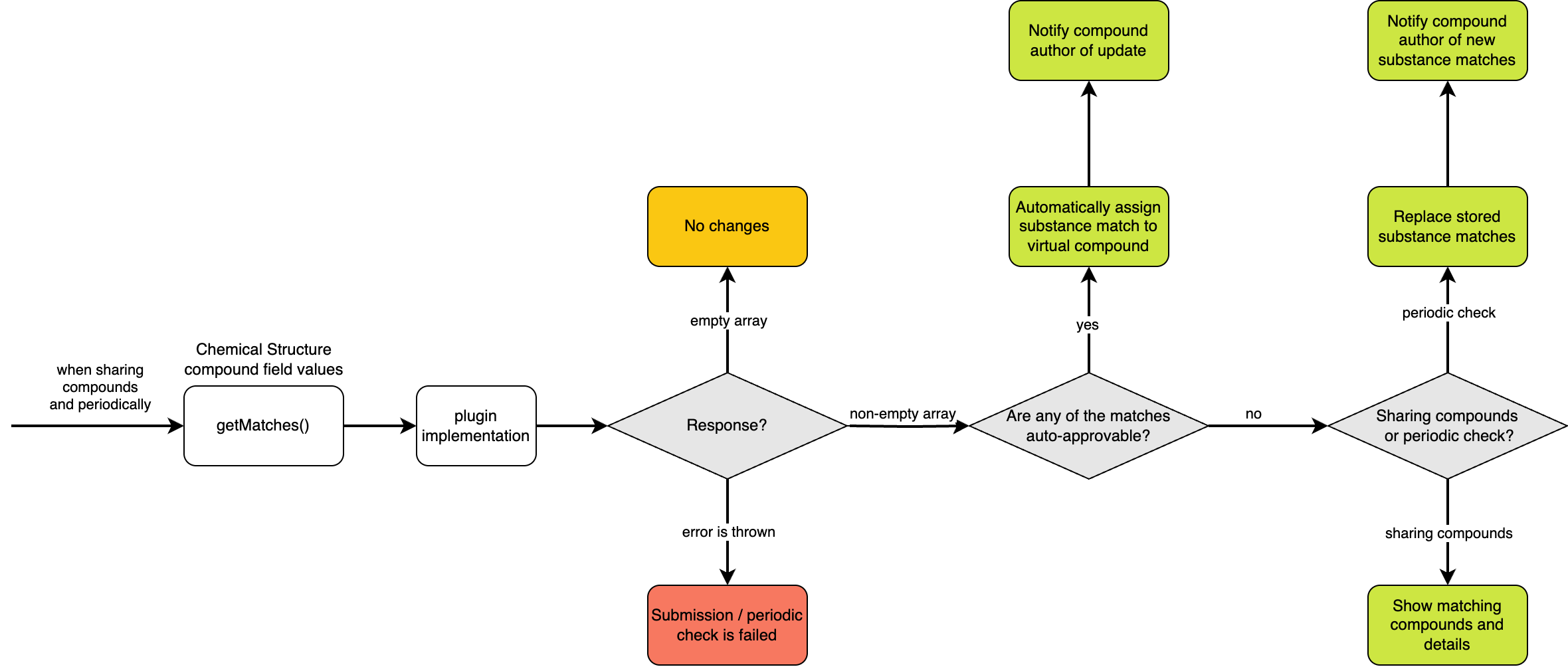
The condition of which matches require approval and which doesn't is left to plugin authors. Please consider contacting Technical support and Chemaxon's scientific consultants for further guidance on this topic!
Mapping between virtual compounds and substances
The key functionality for mapping between virtual compounds and substances is a chemical structure based search implemented by the plugin author, typically using functionality of a substance registration system or compound management platform. Since virtual compounds are most typically created as human input, and chemical structures may be drawn multiple ways with the same meaning, plugin authors are expected to deal with some variability.
Exact match
It is recommended that plugin authors attempt to implement an exact matching scenario for convenience to the end users. In this scenario, the virtual compound's chemical structure is found as duplicate in the registration system and the two can be matched to one another without further user input.
- ensure the response's
requiresApprovalattribute is set tofalse - return the exact chemical structure from the registration system to ensure standardized way of drawing (tautomer form, aromaticity, coordinates, etc...), but optionally the query structure may be returned too to leave the virtual compound as drawn
Flexible matches
If no exact matches are found, or when exact search could not be performed (e.g. the virtual compound has unspecified structural representations, such as chiral centers, or salt forms) then multiple potentially useful substance matches can be stored in Design Hub until end user selection and approval makes the final mapping.
For this use case, several configuration options are available:
compoundFields- optionally, using thecompoundFieldsconfiguration key, define custom fields that may be necessary for storing (both user input and programmatic updates) metadata of matching substances.checkCSTFields- optionally, using theregistry.checkCSTFieldsconfiguration key, specify the name of custom compoundFields whose value should be passed as optional arguments ingetMatchesAPI calls.copyCSTFields- optionally, using theregistry.copyCSTFieldsconfiguration key, and thedataattribute ofgetMatchesresponse objects, define which values to save when users approve a substance match.getMatches:- ensure the response's
requiresApprovalattribute is set totrue - for each response pay attention to providing a specific chemical structure that's unique to that hit
- set the
dataobject with values to assist the end user in selecting matching substances (e.g. Stereo comments) and to update values according tocopyCSTFields.
- ensure the response's
Example for combined logic
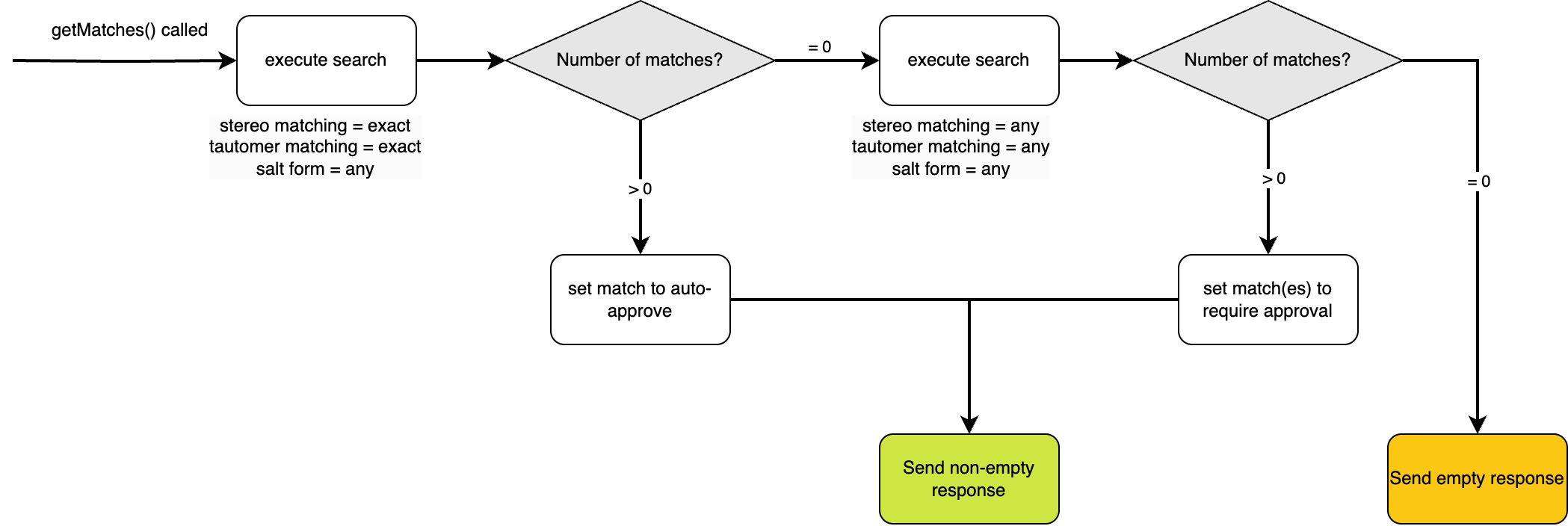
The example above shows how different levels of stereochemical strictness can be combined into one workflow to make a per-compound decision. In this example, a suitable chemical search engine is used that allows configuration stereo, tautomer, and salt matching (i.e. Chemaxon Compound Registration).
Design Hub's registry API sets no constraints towards using the requiresApproval flag based on stereochemistry, however the example is shared because of its obvious benefit.
Plugin skeleton
config.json
{
  ...
  "registry": {
    "checkCSTFields": ["fieldName"],
    "copyCSTFields": ["fieldName"]
    ...
  },
  "compoundFields": [
    {
      "name": "fieldName",
      "label": "Field Label",
      "type": "enum",
      "values": ["Value 1", "Value 2"]
    },
  ]
  ...
}
skeleton.registry.js
//@ts-check
"use strict";

/**
 * @typedef ContentProject
 * @prop {number} project_id the application-internal id of the project
 * @prop {string} label the human readable label/name of the project
 * @prop {string} [key] the key associated of the project (obsolete)
 * @prop {number} [remote_id]: the ID of the project in the external project management system
 */

/**
 *
 * @typedef {Object} RegistryPluginContext
 * @prop {User} user
 * @prop {string} domain
 * @prop {DhUtils} dhUtils
 *
 * @typedef {Object} DhUtils Utility functions. See API of `this.dhUtils` in the plugins guide.
 * @prop {(data: ReqOptions) => Promise<any>} get HTTP GET request
 * @prop {(data: ReqOptions) => Promise<any>} post HTTP POST request
 * @prop {(data: ReqOptions) => Promise<any>} req HTTP request with configurable method
 * @prop {(structure: string, toFormat: string) => Promise<string>} convert
 * @prop {(fileContents: string|Buffer, toFormat: string) => Promise<string>} convertFile
 * @prop {(structures: string[], toFormat: string) => Promise<{structure: string, successful: boolean, error?: string}[]>} batchConvert
 * @prop {(structures: string[], toFormat: string) => Promise<string>} append
 * @prop {(structure: string, dimension?: 2|3, format?: string) => Promise<string>} clean
 * @prop {(structures: string[], width?: number, height?: number) => Promise<string[]>} getImageURLs
 * @prop {PDBUtilities} PDBUtilities
 *
 * @typedef {Object} PDBUtilities
 * @prop {(pdbCode: string) => Promise<string>} load
 * @prop {(pdbCode: string) => Promise<string[]>} findLigands
 * @prop {(pdbFile: string) => string[]} findResidues
 * @prop {(pdbCode: string, ligandCode: string) => Promise<string|false>} getResidue
 * @prop {(pdbFile: string, ligandCode: string) => Promise<string|false>} getResidueFromFile
 *
 * @typedef {Object} ReqOptions HTTP request parameters. See API of `req` in the plugins guide.
 * @prop {string|URL} url
 * @prop {'GET'|'POST'|'PUT'|'PATCH'|'DELETE'} [method]
 * @prop {Object<string, string>} [headers]
 * @prop {any} [body]
 * @prop {boolean} [json]
 *
 * @typedef {Object} RegistryPluginQuery
 * @prop {string} structure
 * @prop {{[key: string]: string|number}} [cstData]
 * @prop {ContentProject} contentProject attributes of the project to which the compound belongs. The set of attributes
 *                                       actually present is based on, limited by, the permissions of the user
 *                                       on behalf of whom the calculation is executed.
 * @prop {string} [virtualId] optional virtual compound ID that can be used
 *                            for ID-based matching in addition to structure-based search
 *
 * @typedef {Object} SubstanceMatch
 * @prop {string} id
 * @prop {string} structure
 * @prop {{[key: string]: string|number}} [data]
 * @prop {boolean} [requiresApproval] if `false`, `id` is automatically assigned
 *                                    by Design Hub to the virtual compound as substance-id
 *                                    without waiting for users' approval.
 *                                    defaults to `true`
 *
 * @typedef {Object} User
 * @prop {string} userName
 * @prop {any} tokens OIDC TokenSet
 *
 * @typedef ConfigurationValues
 * @prop {{[key: string]: string}} secrets
 *
 */

/**
 * Find all matching compounds
 * @this {RegistryPluginContext}
 * @param {RegistryPluginQuery} queryObject
 * @returns {Promise<SubstanceMatch[]>}
 */
async function getMatches(queryObject) {
  const molecule = await this.dhUtils.convert(queryObject.structure, "mol:-a");
  const cstData = queryObject.cstData?.fieldName;
  const user = this.user.userName;

  //perform queries

  return [{
    id: "",
    structure: "",
    data: {
      fieldName: "Value 1"
    },
    requiresApproval: false
  }];
}

/**
 * Store and use values provided by Admin interface's Secret manager
 * @param {ConfigurationValues} config
 */
function onConfigurationChanged(config) {
  console.log("plugin-name configuration", config.secrets);
}

module.exports = {
  name: "skeleton-registry",
  label: "Skeleton Registry",
  getMatches: getMatches,
  onConfigurationChanged: onConfigurationChanged
  domains: ["*"]
};