Design Hub developer guide - real time plugins
- Design checklist
- Life-cycle
- Technical checklist
- NodeJS module API
- REST API
- Templates
- Plugin skeleton
Design Hub's real time plugins display information about a chemical structure, such as predicted properties, compound availability or patentability information, by connecting to databases or calling RESTful JSON web services. There are 2 technical approaches to defining and loading plugins:
- NodeJS modules, stored in a folder set by Design Hub's configuration file (
servicesDirectory) - REST API implementing microservices, loaded through URLs defined in Design Hub's configuration file (
remoteServices)
As described below in the specification, the 2 approaches follow the same concepts, and internally are managed by the same service, so outgoing call arguments are the same regardless of the technical choice, and your plugin's configuration will have identical behaviour in the application regardless of the API.
Furthermore, realtime plugins support 2 API versions, the second generation being richer in functionality for visualization and batch processing.
Design checklist
These real time plugins are meant to quickly display relevant, summary information about a chemical structure in a given topic. A chemical structure is typically optimized taking a dozen different attributes into account, which doesn’t allow a lot of details into any single one, but a summary level of detail is useful to prevent mistakes and provide options for further insight on demand. A summary of a topic should consist of a few key numbers, a few important category names, a single structure image, identifiers or hit counts. Further information can be provided as a link, which the users could follow and review later.
Plugins provide good default configurations to the users, but optionally can be reconfigured using checkboxes, dropdowns or text field inputs.
Life-cycle
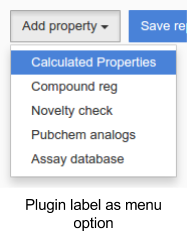
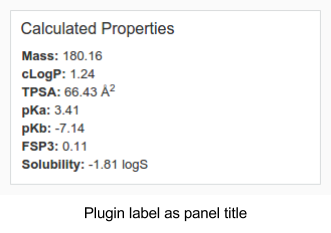
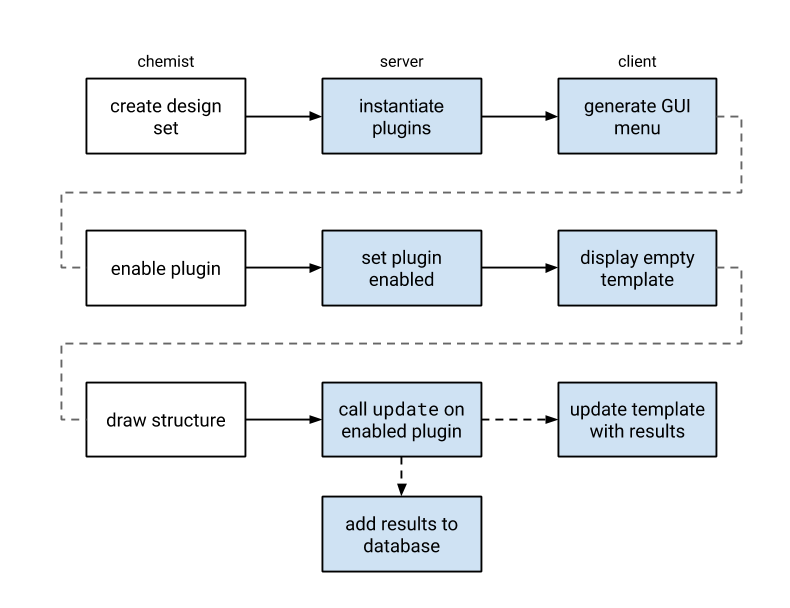
Design Hub scans the service definitions find all real time plugins and generates a GUI element to enable or disable them. When a plugin is enabled, its window is displayed, and that subsequent structure editing can refresh the calculation results. This is done by calling the update() or calculate() function of all enabled plugins with the MRV formatted source of that structure. When this function call returns, the results or error message appears for the users.
Technical check-list
- an instance of Design Hub available for development purposes, i.e.: the ability to stop and start it, to try different configuration options
- for the NodeJS module API: familiarity with JavaScript, NodeJS and its module system and good understanding of Promises / async await operations
- for the REST API: familiarity with REST API implementing frameworks in your toolkit's programming language (such as Spring Boot for Java, or fastAPI for Python)
- basic understanding of Angular JS templating syntax
NodeJS module API
We recommend checking these basic introduction materials to get familiar with NodeJS and AngularJS
NodeJS beginner guide, Youtube (78m),
Getting started with NodeJS, Youtube (19m),
Intro to NodeJS, Youtube (48m)
NodeJS module description: https://nodejs.org/api/modules.html
Promise introduction: https://web.dev/articles/promises?hl=en
Templating basics in Angular JS: https://docs.angularjs.org/tutorial/step_02
Specification
Real time plugins are NodeJS modules, denoted by their filename: *.realtime.js and location in the services directory as configured during installation.
Update API (Legacy)
A real time plugin exports the following properties:
| Name | Type | Required | Description |
|---|---|---|---|
hasCalculateApi |
boolean | no | Set to false to activate this API. Default value: false. |
name |
string | yes | Unique identifier of the plugin, used by Design Hub for identification and internal communication. If multiple plugins use the same identifier, the last one to be loaded overrides the others. |
label |
string | yes | Human readable name of the plugin, used by Design Hub to display GUI elements related to this plugin: as menu entry in the menu to enable the plugin, as title of the panel displaying the results. |
update |
async function | yes | The main function of the plugin, called when the sketcher is used, once for each change. The function must return a Promise of the results / be declared as an async function. The results are broadcasted by the application. Arguments: mrvSource (string) MRV formatted chemical structure of the editorpinnedStructure (string) MRV formatted chemical structure of the (optionally) pinned structure used for comparisonsthis includes domain, settings, user and dhUtils for the current callReturn value: Promise The return value can take 2 forms. Either it must be a JS Object with a client property containing the data to be linked to the template and a report property with the data needed for the report respectively, or it's a simple JS Object containing the data to be linked to the template, in which case, client and report are reserved keywords. Please see the skeleton below. |
hasReport |
boolean | no | Indicates whether this plugin provides report data or not. It controls the visibility of this plugin in design sets. If this property is set to true, this plugin will be visible in design sets. The default value is true. |
template |
string | one of template or templateFile |
The plugin template is an HTML fragment that’s injected into the room’s interface as a panel. The templating language is Angular JS, which should allow interpolating formatted numbers or easily enumerating a list. The result of the update call is made available as the client variable inside the template fragment. |
templateFile |
string | one of template or templateFile |
Relative path to an HTML file that contains the template. |
domains |
array of strings | yes | List of domains where this plugin may be used, when authentication is enabled in Design Hub. Use * to allow any domain. |
sortOrder |
number | no | Sorting order of the plugin as it appears on the GUI. Sorting is ascending. If no number is specified, plugins are sorted by name. Default: 9999 |
getSettings |
async function | no | Configuration options exposed to a chemist in a generated UI component of the plugin. Values selected are passed in this to subsequent update() calls.Return value: Promise of array of objects. See settings.Has higher precendence than settings. Default: none |
settings |
array of objects | no | Configuration options exposed to a chemist in a generated UI component of the plugin. Values selected are passed in this to subsequent update() calls. A valid setting object has the following properties - see below.Default: [] |
settings[*].label |
string | yes | Human friendly name of the setting. |
settings[*].type |
string | yes | One of: boolean, string, number, enum, multienum, project, project-object, objectenum, objectmultienum. |
settings[*].default |
any | no | Default value of the setting. |
settings[*].values |
array of strings or array of objects | no / yes for enum type |
Picklist contents for enum type setting. enum, multienum accept an array of strings, while objectenum and objectmultienum accept an array of objects as possible values. |
settings[*].values[*].id |
string | yes | Saved value of the settings, must be unique among values of this settings |
settings[*].values[*].label |
string | yes | Human friendly label of the setting |
settings[*].values[*].category |
string | no | grouping key of settings |
docs |
string | no | HTML describing technical details of this plugin. When specified, an icon will be rendered on the plugin's GUI panel. |
contact |
string | no | Text describing ways to contact to owner of this plugin. URLs and email addresses will be automatically made clickable. When specified, an icon will be rendered on the plugin's GUI panel. |
Calculate API
Realtime plugins support a new generation, higher functionality API with improvements on visualization and batch calculations.
The key property that enables this API usage is hasCalculateApi, see below:
| Name | Type | Required | Description |
|---|---|---|---|
hasCalculateApi |
boolean | no | Set to true to activate this API. |
name |
string | yes | Unique identifier of the plugin, used by Design Hub for identification and internal communication. If multiple plugins use the same identifier, the last one to be loaded overrides the others. |
label |
string | yes | Human readable name of the plugin, used by Design Hub to display GUI elements related to this plugin: as menu entry in the menu to enable the plugin, as title of the panel displaying the results. |
calculate |
async function | yes | The main function of the plugin. The function must return a Promise with the results. The signature is described below. |
hasSettingsData |
boolean | no | Set to true if you want to provide settings data (this is different from settings) |
getSettingsData |
async function | no | Allows providing data common to all input compounds used for visualization (e.g. large protein structure). The function signature is described below. |
getSettings |
async function | no | Configuration options exposed to a user in a generated UI component of the plugin. Values selected are passed in the subsequent calculate calls.Return value: Promise of array of objects. See settings.Has higher precendence than settings. Default: none |
template |
string | one of template or templateFile |
The plugin template is an HTML fragment that’s injected into the plugin panel of single compound view or spreadsheet view. Data provided to the template is described below. |
templateFile |
string | one of template or templateFile |
Relative path to an HTML file that contains the template. |
domains |
array of strings | yes | List of domains where this plugin may be used, when authentication is enabled in Design Hub. Use * to allow any domain. |
sortOrder |
number | no | Sorting order of the plugin as it appears on the GUI. Sorting is ascending. If no number is specified, plugins are sorted by name. Default: 9999 |
settings |
array of objects | no | Configuration options exposed to a chemist in a generated UI component of the plugin. Values selected are passed in this to subsequent calculate() calls. A valid setting object has the following properties - see below.Default: [] |
settings[*].label |
string | yes | Human friendly name of the setting. |
settings[*].type |
string | yes | One of: boolean, string, number, enum, multienum, project, project-object, objectenum, objectmultienum. |
settings[*].default |
any | no | Default value of the setting. |
settings[*].values |
array of strings or array of objects | no / yes for enum type |
Picklist contents for enum type setting. enum, multienum accept an array of strings, while objectenum and objectmultienum accept an array of objects as possible values. |
settings[*].values[*].id |
string | yes | Saved value of the settings, must be unique among values of this settings |
settings[*].values[*].label |
string | yes | Human friendly label of the setting |
settings[*].values[*].category |
string | no | grouping key of settings |
docs |
string | no | HTML describing technical details of this plugin. When specified, an icon will be rendered on the plugin's GUI panel. |
contact |
string | no | Text describing ways to contact to owner of this plugin. URLs and email addresses will be automatically made clickable. When specified, an icon will be rendered on the plugin's GUI panel. |
batchUpdateSize |
number | no | Maximum number of structures to pass to calculate. |
hasExtendedVisualization |
boolean | no | Set to true if the plugin is able to display multiple structure visualization in a spreadsheet view. Default: false. |
hasSingleVisualization |
boolean | no | Set to false if the plugin should not be available in single compound view. Default: true. |
hasReport |
boolean | no | Set to false if the plugin does not provide any columns for spreadsheet views. If both hasReport and hasExtendedVisualization is false, then the plugin will not be available in spreadsheet view. Default: true. |
minVisualizationPoints |
number | no | Minimum number of structures selected to display the extended visualization. Default: 0. |
maxVisualizationPoints |
number | no | Maximum number of structures selected to display the extended visualization. Default: Infinite. |
onConfigurationChanged |
function | no | Function that Design Hub calls during initialization and whenever an administrator updates the Secrets of the system. Arguments: config (Object) An object with secrets attribute containing the key-value pairs of secrets from the Admin interface |
calculate method
Typescript signature of the input parameter of calculate method:
{
    compounds: {
        title: string; // Title of the structure
        mrvSource: string; // MRV formatted chemical structure
        isReference: string; //Indicates reference usage of structure in create mode
        content_id?: string; //Permanent identifier of the structure. Available only for already saved compounds
    }[];
    settings: {[key: string]: any}; // Settings object configured by the user when adding the plugin
    user: User //data object representing the calling user
    runner: "realtime" | "datacollector"; // realtime in case the plugin is run in single compound view, datacollector otherwise
}
Typescript signature of the output of calculate method, array of those objects should be returned (corresponding to the array of input compounds):
Typescript signature of the object passed to the template:
{
    data: {
        settings: any; // Settings configured for the plugin
        settingsData: any; // Data returned from the getSettingsData method
        records: {
            contentId: string; // Content ID of the structure
            title: string; // Title of the structure
            structure: string; // MRV formatted chemical structure
            report: any; // Report returned by the calculate method
            client: any; // Client object returned by the calculate method
            color: string; // Color for the given compound (corresponding to the selection)
            colorTones: string[]; // Five color tones of the color for distinguishing multiple values
        }[] // Array corresponding to the selected compounds
    };
}
REST API
Available from v20.3.1, Design Hub plugins are single-purpose microservice endpoints that describe the plugin and provide a calculation endpoint to be called as user activity demands. These are implemented by 2 JSON endpoints specified below.
Specification
Method: GET
Path: baseURL (the specified remote service URL without any changes)
Purpose: Provides metadata about the plugin.
Required: yes
Request parameters: None
Response content-type: application/json
Response body: JSON object with the following properties:
| Name | Type | Required | Description |
|---|---|---|---|
type |
string | yes | The type property should be realtime for realtime plugins. |
name |
string | yes | Unique identifier of the plugin, used by Design Hub for identification and internal communication. If multiple plugins use the same identifier, the last one to be loaded overrides the others. |
label |
string | yes | Human readable name of the plugin, used by Design Hub to display GUI elements related to this plugin: as menu entry in the menu to enable the plugin, as title of the panel displaying the results. |
hasReport |
boolean | no | Information whether this plugin provides report data. Based on value visibility of this plugin in design set is set up (true == visible). If not provided value falls back to "true" (visible). |
template |
string | yes | The plugin template is an HTML fragment that’s injected into the Compound creation interface as a panel. The templating language is Angular JS, which should allow interpolating formatted numbers or easily enumerating a list. The result of the update call is made available as the client variable inside the template fragment. |
domains |
array of strings | yes | List of domains where this plugin may be used, when authentication is enabled in Design Hub. Use * to allow any domain. |
sortOrder |
number | no | Sorting order of the plugin as it appears on the GUI. Sorting is ascending. If no number is specified, plugins are sorted by name.Default: 9999 |
settings |
array of objects | no | Configuration options exposed to a chemist in a generated UI component of the plugin. Values selected are passed in the settings object to subsequent POST /update calls. A valid setting object has the following properties - see below.Default: [] |
settings[*].label |
string | yes | Human friendly name of the setting. |
settings[*].type |
string | yes | One of: boolean, string, number, enum, multienum, project, project-object, objectenum, objectmultienum . |
settings[*].default |
any | no | Default value of the setting. |
settings[*].values |
array of strings or array of objects | no / yes for enum type |
Picklist contents for enum type setting. enum, multienum accept an array of strings, while objectenum and objectmultienum accept an array of objects as possible values. |
settings[*].values[*].id |
string | yes | Saved value of the settings, must be unique among values of this settings |
settings[*].values[*].label |
string | yes | Human friendly label of the setting |
settings[*].values[*].category |
string | no | grouping key of settings |
docs |
string | no | Text describing important usage details of this plugin. URLs will be automatically made clickable. When specified, an icon will be rendered on the plugin's GUI panel. |
contact |
string | no | Text describing ways to contact to owner of this plugin. URLs and email addresses will be automatically made clickable. When specified, an icon will be rendered on the plugin's GUI panel. |
Method: POST
Path: <baseURL>/update
Purpose: Called once for each compound change to obtain calculation results.
Required: yes
Request content-type: application/json
Request body:
| Name | Type | Description |
|---|---|---|
structure |
string | MRV formatted chemical structure of the editor |
pinnedStructure |
string | MRV formatted chemical structure of the (optionally) pinned structure used for comparisons |
context |
JSON object | Other information like user information about the caller if available, domain information, etc. |
settings |
JSON object | JSON object containing key-value pairs as JSON strings for each setting entry where key matches selected setting label and values will match selected setting values |
Response content-type: application/json
Response body: a JSON object including the following properties:
| Name | Type | Required | Description |
|---|---|---|---|
client |
JSON object | yes | any data structure to be linked to the plugin template. Please see the skeleton below. |
report |
JSON object | yes (can be null) | A list of key-value pairs denoting the results in an easily filterable / sortable fashion. |
If your plugin doesn't provide reportable key-value pairs of results, you may use a simplified response body where the entire response data structure is linked to the plugin template. In this format, client and report variables are reserved keywords.
Templates
Templates provide a rich option set for realtime plugins so there's a dedicated page describing the available options and components made available through the application. Be sure to check out the examples below as well!
- variable interpolation
- iteration and conditional blocks
- styling
<diff><larger><smaller><pager>[structure]<threedee><protein><ligand>
For details and examples - read more in the template guide.
Plugin skeleton
Below, you can find 2 skeleton files for a realtime plugin implementing most of the API methods. The code below includes typescript definitions for all parameters and expected results, so that editors like Visual Studio Code can assist with static code analysis and adherence to the specifications.
skeleton.realtime.js
//@ts-check
"use strict";

/**
 * @typedef ContentProject
 * @prop {number} project_id the application-internal id of the project
 * @prop {string} label the human readable label/name of the project
 * @prop {string} [key] the key associated of the project (obsolete)
 *
 * @typedef GetSettingsContext
 * @prop {User} user
 *
 * @typedef PluginSettings
 * @prop {string} label
 * @prop {'boolean'|'number'|'enum'|'multienum'|'project'|'text'|'objectenum'|'objectmultienum'} type
 * @prop {string[]|number[]|{id: string, label: string, category?: string}[]} [values]
 * @prop {string|number|boolean} [default]
 * @prop {number} [min]
 * @prop {number} [max]
 *
 * @typedef RealtimePluginContext
 * @prop {User} user
 * @prop {PluginConfiguration} settings
 * @prop {string} domain
 * @prop {DhUtils} dhUtils
 *
 * @typedef {Object} DhUtils Utility functions. See API of `this.dhUtils` in the plugins guide.
 * @prop {(data: ReqOptions) => Promise<any>} get HTTP GET request
 * @prop {(data: ReqOptions) => Promise<any>} post HTTP POST request
 * @prop {(data: ReqOptions) => Promise<any>} req HTTP request with configurable method
 * @prop {(structure: string, toFormat: string) => Promise<string>} convert
 * @prop {(fileContents: string|Buffer, toFormat: string) => Promise<string>} convertFile
 * @prop {(structures: string[], toFormat: string) => Promise<{structure: string, successful: boolean, error?: string}[]>} batchConvert
 * @prop {(structures: string[], toFormat: string) => Promise<string>} append
 * @prop {(structure: string, dimension?: 2|3, format?: string) => Promise<string>} clean
 * @prop {(structures: string[], width?: number, height?: number) => Promise<string[]>} getImageURLs
 * @prop {PDBUtilities} PDBUtilities
 *
 * @typedef {Object} PDBUtilities
 * @prop {(pdbCode: string) => Promise<string>} load
 * @prop {(pdbCode: string) => Promise<string[]>} findLigands
 * @prop {(pdbFile: string) => string[]} findResidues
 * @prop {(pdbCode: string, ligandCode: string) => Promise<string|false>} getResidue
 * @prop {(pdbFile: string, ligandCode: string) => Promise<string|false>} getResidueFromFile
 *
 * @typedef {Object} ReqOptions HTTP request parameters. See API of `req` in the plugins guide.
 * @prop {string|URL} url
 * @prop {'GET'|'POST'|'PUT'|'PATCH'|'DELETE'} [method]
 * @prop {Object<string, string>} [headers]
 * @prop {any} [body]
 * @prop {boolean} [json]
 *
 * @typedef User
 * @prop {string} userName
 * @prop {any} tokens OIDC TokenSet
 *
 * @typedef {Object} PluginConfiguration
 *
 * @typedef {Object} RealtimePluginResponse
 * @prop {Object} client matching the html template
 * @prop {Object<string,string|number|boolean>} report single level key-value report
 *
 * @typedef CalculateSettingsBody
 * @prop {User} user
 *
 * @typedef GetSettingsBody
 * @prop {User} user
 * @prop {'realtime' | 'datacollector'} runner the type of the plugin runner
 * @deprecated @prop {{ project_id: number; label: string }[]} projects the projects the executing user
 *                                                                      is member of. Deprecated in favor of
 *                                                                      the more accurately scoped "contentProject"
 *                                                                      property.
 * @prop {ContentProject} contentProject the project to which the content operated on by
 *                                       the "calculate" function belongs. The set of attributes
 *                                       actually present is based on, limited by, the permissions
 *                                       of the user on behalf of whom the calculation is executed.

 *
 * @typedef GetSettingsDataBody
 * @prop {PluginConfiguration} settings
 * @prop {User} user
 * @prop {ContentProject} contentProject the project to which the content operated on by the "calculate" function belongs.
 *                                       The set of attributes actually present is based on, limited by,
 *                                       the permissions of the user on behalf of whom the calculation is executed.
 *
 * @typedef RealtimeCompoundInput
 * @prop {string} title virtual ID or substanc ID of the compound
 * @prop {string} mrvSource the textual representation of the molecule
 * @prop {boolean} isReference "true" if the runner is "realtime" and the compound is referenced
 *                                    from another parent (design-set), "false" otherwise
 * @prop {{Object.<string, number | string | number[]>}} [referencedData] for internal use
 * @prop {string} [content_id] the application-internal ID of the compound
 * @prop {ContentProject} project attributes of the project to which the compound belongs.
 *                                The set of attributes actually present is based on, limited by,
 *                                the permissions of the user on behalf of whom the calculation is executed.
 *
 * @typedef CalculateRequestBody
 * @prop {RealtimeCompoundInput[]} compounds
 * @prop {User} user
 * @prop {PluginConfiguration} settings
 *
 * @typedef ResultFile
 * @prop {string} name
 * @prop {string} data
 * @prop {string} mime_type
 *
 * @typedef CalculateResponse
 * @prop {any} client matching the html template
 * @prop {{[key: string]: string|number|boolean|Object}} [report] report single level key-value report, extended with Objects for visualization
 * @prop {ResultFile[]} [files]
 *
 * @typedef ConfigurationValues
 * @prop {{[key: string]: string}} secrets
 */


/**
 * Provide settings when the UI dialog is opened
 * @param {GetSettingsBody} body
 * @returns {Promise<PluginSettings[]>}
 */
async function getSettings(body) {
  console.log("plugin-name getSettings", body.user);
  return [];
}


/**
 * Main body of the function
 * @param {CalculateRequestBody} body
 * @returns {Promise<CalculateResponse[]>}
 */
async function calculate(body) {
  console.log("plugin-name calculate", body.settings, body.user);

  for (const compound of body.compounds) {
    console.log("plugin-name compounds", compound.mrvSource);
  }

  return body.compounds.map((compound) => ({
    client: {},
    report: {},
    files: []
  }));

}

/**
 * Fetch and provide values that all results needs, e.g. a protein structure or common chart configurations.
 * @param {GetSettingsDataBody} body
 * @returns {Promise<any>}
 */
async function getSettingsData(body) {
  return {};
}


/**
 * Store and use values provided by Admin interface's Secret manager
 * @param {ConfigurationValues} config
 */
function onConfigurationChanged(config) {
  console.log("plugin-name configuration", config.secrets);
}

module.exports = {
    name: "plugin-name",
    label: "Plugin Label",
    getSettings: getSettings,
    hasSettingsData: true,
    getSettingsData: getSettingsData,
    hasCalculateApi: true,
    calculate: calculate,
    hasExtendedVisualization: true,
    domains: ["*"],
    templateFile: "skeleton.template.html",
    docs: "To be added...",
    onConfigurationChanged: onConfigurationChanged
};
skeleton.template.html
<style>
  .plugin-name {
    background-color: grey;
  }
</style>

<!-- for details of the data variable see TemplateInput -->
<div class="plugin-name" ng-repeat="record in data.records">
  "title" of this record from DH: {{record.title}}
  "color" of this record suggested by DH: {{record.color}} / {{record.colorTones}}
  "client" variable from backend: {{record.client}}
</div>

<div>
  "settingsData": {{data.settingsData}}
</div>