Using Calculator Plugins via API
Steps using Calculator Plugins via API
In this example of the ElementalAnalysisPlugin we demonstrate how to use the Calculator Plugin API step-by-step. These steps are common for all types of plugins.
Instantiate the plugin object
Calculator Plugin classes are placed in the chemaxon.marvin.calculations package. First import the necessary classes:
Instantiate a new ElementalAnalyserPlugin object with its default constructor:
Set the parameters of the calculation
After creating the ElementalAnalyserPlugin object the parameters of the calculation can be set with plugin specific setter methods. The precision of the results can be set with the setDoublePrecision(int) method:
Set the input molecule
All calculator plugins take a molecule (a Molecule object) as input, and perform the calculation on one molecule at a time. The input molecule can be set with the setMolecule(Molecule) method:
Run the calculation
To run the calculation, the run() method of the plugin should be invoked:
Get the results
It is plugin specific how results of the calculation can be retrieved. ElementalAnalyserPlugin can return several kinds of results, some of these are:
- mass and exact mass
- count of atoms and count of all atoms
- formula
- composition
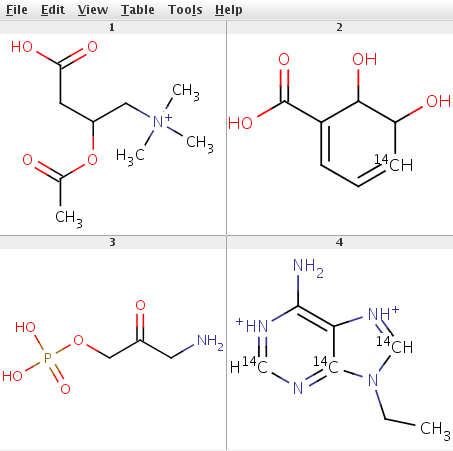
In the file ElementalAnalyserPluginExample.java a complete code example can be found which uses the code parts above. It reads input molecules from a file given as command line parameter and displays the results. The input file example_mols.sdf contains the chemical structures shown below:
 |
|---|
To compile the example, MarvinBeans.jar has to be referenced in the CLASSPATH. After compiling the example can be run from command line like this:
For example:
The output is:
Using multiple plugins, writing the results to SDF fields
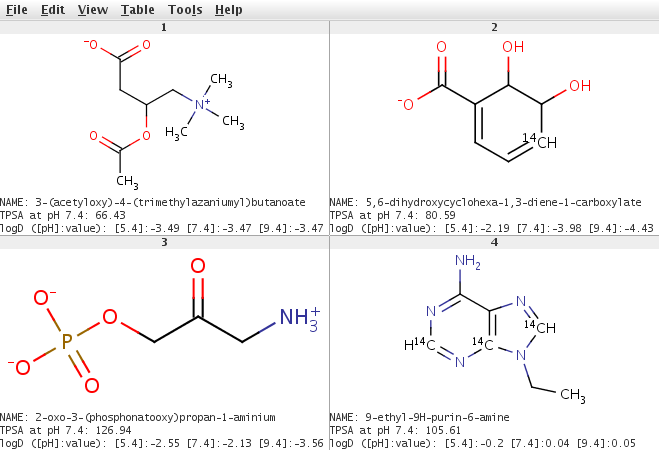
In the second example four plugins are used: the MajorMicrospeciesPlugin to generate the major microspecies at pH 7.4; the TPSAPlugin to calculate the polar surface areas; the logDPlugin to calculate the logD values and the IUPACNamingPlugin to generate the names of molecules read from a molfile. The results of the calculations are written to an SD file: they are the major microspecies of the input molecules, the IUPAC names, the surface area values and logD values.
The main steps in this example are the same as in the previous one, only the methods used for parameter settings and the methods used for getting the results are different.
Setting parameters and getting the results for MajorMicrospeciesPlugin
For setting the parameters method setpH(double) is used. Major microspecies at the specified pH will be generated.
For getting the results method getMajorMicrospecies() is used. It returns a Molecule object.
Setting parameters and getting the results for TPSAPlugin
For setting the parameters method setpH(double) is used.
For getting the results method getSurfaceArea() is used.
Setting parameters and getting the results for logDPlugin
There are quite a few parameters that can be set for logD calculation. These are: Cl- ion concentration, Na+/K+ ion concentration, pH (for calculating logD at a single pH value), pH lower limit, pH upper limit, and pH step size.
The results of the logD calculation are returned by the method getlogDs(), the pH values are returned by the method getpHs(). Both methods return a double array (double[]), the logD array contains the logD values for corresponding pH-s in the pH array.
Getting the results for IUPACNamingPlugin
For getting the results method getPreferredIUPACName() is used, it returns the preferred IUPAC name. IUPACNamingPlugin has also the method getTraditionalName() to return the traditional name of the molecule.
The complete code example can be found in the file PluginExample.java. After compiling the example can be run from command line:
Example:
The result is written to the results.sdf file.
 |
|---|
The above examples can also be run by run.sh shell script (Linux/UNIX) or RUN.BAT batch file (Windows).