Multipage Settings
A MarvinSketch document is a canvas where you can create and manipulate structures.
A multipage document can be chosen in the Multipage Setting dialog box.
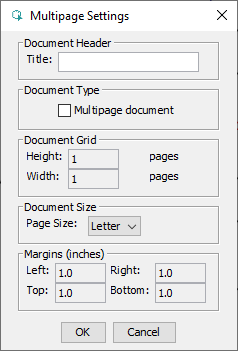
You can set the following parameters in this dialog box:
- Document Header: You can specify the title of the document here.
- Document Type: According to this setting a document can contain multiple pages or a single page.
- Document Grid: Specify the number of horizontal and vertical pages.
- Document Size: Specify the size of the individual pages.
- Margins (inches): Specify the margins of the corresponding sections.