Format styles (journal styles)
You can get more advanced display format for the molecule by applying journal styles. Format styles in Marvin include the setting of the following attributes:
- type of atom font,
- scale of atom font,
- color of atoms and atom labels,
- thickness of bonds,
- color of bonds.
Maximum 64 atom sets can be defined in a molecule. Indexing of atom sets starts from zero. The atom set having the zero index is the default atom set. When loading a molecule all the atoms belong to the default atom set by default. After selecting an atom set and applying a style for it, the selected atoms are removed from the default atom set and a new set is created from the atoms with new style. All the atoms, whose style were not yet modified by applying a style on them, still belong to the default atom set.
You can create an atom- or bond-set in Marvin to specify an atom-font/atom-color and bond-thickness/bond-color. The colors, fonts, thickness values are stored in a lookup table of MDocument.
Examples:
Change the format of some atoms and bonds in a chain of 11 atoms
//import a simple chain
Molecule mol = MolImporter.importMol("CCNCCCCCNCC");
//create a document to register color, font, size in the lookup table
MDocument mdoc = new MDocument(mol);
//define two colors
Color green = new Color(0, 255, 0);
Color blue = new Color(0, 0, 255);
MFont font = new MFont("Helvetica", MFont.BOLD, 20 );
Create a new color/font setting for a set of atoms by registering the color and font in the lookup table
//specify a new atom-style by setting color and font of the first atom set
//set the coloring mode
mdoc.setAtomSetColorMode(1, MDocument.SETCOLOR_SPECIFIED);
//set the color of the 1. atom-set
mdoc.setAtomSetRGB(1, green.getRGB());
//set the font of the 1. atom-set
mdoc.setAtomSetFont(1, font);
Create a new color/thickness setting for a set of bonds by registering the color and the thickness in the lookup table
//specify a new bond-style by setting color and thickness of the 2. atom set
//set the coloring mode
mdoc.setBondSetColorMode(2, MDocument.SETCOLOR_SPECIFIED);
//set the color of the 2. bond-set
mdoc.setBondSetRGB(2, blue.getRGB());
//set the thickness of the 2. bond-set
mdoc.setBondSetThickness(2, 0.2);
Create an atom-set
//set the color and font of the 2. and 8. atoms in the molecule
//by adding these atoms to the 1. atom set.
mol.getAtom(2).setSetSeq(1);
mol.getAtom(8).setSetSeq(1);
Create a bond-set
//set the color and thickness of 4. bond in the molecule
//by adding this bond to the 2. atom set.
mol.getBond(4).setSetSeq(2);
The result of atom and bond set coloring example is shown on the picture:
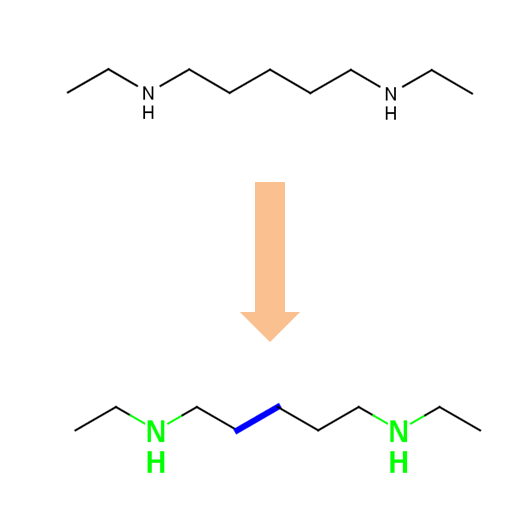
The atom- and bond-set coloring is available using the atomSetColor, bondSetColor applet and beans parameters.