Database Search Service
Database Search Service had a major update in version 25.3.0. If you are using en earlier version, read this documentation instead, or see our upgrade guide.
Database Search Service provides the functionality to store and search chemical structures in a persistent database, currently in H2, PostgreSQL and Oracle databases. It has endpoints for:
- creating/deleting tables,
- inserting/deleting/modifying structures and data in the tables,
- executing duplicate, substructure, full fragment and similarity searches.
This documentation describes installation, administration and usage of Database Search Service. As all JChem Microservices modules, it is available in two modes:
- As part of a microservices system
- As a standalone web application
Microservices system mode
In microservices system mode, the Database Search Service runs together with the Config, Discovery and Gateway Services. These three services are mandatory, and optionally other services can also be part of the system. All configuration must be done in the Config Service.
The default configuration applies to the microservices system mode.
The web application runs on host
Standalone web application mode
In standalone web application mode, the Database Search Service runs alone, without the Config, Discovery and Gateway Services (however, the installer installs them as well).
The default configuration must be changed according to the standalone web application mode. Set the following in the application.properties file
eureka.client.enabled=falsespring.cloud.config.enabled=false- If you are using a version earlier than 25.3.0 remove the line that starts with
spring.config.import=
All configuration must be done in the Database Search Service.
The web application runs on host <server-host and listens on port
System requirements
See here.
Download and installation
See here.
Service is installed into folder: jws/jws-db/
Licenses
See here.
Logging
See here.
Configuration
Default configuration:
| application.properties | description |
|---|---|
| server.port=8062 | |
| logging.file.name=../logs/jws-db.log | |
| spring.config.import=optional:configserver:${CONFIG_SERVER_URI:http://localhost:8888} | Config Service connection configuration with retry mechanism options. |
| eureka.client.enabled=true | set eureka.client.enabled=false to switch to standalone mode |
| initOnStart=${DB_INIT_ON_START:AUTO} | initOnStart can be:INIT: the existing database is deleted, and a new empty one is createdAUTO: existing database is started, in case of non-existing database a new empty one is created |
| updateMode=${DB_UPDATE_MODE:EXIT} | updateMode gets in action only if the version number has changed updateMode can be EXIT: exit if version mode has changedDROP: drop old data if version mode has changedREINDEX: keep old data and reindex them in order to work with new version |
| chemaxon.microservices.db.cache.enabled=true | Use in-memory cache to improve performance of search functionalities. Resource requirement and configuration details are available in JChem Engines cache and memory calculator page |
| chemaxon.microservices.db.cache.similarity.enabled=true | Enable in-memory caching to improve performance of tautomer similarity search. Resource requirement and configuration details are available in JChem Engines cache and memory calculator page |
| chemaxon.microservices.db.datasource.h2.dir=${CXN_STRUCTURE_DATA_DIR:./data/chemical-data/store} | Stores database files - used only in case of H2 database. |
| chemaxon.microservices.db.datasource.dialect=${CXN_DB_DIALECT:H2} chemaxon.microservices.db.datasource.url= ${CXN_DB_JDBC_URL:jdbc:h2:async:${chemaxon.microservices.db.datasource.h2.dir}/db;COMPRESS=true;MAX_COMPACT_TIME=10000;DEFRAG_ALWAYS=TRUE} chemaxon.microservices.db.datasource.username=${CXN_DB_JDBC_USER:user} chemaxon.microservices.db.datasource.password=${CXN_DB_JDBC_PASSWORD:password} |
Database type and connection configurations |
| chemaxon.microservices.db.import-export.dir=${CXN_DB_IMPORT_EXPORT_DIR:data/export} chemaxon.microservices.db.import-export.import-batch-size=${CXN_DB_IMPORT_EXPORT_BATCH_SIZE:5000} |
Folder name where DB can be exported/imported and importing batch size. |
| chemaxon.microservices.db.types[0].type-name = sample chemaxon.microservices.db.types[0].type-id = 1 chemaxon.microservices.db.types[0].tautomer-handling-mode = OFF chemaxon.microservices.db.types[0].stereo-assumption=ABSOLUTE chemaxon.microservices.db.types[0].standardizer-config = aromatize chemaxon.microservices.db.types[0].fp-length-in-bits = 512 chemaxon.microservices.db.types[0].fp-edges = 6 chemaxon.microservices.db.types[0].fp-ones = 2 chemaxon.microservices.db.types[0].canonical-tautomer-heavy-atom-limit = 100 chemaxon.microservices.db.types[1].type-name = taumol chemaxon.microservices.db.types[1].type-id = 2 chemaxon.microservices.db.types[1].tautomer-handling-mode = GENERIC chemaxon.microservices.db.types[1].stereo-assumption=ABSOLUTE chemaxon.microservices.db.types[1].standardizer-config = aromatize chemaxon.microservices.db.types[1].fp-length-in-bits = 512 chemaxon.microservices.db.types[1].fp-edges = 6 chemaxon.microservices.db.types[1].fp-ones = 2 chemaxon.microservices.db.types[1].canonical-tautomer-heavy-atom-limit = 100 |
Molecule types define the interpretation mode of the chemical structures. Important: Indexing of the types array must always be sequential from 0: 0, 1, 2, ... typeName must be uniquetypeID must be unique integer tautomerHandlingMode can be OFF GENERIC NORMAL_CANONICAL_GENERIC_HYBRIDNORMAL_CANONICAL_NORMAL_GENERIC_HYBRIDstereoAssumption can be ABSOLUTE or RELATIVEstandardizerConfig can be made of action strings standardizerConfig=aromatize:b..removeExplicitHThe standardizer configuration can be specified also as chemaxon.microservices.db.types[n].standardizerFile but strictly use only one of them, standardizerConfig OR standardizerFile. If neither standardizerConfig, nor standardizerFile is specified (or both are empty), then we use the default standardizer config, instead, which is “aromatize” fpLengthInBits must be a positive multiple of 64. The default is 512. Setting a higher value increases indexing time, but may give better results in similarity search. canonicalTautomerHeavyAtomLimit is available limiting the size of molecules the tautomer form of which is taken into account in duplicate and fullfragment search in the case of NORMAL_CANONICAL_GENERIC_HYBRID tautomerHandlingMode.New molecule type can be introduced for existing database. Any modification or delete changes take effect only if initOnStart is set to INIT, and the application is re-started, but take care, the existing database will be deleted. |
Search logging
Debug level of search logging can be set in JVM configuration (Installers and Docker images) by adding the following line to the proper .vmoptions file or to JAVA_OPTS:
-Djchem.debug=true
or setting
in application.properties file.
Timeout handling
Timeout limit can be provided as an optional parameter in different structure insertion and search requests but default timeout limit also can be configured with application properties.
Structure insertion
Timeout handling attributes can be used in following endpoints
/rest-v1/db/additional/upload/rest-v1/db/additional/{tableName}/batchInsert
| attribute name | attribute type | attribute place | description |
|---|---|---|---|
| timeoutInMilliseconds | integer | request parameter | Optional request parameter. Timeout limit in milliseconds. |
| offset | integer | request parameter | Optional request parameter. Structure insertion starts from this structure of file/request. |
| stoppedByTimeout | boolean | response attribute | It is true when insert process is interrupted due timeout. |
| processed | integer | response attribute | Number of processed elements from the request. The structure loading is done sequentially. If process is interrupted maybe not all structures are inserted. offset can be calculated based on it for the next insert request |
When timeoutInMilliseconds is not provided, the default timeout limit is determined by the spring.cloud.gateway.server.webflux.httpclient.response-timeout application property.
Structure search
Timeout limit can be provided in all type of duplicate, full fragment, similarity and substructure table searches with timeoutInMilliseconds request parameter.
When timeoutInMilliseconds is not provided, the default timeout limit is determined by the spring.cloud.gateway.server.webflux.httpclient.response-timeout application property.
Configuration
Timeout limit can be controlled by following application properties.
| application.properties | description |
|---|---|
| spring.cloud.gateway.server.webflux.httpclient.response-timeout=25000 | The default timeout limit for structure insertion and search, in millisecond, when related parameter is not provided. |
| chemaxon.microservices.db.timeout.stop-earlier=1000 | Database Search Service interrupts insert or search requests this number of milliseconds before the timeout limit to ensure a response can be provided to the gateway in time. |
High Availability (HA)
HA and load balancing is provided for Database Search Service. Running more instances of the db service ensures HA and load balancing.
Requirements
HA mode needs PostgreSQL or Oracle database. It is not supported with H2. As Database Search Service instances do not use distributed cache, no additional configuration is needed.
Load balanced example
Here you find a load balanced example application on GitHub.
Running the server
Prerequisites in case of microservices system mode:
- Config Service is running
- Discovery Service is running
- Gateway Service is running
Run the service in command line in folder jws/jws-db/:
jws-db-service.exe --install
jws-db-service.exe --start (on Windows in administrator's terminal)
jws-db-service start (on Linux)
or
run-jws-db.exe (on Windows)
run-jws-db (on Linux)
API Documentation
Find and try out the API on the Swagger UI.
| Mode | URL of Swagger UI | Default URL of Swagger UI |
|---|---|---|
| Microservices system | <serverhost>:<gateway-port>/jwsdb/API/ | localhost:8080/jwsdb/API/ |
| Standalone web application mode | <serverhost>:<server-port>/API/ | localhost:8062/API/ |
Demo site
For a detailed description, check out the demo site:
https://jchem-microservices.chemaxon.com/jwsdb/api/index.html
Usage
The guidelines, examples on the Demo site or on the Swagger UI API documentation of your installed service display the methods and syntax implemented for reaching the essential chemical searching functionalities.
Molecule type information
Database Search Service provides method for getting the available molecule types.
Every table has a Molecule type: this is a descriptor that is used by the search engine. It contains information about how structures are handled during search. The application has two very simple built in types called: sample (search with aromatization) and taumol (tautomer search). See the type definitions in the application.properties file.
Store and search molecules and non-chemical data
Database Search Service provides endpoints for storing and searching chemical structures in a persistent database.
There are endpoints for
- creating / deleting tables,
- inserting / deleting / modifying structures and data in the tables,
- executing duplicate, substructure, full fragment and similarity searches.
Search on additional data
Database Search Service provides additional data filtering option in POST requests on these endpoints:
/rest-v1/db/additional/{tableName}/fullfragment/rest-v1/db/additional/{tableName}/similarity/rest-v1/db/additional/{tableName}/substructure
Possible filtering options in additionalDataCondition attribute:
Text
Text additional data can be filtered with following operators.
exact- Filter text is exactly the same as additional data valuecontains- Additional data contains the provided filter textnotExact- Filtered additional data type is defined on molecule and has different value than filter text
Number
Numbers can be filtered with following operators: >, >=, <, <=, =, !=
Complex
Multiple filters can be combined with and and or logical operators
{
  "operator": "or",
  "conditions": [
    {
      "operator": "and",
      "conditions": [
        {
          "field": "mass",
          "operator": ">",
          "value": 100
        },
        {
          "field": "mass",
          "operator": "<=",
          "value": 200
        }
      ]
    },
    {
      "field": "name",
      "operator": "contains",
      "value": "methane"
    }
  ]
}
Data recovery
The data is stored in PostgreSQL/Oracle database server or in H2 database case in the file system under the folder which is configred in chemaxon.microservices.db.datasource.h2.dir application property. The content of that folder must be stored as backup. Furthermore, the application.properties file(s) also should be saved.
Import/export tables using S3 bucket
It is possible to use S3 buckets to import/export database tables. For this we use Spring Could AWS.
Our default settings are different than Spring's defaults so users who are not using this feature can run their services without AWS issues.
The current constant is the following:
| application.properties | description |
|---|---|
| spring.cloud.aws.region.static=eu-central-1 | A static value for region used by auto-configured AWS clients |
Credential configuration details are available in official Spring Cloud AWS documentation.
You can setup S3 import/export the following settings:
# Specifies whether use FILE based import/export or S3 based import/export. Default is: `FILE`
chemaxon.microservices.db.import-export.db-export-strategy=S3

# Specifies which S3 bucket to use. Default value: s3://export-bucket/ . The URL should follow the S3 URL scheme, like in the default value.
chemaxon.microservices.db.import-export.s3-bucket-base-url=s3://export-bucket/
AWS Fargate setup
When running Database Search Service on AWS Fargate, it is recommended to use a persistent data storage (e.g. Amazon RDS) and if upgrading in REINDEX mode, the export/import strategy should be set to S3:
# Specifies whether use FILE based import/export or S3 based import/export. Default is: FILE
chemaxon.microservices.db.import-export.db-export-strategy=S3

# Specifies which S3 bucket to use. Default value: s3://export-bucket/ . The URL should follow the S3 URL scheme, like in the default value.
chemaxon.microservices.db.import-export.s3-bucket-base-url=s3://export-bucket/
Because in REINDEX mode the service reimports the tables at startup, the timeout and startPeriod of the AWS Fargate service should be set accordingly so it would give enough time for the reimport. (AWS API Reference - ECS HealthCheck)
The above import/export settings for S3 should also be set if using /rest-v1/db/additional/{tableName}/importFromFile/{fileName} and /rest-v1/db/additional/{tableName}/exportToFile endpoints on AWS Fargate.
Setting up backend suitable for AWS Fargate
Database Search Service uses a backend where index data is stored through a JDBC connection. As default, this JDBC connection is a file based H2 connection. On AWS Fargate systems persisting data on the file system of the AWS Fargate container is not advised as after deleting the container data gets lost. Therefore, we suggest using a database outside the AWS Fargate container.
An example for setting a PostgreSQL Amazon RDS instance:
chemaxon.microservices.db.datasource.dialect=POSTGRESQL
chemaxon.microservices.db.datasource.url=jdbc:postgresql://<URL_OF_DB>:<PORT>/<DB_NAME>
chemaxon.microservices.db.datasource.username=<USER>
chemaxon.microservices.db.datasource.password=<PASSWORD>
JSON Converter
Converts different molecular string representations into JSON format and molecular JSON representations to string.
Oracle database setup
Database Search Service supports Oracle databases; however, it requires an Oracle JDBC driver that must be added manually.
Download the JDBC driver
Download the JDBC driver .jar file that matches your Oracle database version from the official Oracle website: http://www.oracle.com/technetwork/database/features/jdbc/index-091264.html
Add driver to installed Database Search Service
Place the downloaded JDBC driver file into the <jws-home>/extra-libs/ directory.
After adding the file, restart Database Search Service to apply the change.
Add driver to Database Search Service docker image
To use Oracle with the Docker deployment, extend the Database Search Service Docker image by adding the JDBC driver to /app/jws/extra-libs/ directory.
Performance measurement and recommended system setup
The search performance of Database Search Service was evaluated using datasets of various sizes in an AWS environment.
The objective was to identify a cost-optimized system configuration that maintains stable performance under high workloads.
Environment
All measurements were conducted in Amazon Web Services (AWS).
- Database Search Service ran in standalone mode using the ECS Fargate service.
- AWS RDS was used to host PostgreSQL databases 17.6 version.
- The Database Search Service instance had its cache preloaded prior to measurement.
Architectural overview
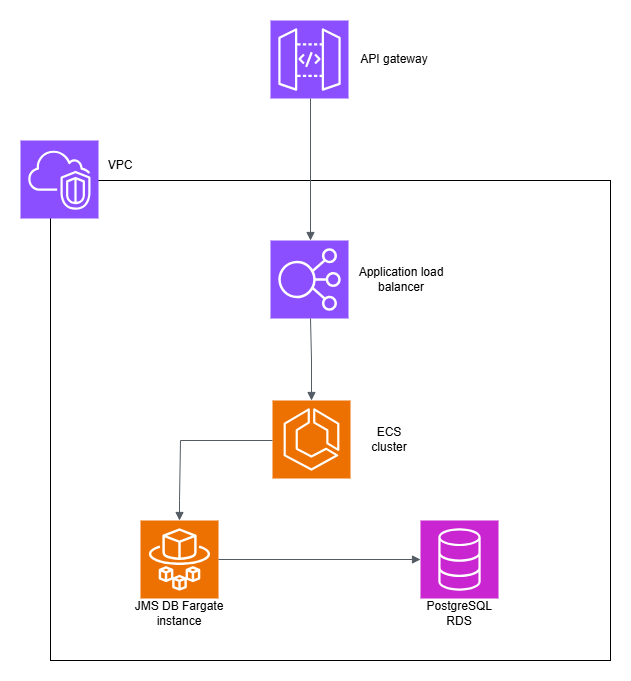
Measurement process
The following Database Search Service endpoints were tested using the POST method:
- /rest-v1/db/additional/{tableName}/duplicate
- /rest-v1/db/additional/{tableName}/similarity
- /rest-v1/db/additional/{tableName}/substructure
For each search type, 30–50 representative query molecules were selected to cover common use cases.
Substructure searches were tested with different query sets, categorized by hit frequency (very frequent, frequent, rare) and special functionality (stereochemistry).
Search results were limited to 10 or 100 hits.
Performance was measured in two scenarios:
- Sequential — queries sent one by one.
- Parallel — queries sent concurrently from 5 clients.
Databases were created from randomly selected subsets of the Enamine dataset with the following structure counts:
- 1.000.000
- 10.000.000
- 100.000.000
- 500.000.000
- 1.000.000.000
All tests were performed using the default "sample" molecule type, so tautomers were not considered.
The measurement process was executed using the K6 framework.
Measurement result
Suggested environment configuration according measurement result.
| structure count | service vCPU | service RAM | service Xmx | DB type | DB vCPU | DB RAM |
|---|---|---|---|---|---|---|
| 1 million | 1 | 4 GB | 2580m | db.t3.micro | 2 | 1 GB |
| 10 million | 1 | 4 GB | 3292m | db.t3.micro | 2 | 1 GB |
| 100 million | 2 | 12 GB | 10420m | db.t3.small | 2 | 2 GB |
| 500 million | 8 | 44 GB | 44100m | db.m7g.large | 2 | 8 GB |
| 1 billion | 16 | 96 GB | 88000m | db.r5.xlarge | 4 | 32 GB |
Measurement was executed with 25.3.1 version.
Result details are available in the file jms_standardized_measurement_25_3_1.xlsx.
This file includes measurement result sheets — performance metrics by dataset size.
Results may vary by 5–10%, especially under parallel load conditions.
These measurements cover the typical search scenarios. However, there can be some specific cases which are not handled with the same efficiency by the search engine and measurement results can be significantly different.
Structure upload performance
Databases were created from molecule files, each containing 1 million structures.
Upload performance primarily depends on the number of available vCPUs and whether duplicate filtering is enabled.
The Upload sheet in jms_standardized_measurement_25_3_1.xlsx contains detailed upload performance metrics.