Customizing Marvin GUI
The Customization document demonstrates an easy, interactive way of GUI personalization.
This document shows how to use the same interactive method to customize the GUI if MarvinSketch is used as a JavaBean.
Configuration File
MarvinSketch stores all changes made on the GUI in a configuration file.
This file is located at USER_HOME/CHEMAXON_DIR/VERSION/customization.xml
Where the USER_HOME is
C:\Documents and Settings\USERNAMEon Windows,/home/USERNAMEon Unix
and the CHEMAXON_DIR is
chemaxonon Windows.chemaxonon Linux.
VERSION is the actual version number of MarvinSketch, with which the customization is made
Example location:
- Windows:
C:\Documents and Settings\USERNAME\chemaxon\18.24.0\customization.xml
- Unix/Linux:
/home/USERNAME/.chemaxon/18.24.0/customization.xml
Creating Custom Tools Palette
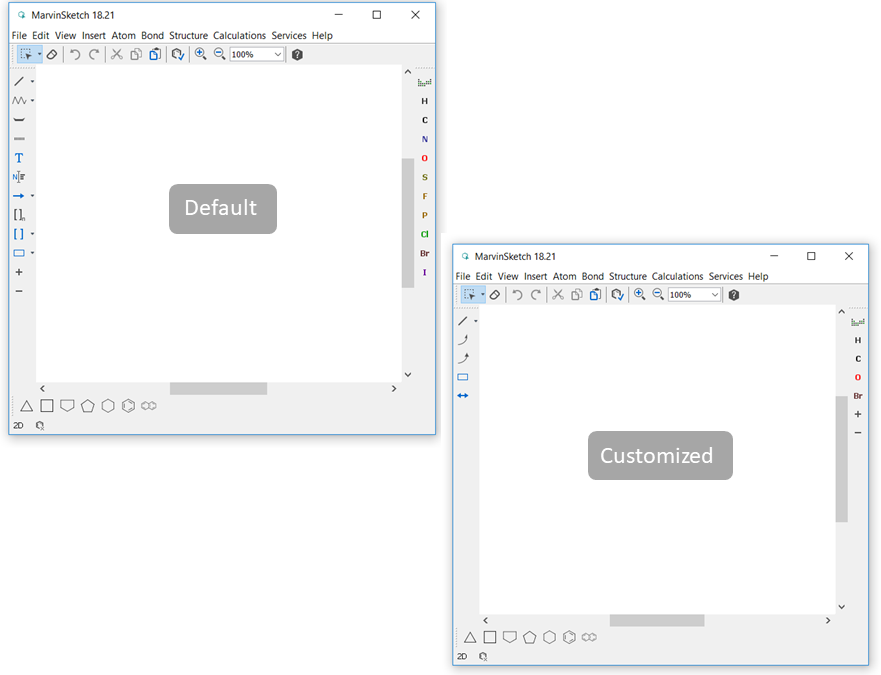
This example shows a configuration file which performs the following changes:
- The Tools toolbar on the left-hand side is hidden.
- A new toolbar is defined in its place with some custom actions.
- The Atoms toolbar on the right-hand side is changed.
The result is shown in the picture below:
The content of the default scheme of the configuration file is as follow
Currently, using a configuration file is the only way to change the GUI.
Note that the graphical user interface of MarvinView cannot be customized.