Migration Guide
from JChem Oracle Cartridge to JChem PostgreSQL Cartridge
Here we describe a basic migration guide for transferring an Oracle table storing chemical structures indexed with jc_idxtype index of JChem Oracle Cartridge into PostgreSQL database and making it usable for JChem PostgreSQL Cartridge.
Presumptions
Oracle side
Your Oracle table to be migrated is named COMPOUND_STRUCTURES (in our example it is the compound table of the ChEMBL database).
It has the following columns:
The jc_idxtype index created was created on MOLFILE column.
This index has a parameter relating standardization:
This setting_val has the following value:
PostgreSQL side
The database is PostgreSQL or Enterprise DB (EDB).
The Cartridge application server can run on the same or on a separate machine.
Migration steps
Oracle side
-
Export the data from the Oracle table into csv file using Oracle SQL Developer (required minimum version number 18.4)
- Right click on the table to be exported, and select Export...
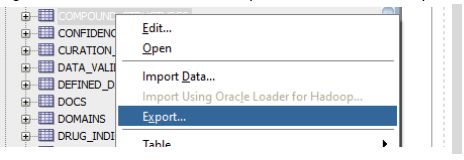
- Export DDL is not needed, only Export Data to csv.
1
2
Name the exported file as `TableMigration.csv`
<img src="images/download/attachments/9241532/m_2.jpg" alt="images/download/attachments/9241532/m_2.jpg" height="400"/>
1.
Run the export
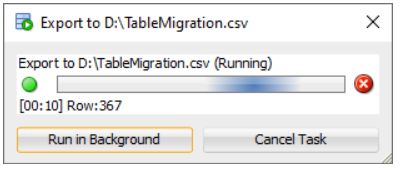
1.
Copy fileTableMigration.csvto machine of the PostgreSQL server into the /tmp/ folder. The user postgres must have read right on that file.
- Right click on the table to be exported, and select Export...
PostgreSQL side
-
Install JChem PostgreSQL Cartridge
-
Install the jchem-psql-db-server ( jchem-psql-edb-db-server) package on the machine with the PostgreSQL server (EDB server).
-
Install the jchem-psql-app-server (jchem-psql-edb-app-server) package on the appropriate machine
1*Alternatively the package jchem-psql (jchem-psql-edb) containing the full installation can be installed if the JChem Service will run on the same machine where the database server is running.*
-
-
Create a molecule type file according the standardization set at Oracle cartridge index creation
-
Make a copy from the file
/etc/chemaxon/types/sample.typeand name it/etc/chemaxon/types/example.type -
In
example.typefile set1 2 3
`typeID=2` `standardizerAction = aromatize:g..removeexplicitH` -
Take care, the file must have the same privileges as sample.type has.
-
-
sudo service jchem-psql init -
Start jchem-psql service
sudo service jchem-psql start -
Connect with psql to the database as user postgres. Step into the database where the cartridge was installed (where the CREATE EXTENSION steps were executed during the installation).
-
Create table in PostgreSQL with molecule type column for the chemical structures
{warning}
if the original table in Oracle contained CLOB type columns other than the molecular column then the corresponding column in PostgreSQL should have type TEXT.
-
Import the data from the csv file into that table
-
Create index on the chemical structure column
-
Test chemical structure searching
PostgreSQL side if the chemical structures are already filled in a CLOB or TEXT column of a table
-
Same as above
-
Same as above
-
Same as above
-
Same as above
-
Same as above
-
Rename the column storing the chemical structures
-
Add a new, molecule type column with example subtype to the table
-
Copy the chemical structures by casting to molecule type to the newly created molecule type column
-
Create index on the chemical structure column
-
Test chemical structure searching
-
Optional. Remove the column storing the original chemical structures if they won’t be needed anymore
Alternatively,
instead of steps 6, 7, 8, and 11, change the type of the original CLOB or TEXT column to molecule type.
Be careful, the original chemical structures will be lost.
Migration demo
See the video demonstrating migration from JChem Oracle Cartridge to JChem PostgreSQL Cartridge.