Second Generation Search Engine
This document describes the main features, configuration possibilities and functional features of the second generation search engine implemented in the following products.
New features
Relevance ordering
The hits of substructure search are given back ordered by the relevance (similarity) between the hit structure and the query structure.
Hit as you draw
The most relevant hit structures are given back almost simultaneously with the modification of the query structure.
Configuration
Technical parameters
The Xmx size, cache sizes, and further parameters need to be set before running the servers.
Here is a helping page provided for the calculation of the approximate configuration parameters.
JChem Engines cache and memory calculator
Business rules
The business rules relating the interpretation mode of the chemical structures are defined in molecule types.
These rules cover the followings:
- standardizer actions to be executed on the structures
- tautomer search mode
- assumption of stereo interpretation mode
Molecule type
The molecule types must be set before initializing the new servers.
| Where to define molecule type(s) | |
|---|---|
| JChem Choral | |
| JChem PostgreSQl Cartridge | /etc/chemaxon/types/ |
| JChem Microservices DB | jws-config/common-config/application.properties file or jws-db/config/application.properties file |
| Application mode of molecule type(s) | |
|---|---|
| JChem Choral | as index type and as search type |
| JChem PostgreSQl Cartridge | as column type |
| JChem Microservices DB | as table property |
Standardizer rules
The standardizer actions can be defined in two forms as
- standardizer action string
- standardizer file
Tautomer mode
There are three tautomer search modes provided
- OFF
Tautomers are not taken into account during the search
- GENERIC
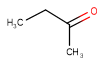
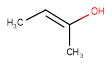
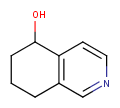
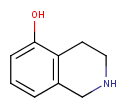
The generic tautomer - representing all theoretically possible tautomers - of the target is matched with the query structure itself. This method is applied in substructure search, full fragment search, duplicate, and superstructure search.
-
CANONIC_GENERIC_HYBRID
It is a hybrid tautomer search mode. The query structure is compared to the generic tautomer of target at substructure and similarity search , while normal canonical tautomers are compared at duplicate search. In full fragment search from version 20.12 to 20.14 the generic tautomer of the target is used, while from version 20.15 normal canonical tautomers are compared.
| Query | Target | Tautomer mode OFF |
Tautomer mode GENERIC |
Tautomer mode CANONIC_GENERIC_HYBRID |
|---|---|---|---|---|
 |
 |
 |
 |
|
 |
 |
|
|
|
 |
 |
|
|
|
Stereo assumption
By default, all stereo molecules - independently of the presence or absence of the chiral flag - are regarded as molecules with absolute stereo configuration.
If you want exclusively molecules with chiral to be handled as absolute (and molecules without chiral flag to be handled as relative) you must set stereoAssumption = RELATIVE in the molecule type definition.
| Query | Target | Stereo assumption ABSOLUTE |
Stereo assumption RELATIVE |
|---|---|---|---|
 |
 |
|
|
 |
 |
|
|
Functional features
Search options
Ignore tetrahedral stereo search
By default, the specified tetrahedral stereo configuration is required to match in the hit structures.
In order to ignore the tetrahedral stereo configuration specified in the query structures during the search, the ignoretetrahedralstereo option can be used.
| Query | Target | without ignoretetrahedralstereo [Default] |
with ignoretetrahedralstereo |
|---|---|---|---|
|
 |
|
|
|
|
|
in substructure search in duplicate search |
| option name | |
|---|---|
| JChem Choral | ignoretetrahedralstereo |
| JChem PostgreSQl Cartridge | ignoretetrahedralstereo |
| JChem Microservices DB | stereoSearchIgnoreTetrahedralStereo |
Stereo search on marked double bond only
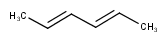
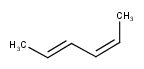
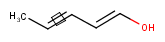
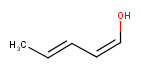
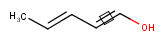
By default, the double bond stereo configuration of all the double bonds of the hit structures must be the same as that of the query structures. See first examples below.
The dbsmarkedonly search option makes possible to check the E/Z configuration of only those double bonds that are marked.
| Query | Target | without dbsmarkedonly [Default] |
with dbsmarkedonly |
|---|---|---|---|
 |
|
|
|
|
 |
|
|
 |
 |
|
|
 |
|
|
|
| option name | |
|---|---|
| JChem Choral | dbsmarkedonly |
| JChem PostgreSQl Cartridge | dbsmarkedonly |
| JChem Microservices DB | stereoSearchOnMarkedDoubleBondOnly |
Axial stereo information
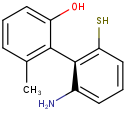
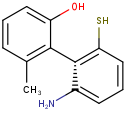
In the products based on the second generation search engine, the axial stereo information is taken into account in duplicate search, while in the products JChem Base and JChem Oracle Cartridge - using the first generation search engine - the axial stereo information is not taken into account, by default.
Duplicate search results
| Query | Target | Second generation search engine | First generation search engine [Default] | First generation search engine with ignoreAxialStereo=false |
|---|---|---|---|---|
 |
 |
|
|
|
Hit highlight
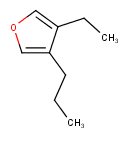
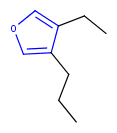
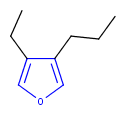
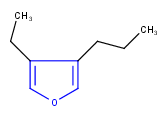
The highlight function compares a query structure with a target structure and highlights the bonds and atoms of the target structure matching with the query structure. The alignment mode and the color applied for highlighting can be set.
Three alignment modes are available:
-
off
The hit structure's position on the screen is the same as that of the target structure.
-
rotate
The hit structure is rotated till its part corresponding to the query gets the same position as the query structure has.
-
partial clean
The hit structure's position on the screen is partially aligned to the query structure.
| Query | Target | Alignment off |
Alignment rotate |
Alignment partial clean |
|---|---|---|---|---|
 |
 |
 |
 |
 |
| option name | |
|---|---|
| JChem Choral | function highlight operator hit_highlight |
| JChem PostgreSQl Cartridge | function highlight |
| JChem Microservices DB | /rest-v1/db/highlight |