About Updating Instant JChem
You can update your Instant JChem installation. This allows you to keep up to date with the current functionality and fixes, without needing to re-install the program. Instant JChem comes with the Chemaxon Update Center pre-configured, in the Plugin Manager, and this Update Center will always contain the latest versions. However, you can configure additional Update Centers to use and you do not have to use the one provided by Chemaxon. The reasons why you might want to do this are:
- You wish to have more control over when your users update. You may not wish to use new versions as soon as they become available, but may wish to do some testing and validation first.
- You do not want the JChem table versions in your database to be upgraded, as explained below.
- You wish the update files to be accessible locally to improve download performance.
- You wish to add your own (or 3rd party) modules to the Update Center.
Instructions for setting up a new Update Center is described in the developer documentation, here
Consequences of Updating
Updating a database that is used by other users should be done with care. The tables will not be usable by older versions of IJC or other JChem based applications. No other users should access the database while it is being updated. Please first consult your database administrator if in any doubt.
Updating Instant JChem from an Update Center will obviously change the Instant JChem program. When you do this please bear in mind the following:
- Not every combination of circumstances can be tested, so please back up any important data prior to updating, just in case something goes wrong.
- Restarting Instant JChem will usually be required.
- Updating may result in the JChem database tables being regenerated if the JChem version is increased. This will:
*
*
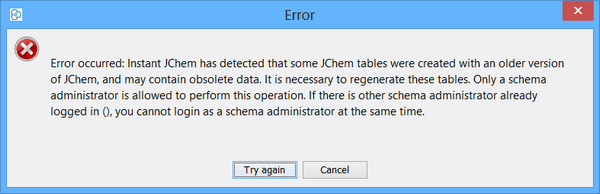
This dialog can be shown also when last logged user have not been successfully logged out. In this case, try to login as last logged user to remove deadlock, then proceed with regeneration.
Java Web Start
Instant JChem is also runnable using Java Web Start. Click here if you want to do this.
Using Java Web Start avoids the need to use the Instant JChem installer or use the Update Center to obtain updates. With Java Web Start the updated version is detected and loaded immediately. This provides an easier approach to running Instant JChem, but is slightly less flexible. If using the Java Web Start version most of the information in this section is not relevant, but do read the previous sections of this page as these still contain useful information.
Organisations can also deploy the Java Web Start version to their own server, which can have major administrative benefits. For documentation on this click here .
See also: