Design Hub developer guide - REST API
Available from v20.13.0, Design Hub includes a token based API access layer. Authenticated users of the system can generate API keys to be used to authorize HTTP requests made by other applications, outside of active login sessions.
Authorize requests
Use of most API endpoints requires a successful token based authentication. The user needs ACCESS_REST_API permission to be able to manipulate and view API tokens. The token can be obtained by opening the corner menu on the user interface and creating a new token. Here, previous tokens can be invalidated as well.
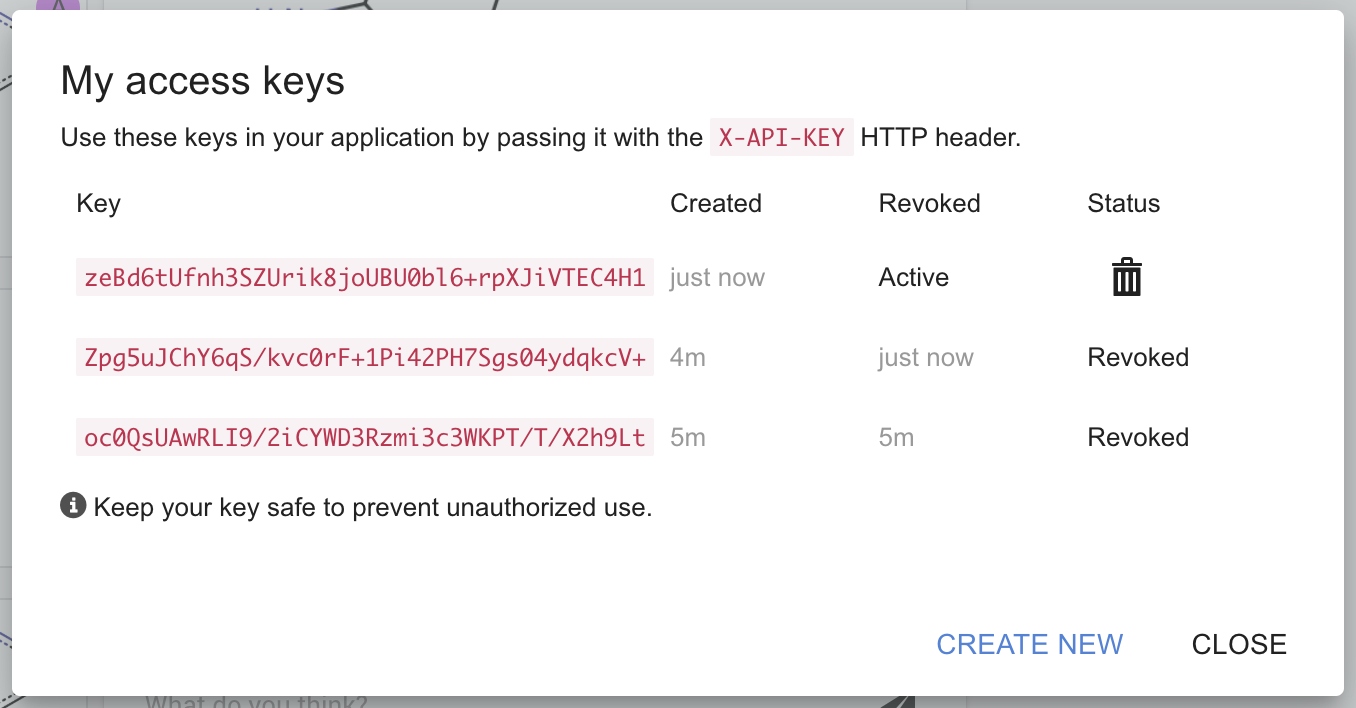
Once a token has been obtained, specifying them on HTTP requests can be done in the X-API-KEY header:
Different HTTP errors are returned for incorrect authentication. The following spreadsheets describes which status code corresponds to which check.
| Status code | Description |
|---|---|
400 Bad request |
X-API-KEY header not specified on the request |
401 Unauthorized |
X-API-KEY value is invalid |
404 Not found |
HTTP path or method specified in the request doesn't exist |
Methods
Get user details
HTTP Request: GET /api/user
Purpose: Provides basic information about the user authorized by the access token.
Request headers: X-API-KEY required
Response content-type: application/json
Response body:
| Property name | Value | Description |
|---|---|---|
user_id |
number | internal identifier of the user |
displayName |
string | user-specified display name |
Get projects
HTTP Request: GET /api/projects
Purpose: Provides list of projects accessible to the authorized user.
Request headers: X-API-KEY required
Response content-type: application/json
Response body:
| Property name | Value | Description |
|---|---|---|
project list |
list | An unordered list of projects |
project list[*].project_id |
number | Unique, internal identifier of the project. |
project list[*].label |
string | Human friendly name of the project. |
project list[*].last_used |
string | Serialized date object representing when this project was last used, in ISO date format, UTC timezone. May be used for sorting. |
List compounds and IDs
HTTP Request: GET /api/compounds/public
Purpose: Provides all IDs and compounds publicly available in the system. May be used to make Design Hub generated IDs usable in other systems.
Request headers : X-API-KEY required
Response content-type: application/json
Query parameters:
| Parameter name | type | Description |
|---|---|---|
offset |
number (optional) | number of compounds to skip in the beginning of the list, default 0 |
limit |
number (optional) | maximum size of list, default based on Design Hub config parameter limitPublicCompoundsListSize |
Response body:
| Property name | Value | Description |
|---|---|---|
compounds |
list | A list of compound records ordered by record creation date |
compounds[*].currentId |
string | Latest known ID of the compound, e.g. "CXN-123456" |
compounds[*].previousIds |
list of strings | List of previously known IDs of the compound, e.g.: ["VXN-1234567"] |
compounds[*].source |
string | MRV formatted source of the compound |
compounds[*].url |
string | A root relative URL to the compound's dedicated webpage, e.g.: "/compounds/find/CXN-123456" |
total |
number | Number of all public compounds that can be obtained using this endpoint |
offset |
number | Index of the first compound in this result set |
limit |
number | Number of compounds requested |
Multipart form upload
HTTP Request: POST /upload/api
Purpose: Provides a way for simple web sites to send molecules to Design Hub.
Request content-type: multipart/form-data
Request body: a chemical structure file recognized by Chemaxon IO system
Response content-type: application/json
Response body: a HTTP redirect that should be opened by the user's browser
Example:
A curl command produces valid multipart request, when the data flag refers to a file using the @ symbol:
A browser form with a file input also produces a valid multipart request, when the form’s action attribute and the file input’s name attribute are specified as below:
When submitted, this sends the following HTTP request:
If the request succeeds, the server returns HTTP 302 Moved temporarily status code, along with a redirect URL containing a unique ID that references the parsed contents of the file. Integrating applications should open this URL in the user’s browser. This unique URL is valid for 5 minutes.
JSON upload
HTTP Request: POST /upload/api
Purpose:Provides a way for applications to send molecules to Design Hub.
Request content-type: application/json
Request body:
| Property name | Value | Description |
|---|---|---|
structures |
string | A string serialized representation of a chemical structure file recognized by Chemaxon IO system |
Response content-type : application/json
Response body : a JSON object including the following properties:
| Property name | Value | Description |
|---|---|---|
url |
string | a root relative URL (path) that should be opened by the user's browser |
Example:
A valid request has the Content-Type of application/json and the body contains a JSON structure, with the file contents under the structures key:
If the request succeeds, the server returns a simple JSON object containing a unique URL that references the parsed contents of the file. Integrating applications should open this URL in the user’s browser. This unique URL is valid for 5 minutes.