Structure to Name User Guide
Structure to Name can generate the IUPAC name, traditional name(s) or CAS Registry Number® of the structure.
To convert the generated names back to structures, Name to Structure can be used.
Note that the CAS Registry Number® generation uses webservice, read the
notice about CAS Registry Numbers® for more information.
IUPAC name generation
When possible, the generated name conforms to the
Nomenclature of Organic Chemistry : IUPAC Recommendations and Preferred Names published in 2013.
Our goal is to generate the preferred names specified by IUPAC in as many cases as possible, but we do not claim full conformance with that document
(see below for a list of limitations). In other cases, the generated names should be systematic names that can be interpreted back to the correct chemical structure.
Features
Supported nomenclatures include:
- Chains, Monocycles
- Retained/traditional names for ring systems with and without heteroatoms
- Spiro ring systems
- All cases of von Baeyer nomenclature for bridged ring systems
- Ring assemblies of size 2 (e.g.
biphenyl,bifuran, ...)
- Fused ring systems (linear fused ring systems are named using the fused nomenclature, others using von Baeyer nomenclature)
- Ethers
- Common characteristic groups
- Ionic compounds
- Compounds with one radical
- Unlimited number of atoms and rings
- All atom types
- Substitutive nomenclature
- Isotopes
Current limitations
- Molecules containing multiple radicals (e.g.
ethane-1,2-diyl) are not supported yet.
- Amino-acids and peptides are supported only when the amino-acids are represented as groups.
- Molecules containing coordinate bond are not supported.
- Some aspects of nomenclature are only partially implemented, in particular complex cases of fused systems, ring assemblies of size 3+ and multiplicative nomenclature. In those cases, a non-preferred but chemically correct name will be generated.
Usage
Individual molecules
You can name molecules by using the Naming menu entry of Tools menu in MarvinView, or Structure > Structure to Name in MarvinSketch.
You can choose which names should be generated in the Naming Options panel. If a traditional name is requested but cannot be generated, the preferred IUPAC name will be generated instead.
By default, molecules are handled separately if more than one molecule is drawn. However, sometimes a
single molecule consists of more fragments ( e.g., salt molecules), where the fragments should be treated as one molecule.
This can be achieved by switching on the "Single fragment mode" option in the Naming Options panel.
The snapshot below shows a molecule taken from the IUPAC specification, with its name computed by Marvin.
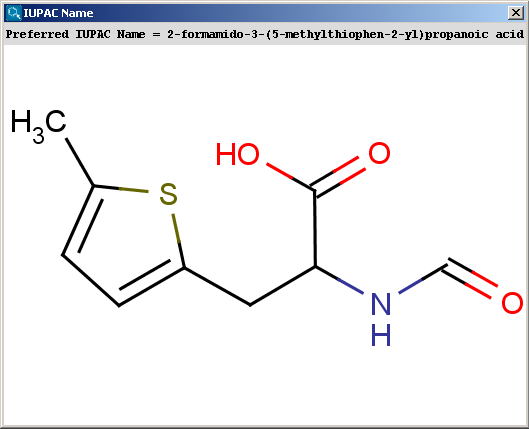
The contents of the text field can be copied to the clipboard by Ctrl+C, the structure field offers a context menu when right-clicking on it.
The name can be added to the canvas by using the Place Analysis Box entry in the Structure menu.
The name will be displayed below the molecule, along with other information, and updated in real-time when the molecule is modified.
Batch naming
Naming of a large number of molecules contained in a file can be achieved in two ways: with MarvinView, and on the command line, with molconvert. In both cases, all formats supported by Marvin are acceptable as input.
With MarvinView, open the file containing the structures to be names. Then select the menu File/Save As, and choose "IUPAC Name files" in the "Files of type" drop-down box. Choose a name for the file, and click on the Save button. The file will contain the names of the structures, one per line.
Alternatively, on the command line, you can use the following command:
The file names.txt will contain the names of the molecules in the input file, with one name per line.
It is possible to use format options to choose a nomenclature style.
For instance, to generate traditional names, use the following:
Adding as an additional field to a SDfile
Adding names as an additional field to a SDfile can be achieved with the cxcalc tool.
Adding traditional names can be done using the name -t traditional option.
In addition, the -t [FIELD NAME] option can be used to control the SDF field name:
API
For information about how names can be generated from Java programs, see the developer documentation.