Getting Started
This is a small introduction to help you get started with Chemaxon Python API. For a thorough documentation, go to the API Reference. A more detailed list of examples can be found in the Python API examples project.
Molecule import
You can easily import molecules from various formats. You can either specify the format yourself,
or if you do not specify any format, the function will recognize the format automatically.
from chemaxon import import_mol
mol = import_mol("CC(=O)OC1=CC=CC=C1C(O)=O")
mol2 = import_mol("CC(=O)OC1=CC=CC=C1C(O)=O", "smiles")
The import_mol function returns a chemaxon.molecule.Molecule object on success.
Bulk import from file:
from chemaxon import open_for_import

with open_for_import("my_molecules.sdf") as mol_iterator :
    for mol in mol_iterator :
        print(export_mol(mol, "smiles:u"))
Bulk export to a file:
from chemaxon import open_for_export, import_mol

molecule_list = ... # assume we have a list containing molecules

with open_for_export("file.sdf", "sdf") as out:
    write_res = all(out.write(mol) for mol in molecule_list)
Molecule export
You can also export molecules into various formats. You can need to specifiy the format in this case.
from chemaxon import export_mol
mol_str = export_mol("CC(=O)OC1=CC=CC=C1C(O)=O", "smiles")
mol2_str = export_mol("CC(=O)OC1=CC=CC=C1C(O)=O", "mrv")
The export_mol function returns a str object on success, which contains the molecule in the specified format.
Export to file (even multiple molecules):
from chemaxon import open_for_export
molecules = list(...) # A list of chemaxon.molecule.Molecule objects

with open_for_export("my_molecules.sdf", "sdf") as mol_exporter :
    for mol in molecules :
        mol_exporter.write(mol, "mol:V3")
Molecule display
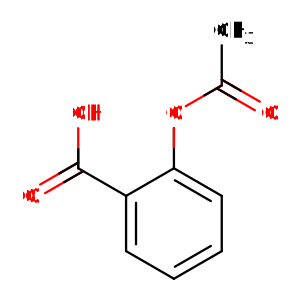
The molecule can be exported to a svg file string:
Calculations
Once you have a molecule, you can calculate various properties of it.
from chemaxon import logp, LogpMethod
result = logp(mol, method=LogpMethod.CHEMAXON, consider_tautomerization=True)
This function returns a chemaxon.calculations.logp.LogPResult object, which contains the calculated logP value,
and the logP values of the individual atoms.
You can also calculate logp using the default parameter values:
Exception handling
from chemaxon import Molecule, LogpMethod, import_mol, logp
try:
    # for illustrating exeption raising, a non-importable molecule is used
    mol = Molecule("non-importable", None)
    logp(mol, LogpMethod.CHEMAXON, -12, -34, consider_tautomerization=True, ph=15)
except RuntimeError as e:
    # custom error handler code