R-group Dialog
In the R-group dialog, you can change the selected R-group label.
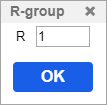
The R-group dialog has two types depending on the context (changing the R-group label in scaffold molecules or changing the R-group definitions).
To change the R-group label in scaffold molecules, follow the steps below:
- Select the Smart R-group tool, then click the R-group label you would like to change.
- In the opening R-group dialog, you can set the R-group count.
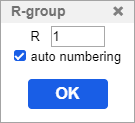
- The auto-numbering can be turned off, it is useful when you would like to put more than one R-group with the same label.
- After clicking the OK button the changes will be applied.
To change the R-group label of an R-group definition, follow the steps below:
- Select the Smart R-group tool, then click the R-group label you would like to change.
- In the opening R-group dialog, you can set the count of the R-group definition.
- After clicking the OK button the changes will be applied.