Toolbars
Toolbars provide buttons for accessing the majority of features offered by Marvin JS. The button of the currently selected tool has a blue highlight indicating its active status.
In Marvin JS, when you hover over a button a tooltip appears describing its functionality.
Marvin JS has the following toolbars:
- Atom Toolbar: Contains atom types, for example, query atoms, elements of the Periodic system, frequently used atoms.
- General Toolbar: Consists of tools with the scope of the whole canvas. This means that when you use these buttons, it applies to every object on the canvas. (There are three exceptions, where the change will apply for the selected structure-part if there is one: Zoom to selection, Clean 2D, Explicit Hydrogen.) Generally, the web service dependent features are also available from here.
- Template Toolbar: Contains predefined structures and building elements.
- Tools Toolbar: Contains various drawing tools.
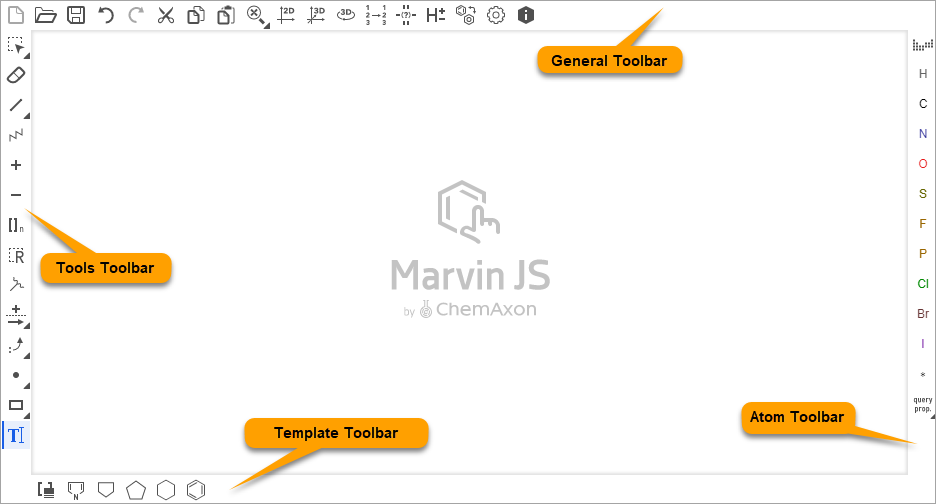
The layout of the toolbars can vary depending on custom settings.
Slide Toolbar Buttons
When the window is smaller than the minimum size that is required to show all the buttons, the hidden features can be reached by using the Slide buttons.
Buttons appear when there are hidden buttons on the toolbars.
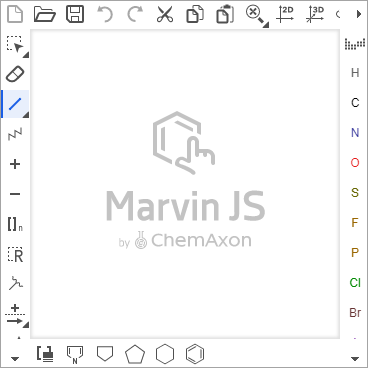
Click the triangle which points to the direction, where you would like to see the hidden buttons.
| Icon | Description |
|---|---|
 |
Moves the horizontal toolbar |
 |
Moves the vertical toolbar |