Attached Data Dialog
It is possible to assign attached data to atoms, bonds, an s-group (repeating unit, SRU polymer, copolymer), or a fragment.
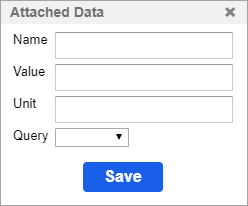
The table below shows the available fields and value types.
| Field | Value type |
|---|---|
| Name | any text or number |
| Value | any text or number |
| Unit | any text or number |
| Query | =, <>, <, <=, >, >=, between, like, contains |
Add data
- Right-click on an atom, a bond, an s-group (repeating unit, SRU polymer, copolymer), or a fragment and choose the Attached Data item from the context menu.
- Fill the appropriate fields in the dialog.
- Click Save.
Edit data
The attached data can be edited at any time.
- Right-click the atom, bond, an s-group (repeating unit, SRU polymer, copolymer), or fragment.
- Open the same dialog (Attached Data dialog) from the context menu.
- Edit the items on the list.
- Click the Save button.